Operators
Operators in C++ help to shorten code to more abstract symbols - the arr[idx] utilizes operator[], instead of forcing developers to do pointers
Instead of holding onto a memory pointer to a vector data(), and then using memory size and indexes (similar to discussion in hashing), C++ creates that operator below
int main()
{
    std::array<int, 3> a{ 0, 1, 2 };

    int *pointer = a.data();

    std::printf("pointer[0]: %d\n", pointer[0]); // prints 0
    std::printf("pointer[1]: %d\n", pointer[1]); // prints 1
}

// Versus

T operator[] (int idx) {
    return *(data + idx)
}
Iterators
Iterators utilize operators to help access elements / do certain logic without having to actually place the final results anywhere. Python yield functions act as iterators, and they allow you to access sequential elements without storing the actual data anywhere
You can initialize the below operator with zip_iterator it{a.data, b.data()};, and then running it[0] would give you back the iterator for the 0th index without storing it in memory anywhere
Chaining a number of these iterators together, like a transform iterator that runs on the output of a zip iterator, helps us to run this actual code without putting anything into memory
Show C++ Script
struct zip_iterator
{
  int *a;
  int *b;

  std::tuple<int, int> operator[](int i)
  {
    return {a[i], b[i]};
  }
};

struct transform_iterator
{
  zip_iterator zip;

  int operator[](int i)
  {
    auto [a, b] = zip[i];
    return abs(a - b);
  }
};

int main()
{
  std::array<int, 3> a{ 0, 1, 2 };
  std::array<int, 3> b{ 5, 4, 2 };

  zip_iterator zip{a.data(), b.data()};
  transform_iterator it{zip};

  std::printf("it[0]: %d\n", it[0]); // prints 5
  std::printf("it[0]: %d\n", it[1]); // prints 3
}
Thrust Iterators
Why is this so important? We can then use thrust::reduce operations with an iterator type of structure, and it will run all of the zip based iterators at the same time, and then run the transform reduction over the final iterator sequentially. The reason it works well on a GPU is we aren't forced to store it on GPU and have it re-read it!
Thrust provides many out of the box functions to create iterators or work with them:
thrust::make_transform_iteratoris a map function that runs over an input and creates an outputthrust::make_zip_iteratortakes multiple inputs and iterates over them all to create an outputthrust::tabulatecreates an implicit counting iterator (essentiallyrange()in python) and runs an operation over it. The call isthrust::tabulate(first, last, op), so we define the range and operation and it runs it for usthrust::reducetakes an iterator, an initial value, and an operation and runs that operation over each iterator and the initial value- The default operation is summation, meaning it adds each value to the initial value
You can also make a identity iterator that just returns the index passed to it, and that would allow you to just run a transformation over a range of integers without actually storing the range in memory! You only store the result
Show C++ Script
struct counting_iterator
{
  int operator[](int i)
  {
    return i;
  }
};
The "fancy iterators" showcases how not having to write to storage makes runtimes at least 2x as fast, without even accounting for creating the storage and accessing in the naive solution of storing in a diff[] vector
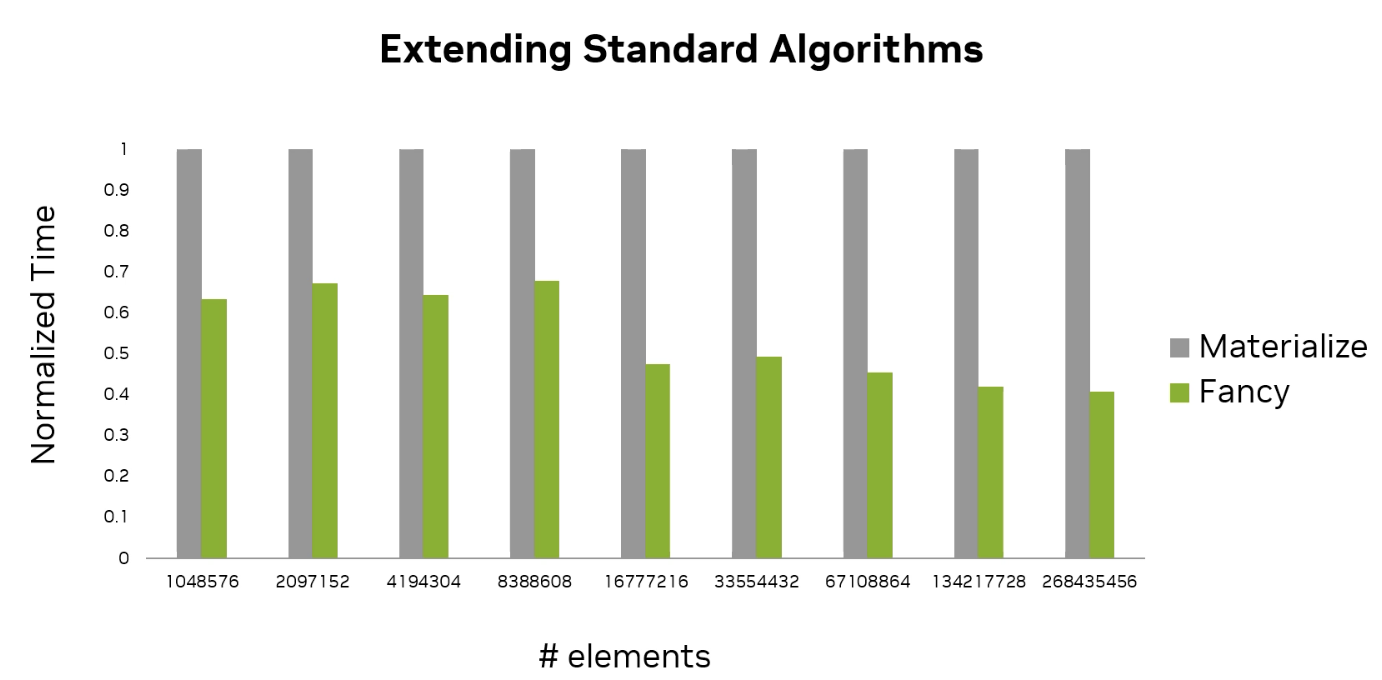
The general idea is that even on a single device, even with elements, this should work fine
Show C++ Script
float naive_max_change(const thrust::universal_vector<float>& a,
                       const thrust::universal_vector<float>& b)
{
    thrust::universal_vector<float> diff(a.size());
    thrust::transform(thrust::device, a.begin(), a.end(), b.begin(), diff.begin(),
                      []__host__ __device__(float x, float y) {
                         return abs(x - y);
                      });
    return thrust::reduce(thrust::device, diff.begin(), diff.end(), 0.0f, thrust::maximum<float>{});
}

float max_change(const thrust::universal_vector<float>& a,
                 const thrust::universal_vector<float>& b)
{
    auto zip = thrust::make_zip_iterator(a.begin(), b.begin());
    auto transform = thrust::make_transform_iterator(zip, []__host__ __device__(thrust::tuple<float, float> t) {
        return abs(thrust::get<0>(t) - thrust::get<1>(t));
    });
    return thrust::reduce(thrust::device, transform, transform + a.size(), 0.0f, thrust::maximum<float>{});
}

int main()
{
    // allocate vectors containing 2^28 elements
    thrust::universal_vector<float> a(1 << 28);
    thrust::universal_vector<float> b(1 << 28);

    thrust::sequence(a.begin(), a.end());
    thrust::sequence(b.rbegin(), b.rend());

    auto start_naive = std::chrono::high_resolution_clock::now();
    naive_max_change(a, b);
    auto end_naive = std::chrono::high_resolution_clock::now();
    const double naive_duration = std::chrono::duration_cast<std::chrono::milliseconds>(end_naive - start_naive).count();

    auto start = std::chrono::high_resolution_clock::now();
    max_change(a, b);
    auto end = std::chrono::high_resolution_clock::now();
    const double duration = std::chrono::duration_cast<std::chrono::milliseconds>(end - start).count();

    std::printf("iterators are %g times faster than naive approach\n", naive_duration / duration);
}
Complex Operations
More complex operations like CNN Pooling and heat transfer, require more complicated indexing. That just means the iterators and transformations need some better logic during indexing - the actual blue inputs and yellow output id's can all be mapped from each other as a domain and range function. The 2D blue grid itself can just be flattened into a 1D array if required with total values. Based on these values and some fancy modulos, we can find the yellow cell it maps to
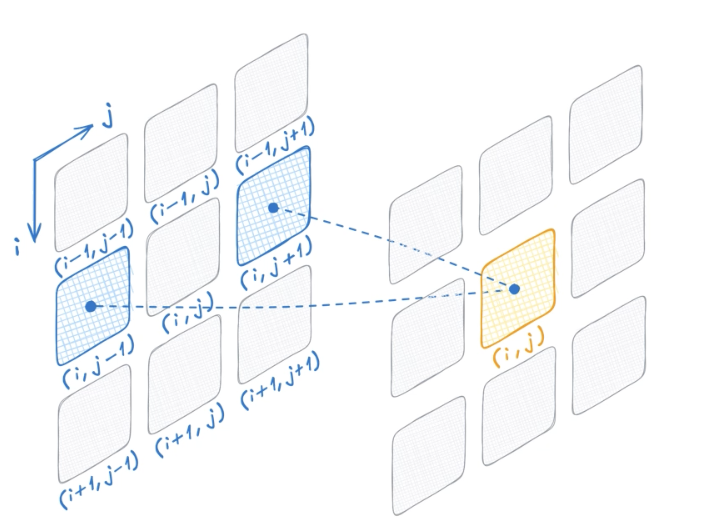
The benefit of iterators here is that all of this can be done without a for loop since every operation is independent of the other
Furthermore, using operations like cuda:std:mdspan and flatten functions can do this out of the box for us and give us iterators over the original dimensional data without actually materializing it anywhere else. You just need to supply a pointer to start of vector, and then you can access with (,) indexing operators
cuda::std::array<int, 6> sd{0, 1, 2, 3, 4, 5};

// 2 rows by 3 columns
cuda::std::mdspan md(sd.data(), 2, 3);

md(0, 0); // 0
md(1, 2); // returns row 1 col 2 == 5