CUDA Notes + Courses
GPU Courses
Did so much stuff in school I forgot, and then did a bunch of NVIDIA courses a while back that I just took the general notes and dumped them into here
GPU's are busses, and CPU's are cars! If we need to handle many small tasks with flexibility and not many passengers (data), a car works great. If we have a few specific tasks where we need to transport a large number of passengers (data), a bus works the best! GPU's typically have larger bandwidth, coupled with higher latency as compared to CPU's
The choice of single thread CPU, vs multi thread CPU, vs GPU usually comes to the data size
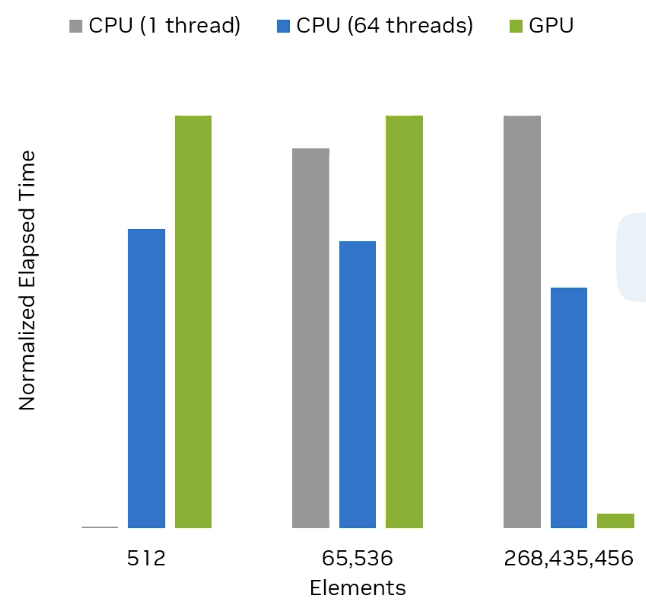
As long as operations are independent of each other we can utilize GPU's for massive parallel processing - even seemingly complex operations mapping indexes, pooling values, and doing map-reduce style programs can utilize iterators to ensure all operations are done in parallel, even if they seem to be dependent on each other. With large enough input, the GPU processing starts to drastically outperform multi-threaded CPU operations, but getting the data setup to be ran, and writing the right CUDA code is the hardest part after identifying the problem
Vocabulary
- Bandwidth: The maximum theoretical capacity of a network link
- Throughput: The actual data successfully delivered over time
- Latency: The delay or time from start to destination of data
Programming Model
CUDA programming model assumes a heterogeneous computing system, including both GPU and CPU. The CPU and its memory are called the host and host memory, while the GPU and it's memory are called the device and device memory
CUDA applications can run specific parts of their programs on GPU, but applications always start, and sometimes entirely run, on the CPU.
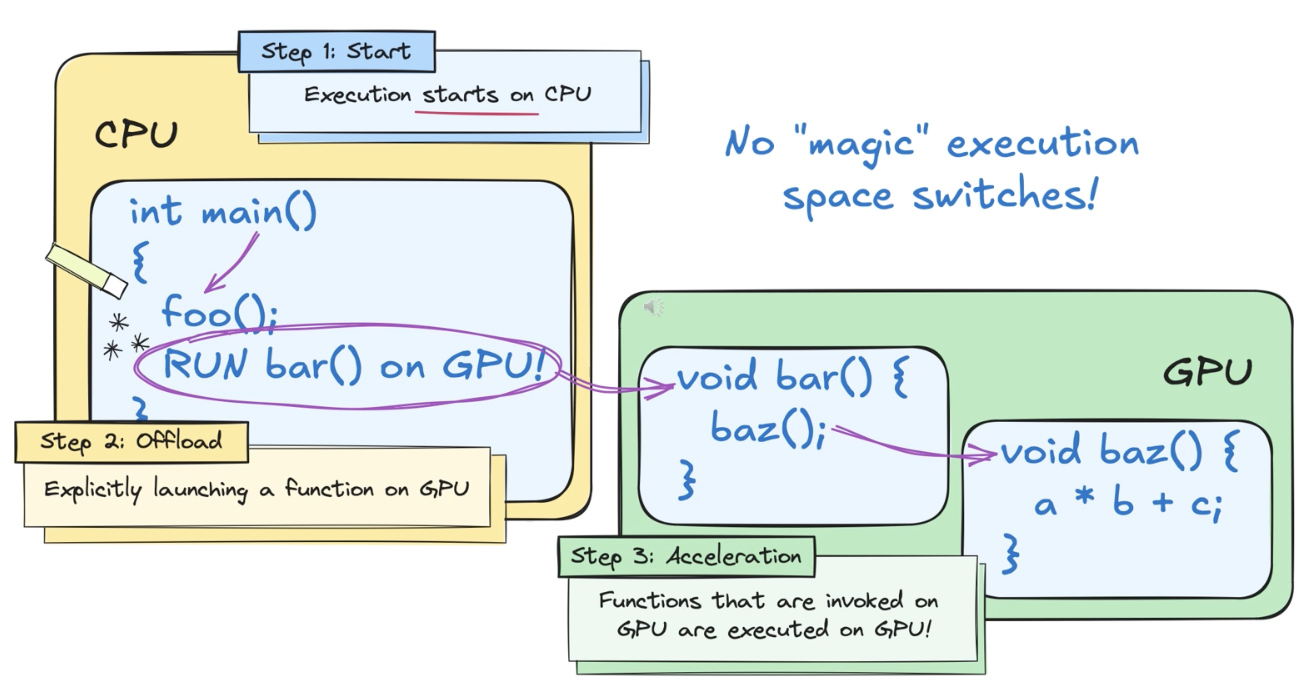
The host code that runs on the CPU can use CUDA APIs to copy data between the host and device memory, start GPU code, and wait for data copies or GPU code to complete. Also, the CPU and GPU can run things at the same time in parallel. The best performance is usually found by maximizing utilization of both!
For historic reasons the code an application executes on the GPU is called device code, and a function that's invoked for execution on the GPU is called a kernel / kernel function. The act of starting up a function to run is launching a kernel, which is basically just starting many threads that all execute the kernel code in parallel on the GPU
CUDA Threads are the basic unit of parallelism, each thread maintains its own state and control flow
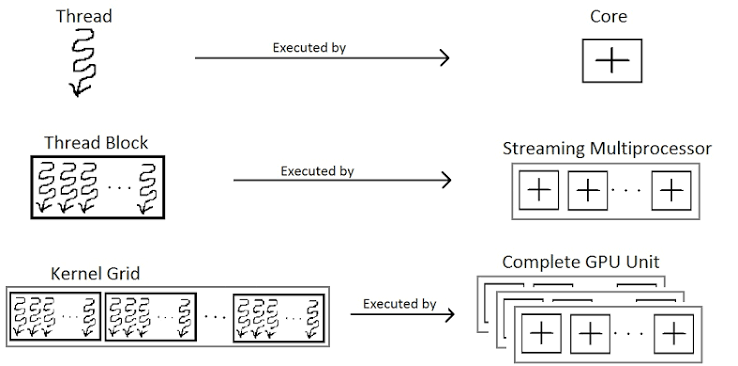
[The programming model of how kernel functions are actually distributed reaches into streaming processors, threads, thread blocks, grids, etc](/docs/llm_systems/gpu_course/exercises/03_02_kernels.md). These are all logical /physical units of separation that allow for data operations to run in parallel, with some shared state, and actual distribution of scheduling and execution of code on an unspecified size GPU
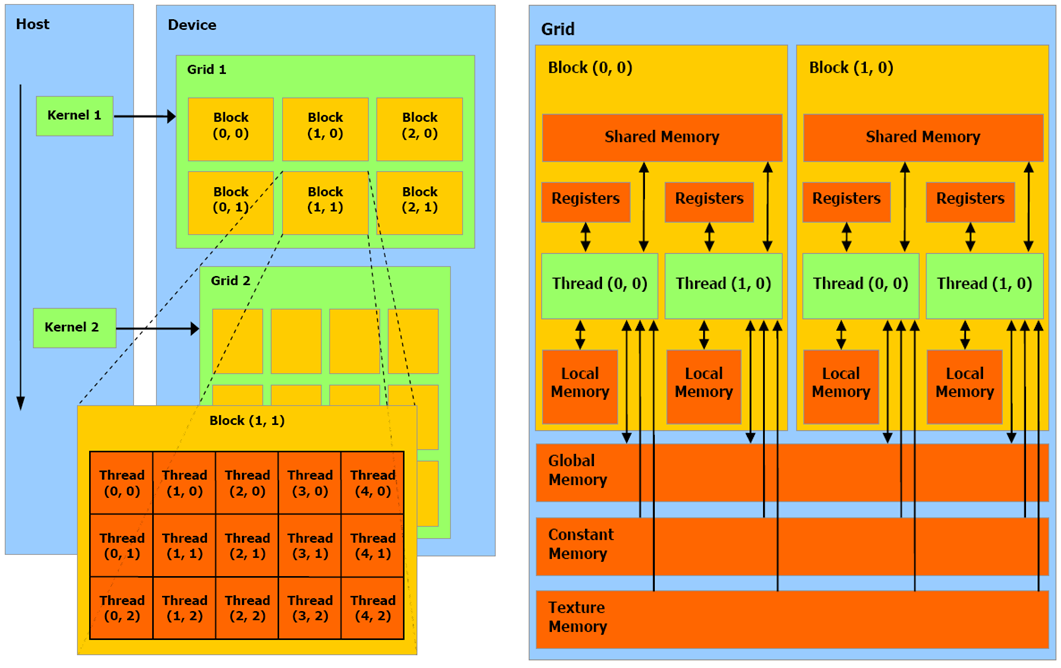
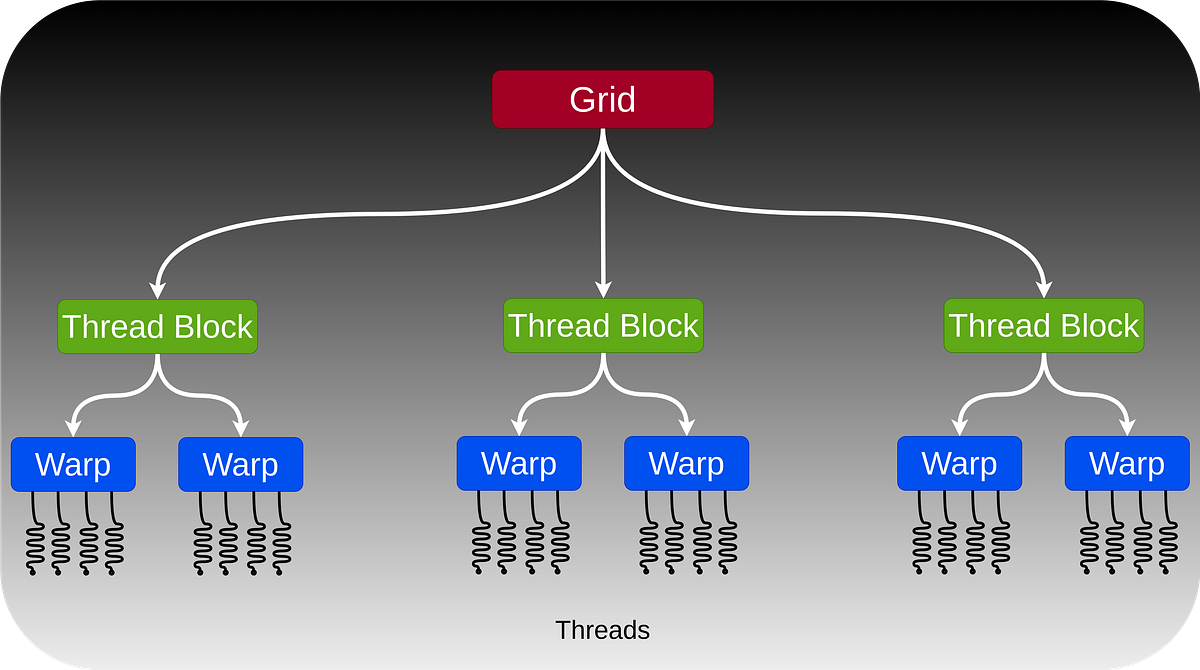
Threads in a thread block are guaranteed to be co-scheduled on a streaming processor, and thread blocks in a cluster are guaranteed to be co-scheduled on a GPU processing cluster
The distribution of threads to cores should mostly be done declaratively, by letting compiler and GPU schedulers handle the actual divvying up of thread code / parallelism to GPU cores to run. There are some tweaks that can be made via thread blocks, thread clusters, and streaming multiprocessor mappings. Memory is mostly defined to a streaming multiprocessor which helps to define memory and computation boundaries during parallel execution
CUDA C++ & Python
CUDA C++ has a huge ecosystem of libraries for utilizing GPU without writing kernel or GPU code directly. In fact, it's most likely better for developers to utilize abstracted APIs that sit on to of typical CUDA libraries like BLAS, CUDADNN, etc; Ensuring the input data, connections between these libraries, and configurations are setup appropriately will reap a higher GPU utilization as compared to writing new kernel code
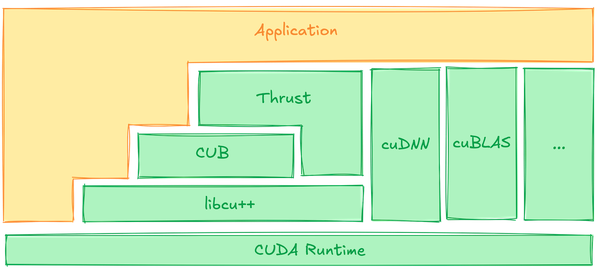
In the modern era of CUDA, it is almost always advisable to use GPU-accelerated libraries if they provide the necessary expressiveness for your needs. Many of these libraries provide implementations tuned by GPU computing experts. When libraries are not available or sufficient, writing GPU kernels and device functions directly is available in Python as in C++
cupy for GPU device memory, and numpy for CPU host memory, are highly 1:1 libraries which allow for passing data between memory hardware. After that, there are many cupy libraries for altering, transforming, and running data with CUDA applications
GPU Hardware Model
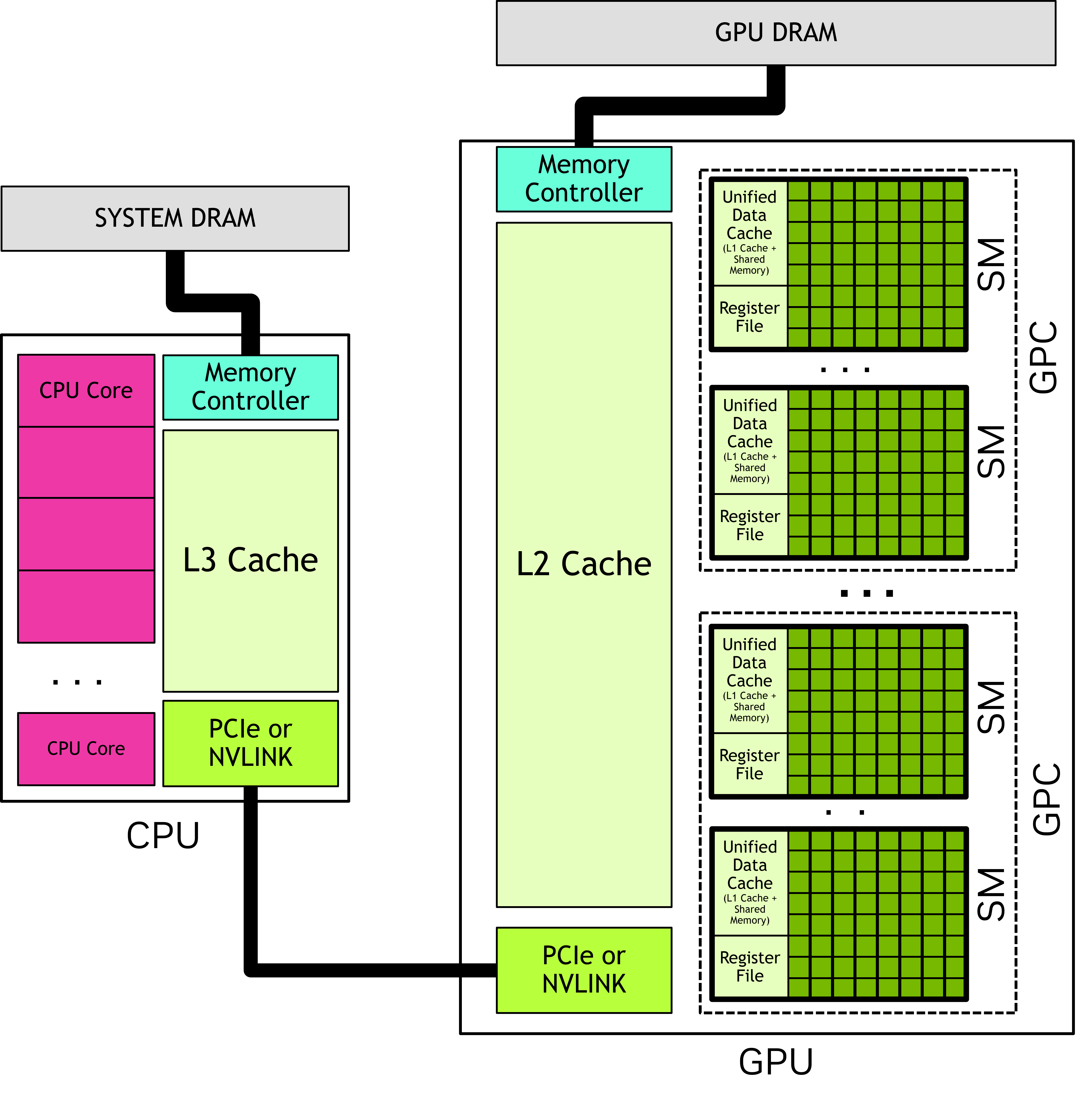
For the purposes of CUDA, the GPU can be considered a collection of streaming multiprocessors (SM) which are organized into groups called graphics processing clusters (GPC). Each SM contrains a local register file, a unified data cache, and some other functional units for computations
Unified data cache provides physical resources for shared memory and L1 cache. Allocation of unified data cache to L1 and shared memory is controlled at runtime. This mostly just means that shared memory and L1 cache may use the physically same on-chop static RAM (SRAM) inside each streaming multiprocessor, and the GPU can dynamically change the allocation to each. Some programs run better with different configurations, shared memory is more imperative where developer allocates, L1 is declarative and handles by hardware:
- Shared memory, developer controls what goes into shared memory via
__shared__constructs - Normal memory access is cached automatically to L2 and L1, hardware decides what goes where
When analyzing a kernel, you need to know the specific GPU architecture you're targeting, and how the kernel itself works with different memory structures. It's not a one-size-fits-all
GPU Thread Blocks
When a CUDA application launches a kernel, it does so with many threads, usually millions. The threads are organized into blocks called thread blocks, and thread blocks are organized into a grid. All thread blocks in a grid have the same size and dimensions
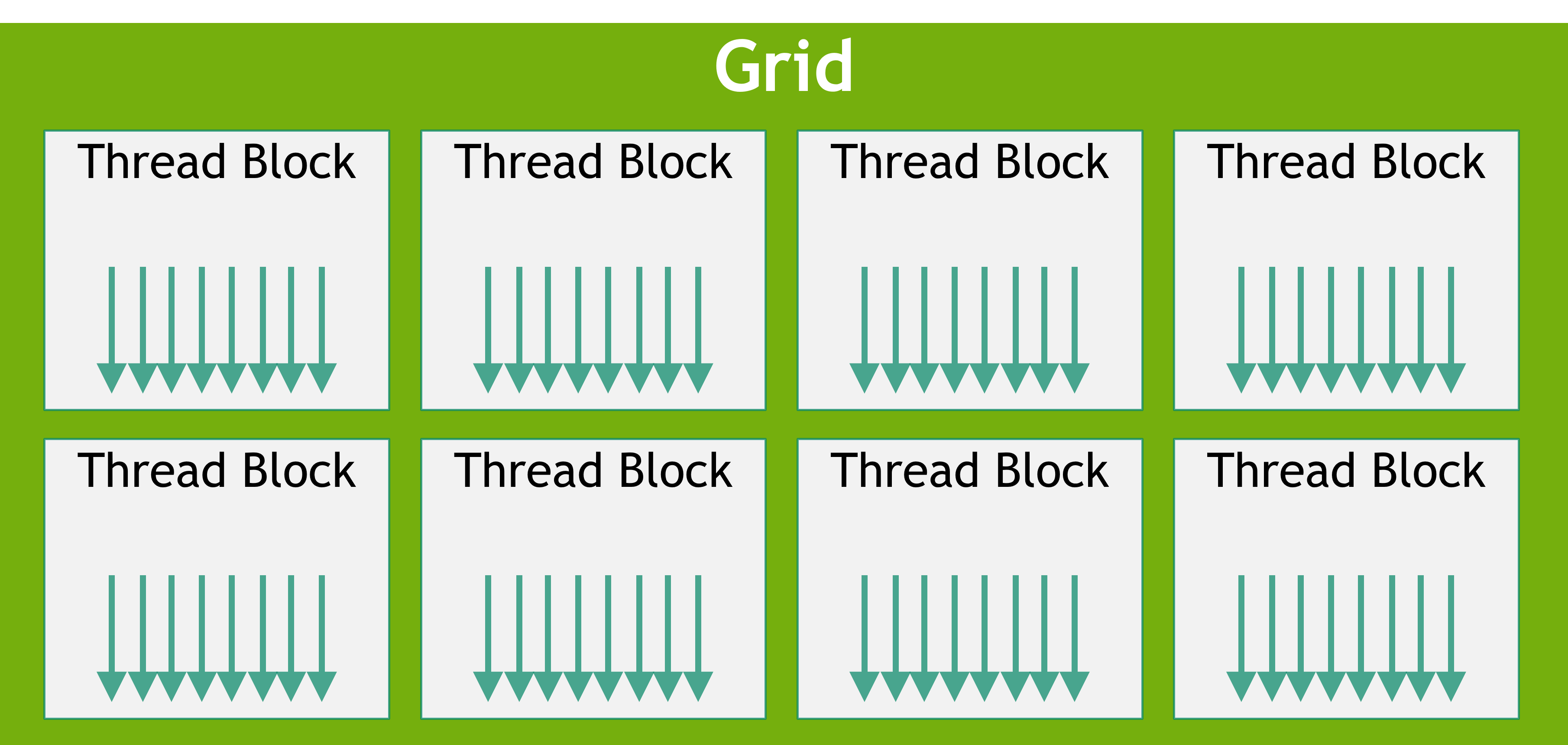
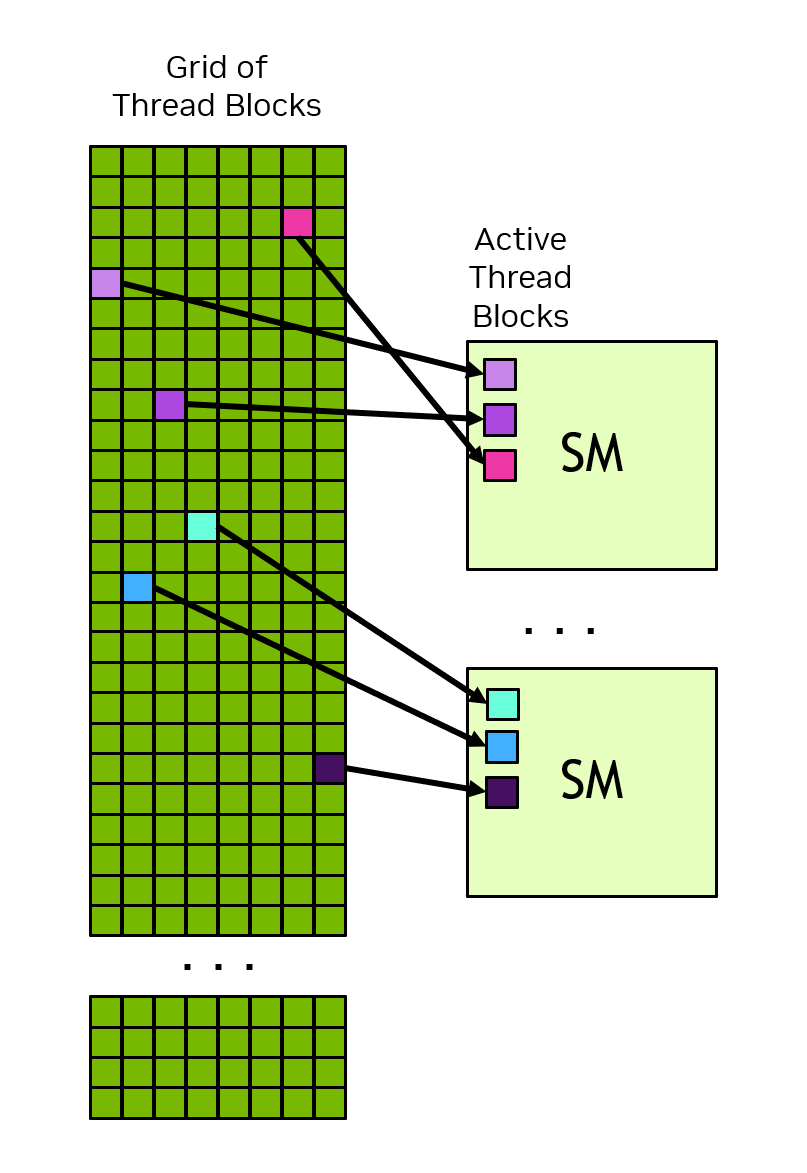
When a kernel's launched, it's launched using a specific execution configuration, which specifies the grid and thread block dimensions. Execution configuration also typically has configs for streaming multiprocessor, cluster size, etc. All threads in a thread block are executed in a single streaming multiprocessor, which allows threads within a thread block to communicate and synchronize with each other / share data. Furtheremore, there's no guarantee of scheduling between thread blocks, and so a thread block can't rely on results from other thread blocks - they need to be truly parallel and stateless between each other during execution. There's a strict CUDA requirement that there be no data dependencies between threads in different thread blocks. Since this requirement is forced, the CUDA programming model allows arbitrarily large grids to run on GPUs of any size, whether there's one streaming multiprocessor or not!
One streaming multiprocessor may have multiple thread blocks assigned to it, but each thread block is assigned to specifically one streaming multiprocessor:
GPU Thread Clusters
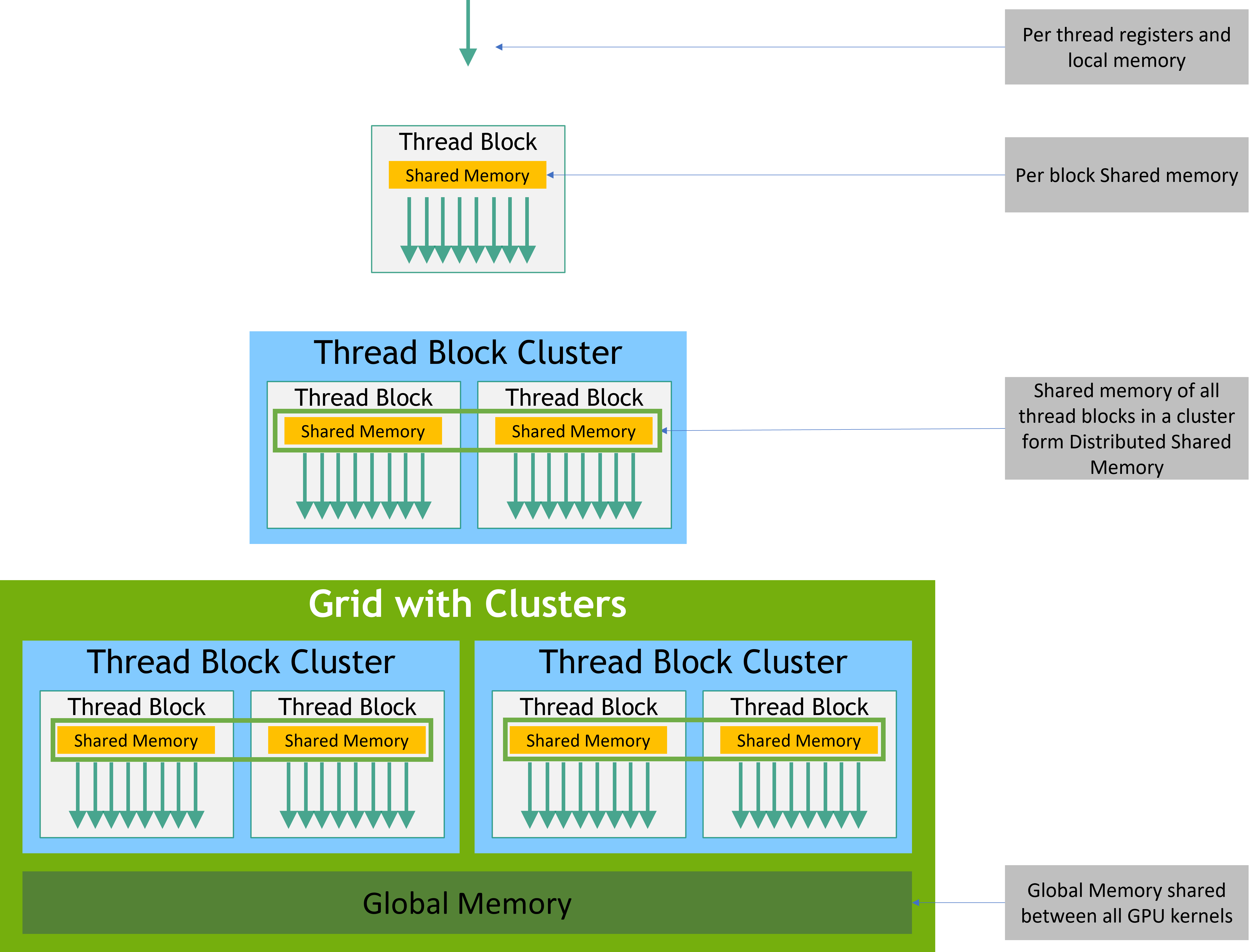
GPU thread clusters slightly alter the information above, where thread block clusters allow groupings of thread blocks, and allow for some synchronization and communication between adjacent thread blocks
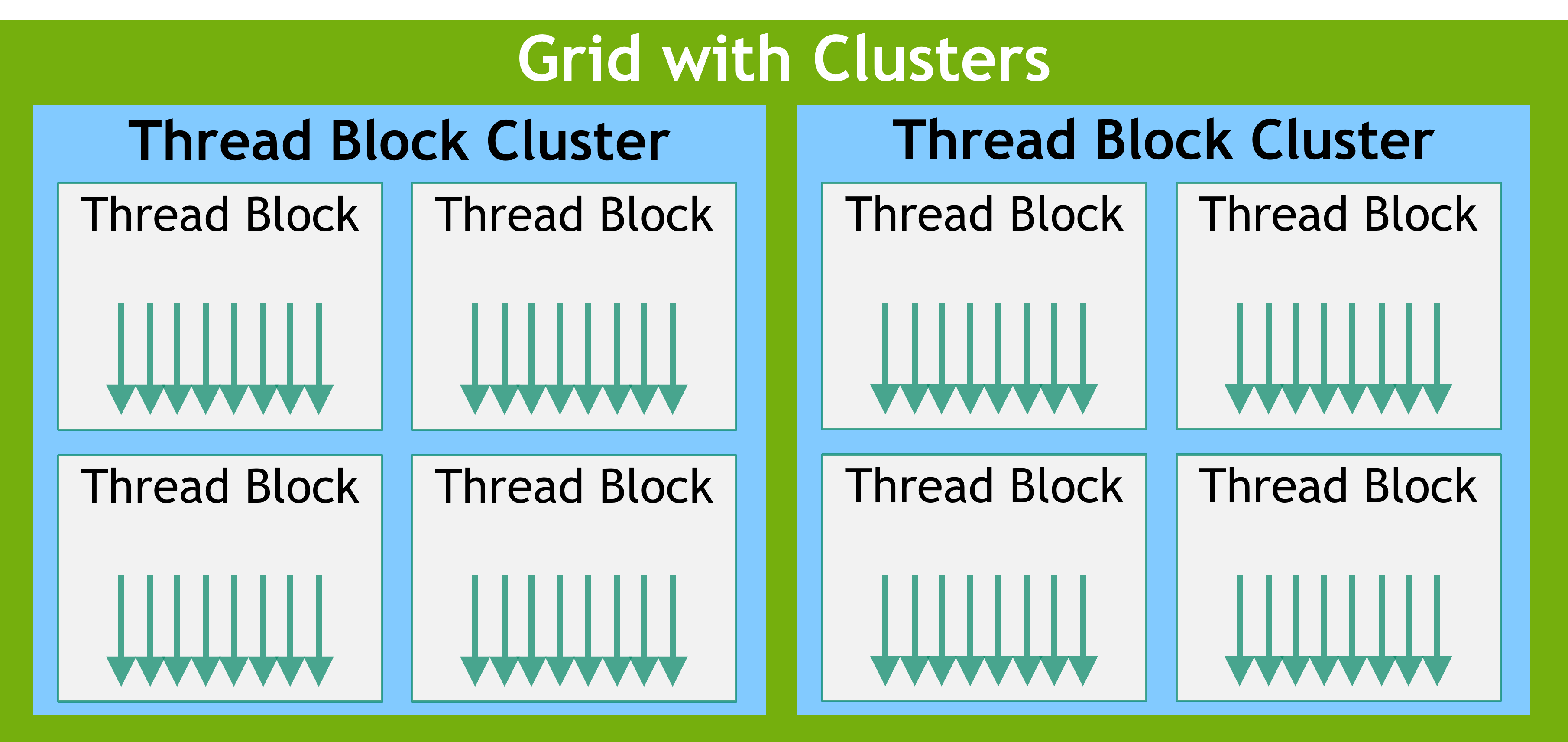
All thread blocks in a thread block cluster are executed on the same graphics processing cluster (GPC), which allows for some scheduling and sharing:
- All thread blocks in a thread cluster are executed in a single graphics processing cluster
- All thread blocks are scheduled simultaneously, and within, a single GPC
- Threads in different thread blocks within the same thread cluster can communicate and synchronize with eachother using interfaces from Cooperative Groups
- Specifically, threads in clusters can access the shared memory of all blocks in the cluster, which creates a notion of distributed shared memory (since all threads in a block assigned to a GPC can access the shared memory of other threads in other blocks)
Altogether, this creates a way to run truly parallel computations, with some data synchronization, with guarantees of specific scheduling semantics on variable memory size GPU clusters without changing actual kernel functions. When deploying a kernel onto a specific GPU architecture, changing configs can help with runtime and semantics instead of hardcoding into GPU kernel application code
GPU Warps and SIMT
Within a thread block, threads are organized into groups of 32 threads called warps, a warp executes the kenel code in a single instruction multi-thread (SIMT) paradigm. In SIMT all threads in the warp are executing the exact same kernel code, but each thread can follow different branches of that code (for example if-then statement would produce a branch). SIMD execution follows a single control path, SIMT allows each thread to follow it's own control flow path
All threads in a warp execute the same code, but threads don't necessarily follow the same execution path. The index in a warp from is known as a warp lane, and based on the actual control flow of the thread, certain lanes execute at the same time. Specifically, only a single control flow in a warp will execute at any time, and other flow branches will be masked off in the meantime:
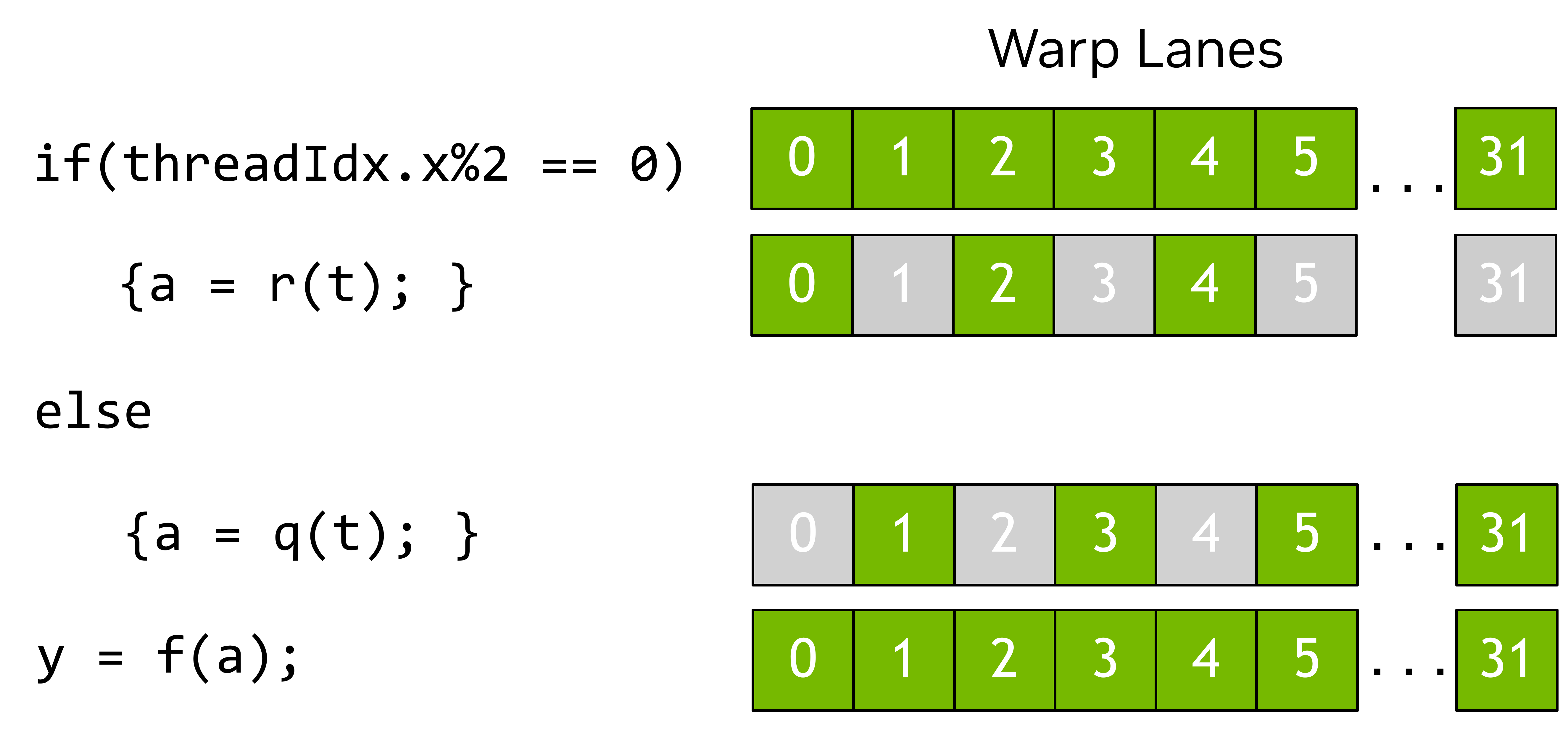
Therefore, GPU utilization is maximized when threads within a warp follow the same control flow path. All CUDA does is guarantee that all threads in a warp progress through the code together, and different hardware may optimize some of the masked lanes, in ways that are transparent, as long as the programming model is followed. Any number of warp lanes that aren't a multiple of 32 simply go unused
GPU Tiles
CUDA supports tile programming where you write code at the level of an entire thread block, and descibe operations on multi-dimensional collections of data called tiles. Compiler just maps these operations to individual threads of the block. Tile kernels launched within a block can query their relative position within the grid to determine which portion of data it's responsible for, and so the programmer just needs to specify grid dimensions and then number of threads per block is determined by the compiler
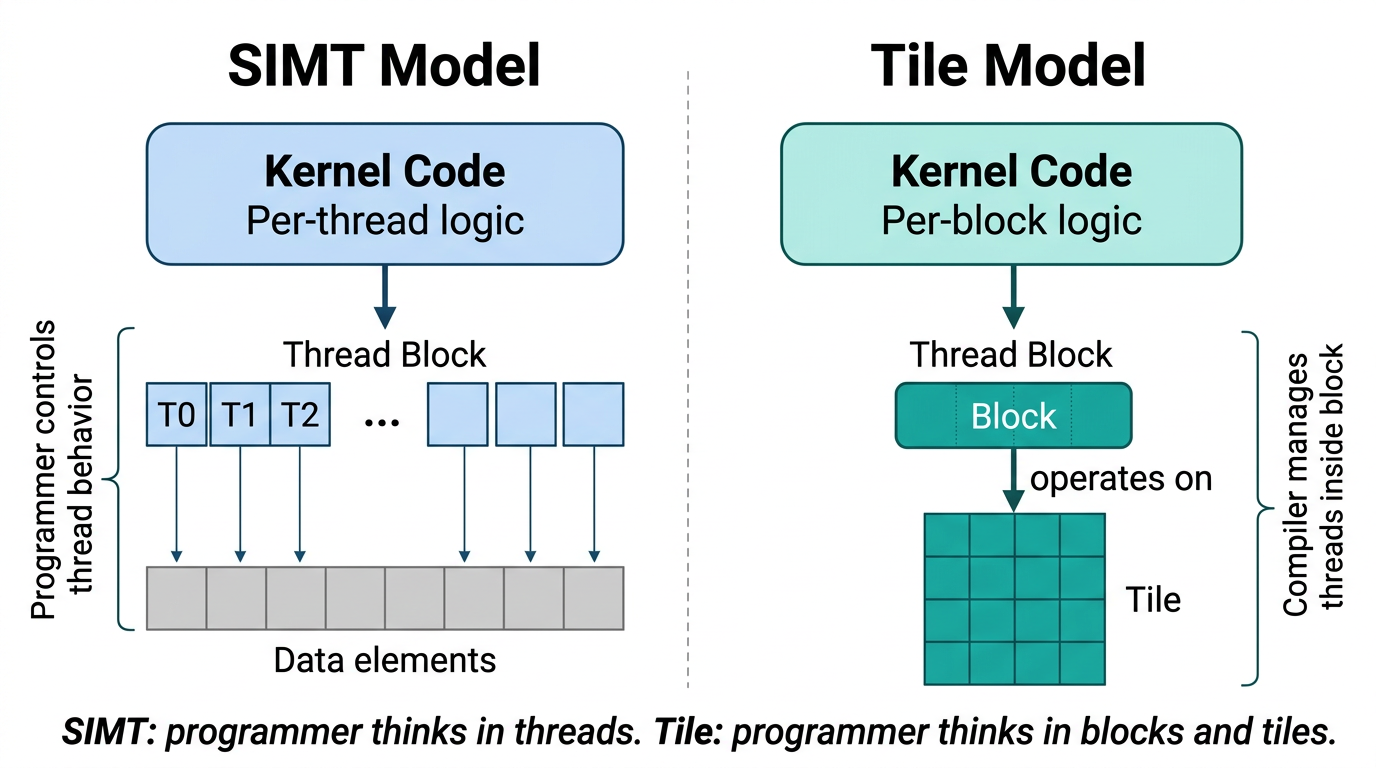
GPU Tiles + Arrays
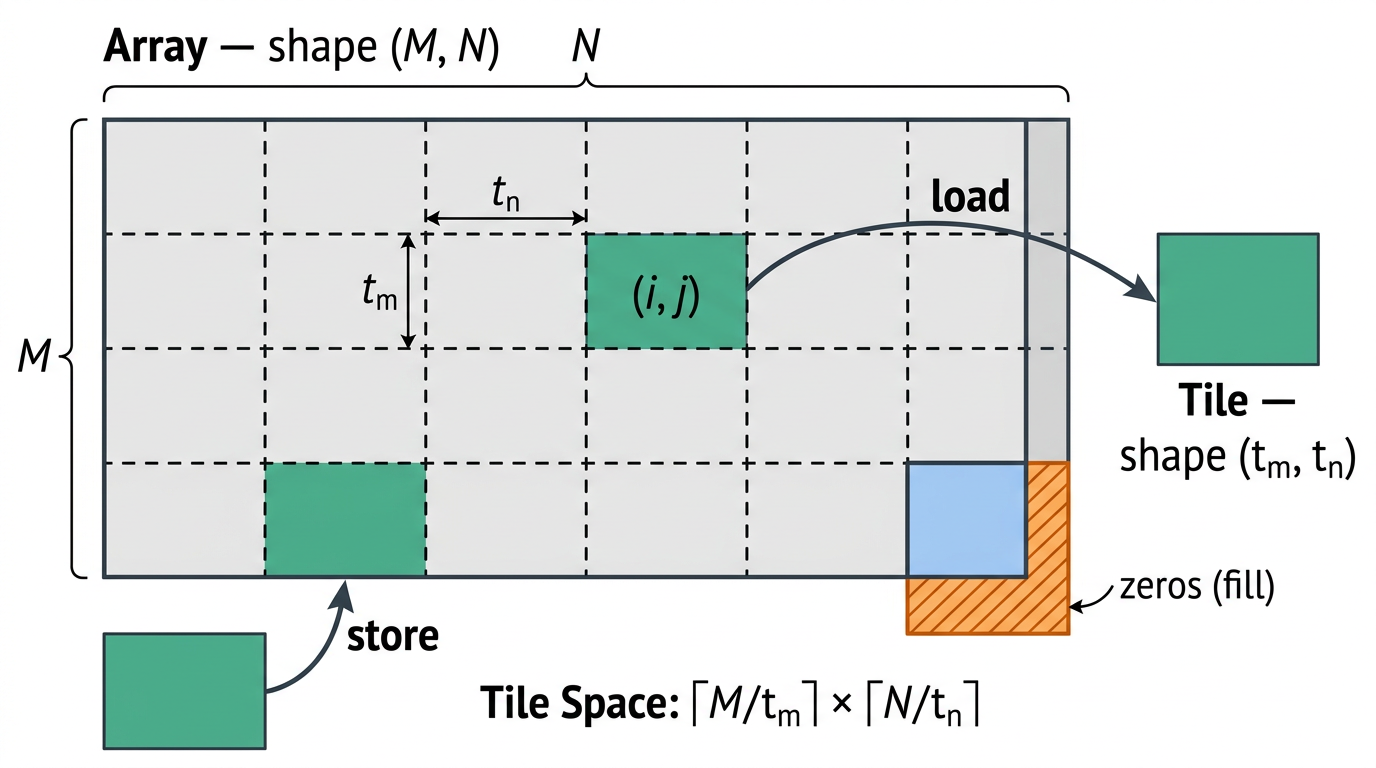
Tile programming works best with arrays and tiles
- Arrays are mutable, and their content can be modified within a kernel
- Arrays do have a shape and data type
- A tile is a multi-dimensional collection of values that exists only within tile code, and is local to a single block
- Tiles are immutable, every operation produces a new tile
- Compiler decides how a tile is stored
If an array of size is created, and there's a desire to move this to a tile, the load and store operations are done in tile space. A load operation would specify tiles of shape , which would divide the array up into blocks of size and
Many out of the box linear algebra, transforms, etc exist for tile based programming, especially in BLAS and CUDADNN modules
Writing SIMT Kernels
CUDA Threads are the basic unit of parallelism, each thread maintains its own state and control flow
Threads are organized into thread blocks which are organized into grids. Grids and thread blocks can be 1, 2, or 3 dimensional
Threads inside of a thread block can cooperate and access the same memory addressees, especially in shared memory. During this time, synchronization is required to avoid race conditions and memory hazards, and the most basic form of synchronization within a block is called syncthreads
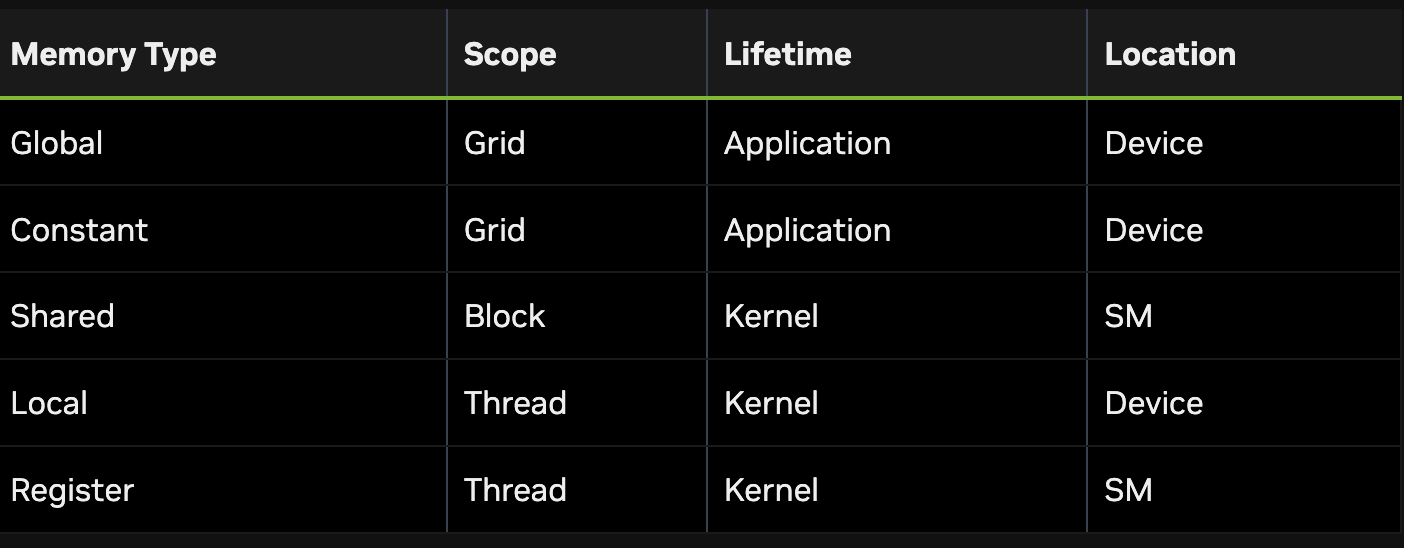
Thread Memory Management
- Global memory (device memory) is primary memory space that's accessible by all threads in a kernel
- Global memory persists util it's released, or the application is terminated
- The CPU can access this via
cudaMemcpy, and GPU global memory can be written back to the CPU after GPU kernel functions are completed - During kernel execution, data from global memory can be read by CUDA threads, and the result from operations carried out by CUDA threads can be written back to global memory
- Shared memory is a memory space that is accessible by all threads in a thread block. It's physically located on each streaming multiprocessor and it uses the same phyiscal resource as L1 cache
- Each thread block is tied to a specific streaming multiprocessor, but each streaming multiprocessor may have multiple thread blocks allocated to it
- Data in shared memory persists thoughout the kernel execution, and is condsidered a user-managed scratchpad for use during kernel execution
- Since shared memory is placed on the streaming multiprocessor itself, the bandwidth is higher and latency is lower compared to global memory, but the total storage size is significantly lower
- Data is accessible by all threads in the thread block, so
__syncthreads()function is needed to avoid race conditions. The__syncthreads()will block all threads in the thread block until all threads have reached the call to__syncthreads()- In total, it ensures all threads meet at the same end point, and afterwards data can be moved between threads and continued
- It can be created statically or dynamically
- Shared memory can be created via
__shared__decorator -
  // assuming blockDim.x is 128
  __global__ void example_syncthreads(int* input_data, int* output_data)
  {
      __shared__ int shared_data[128];
      shared_data[threadIdx.x] = input_data[blockDim.x*blockIdx.x + threadIdx.x];

      // All threads synchronize, guaranteeing all writes to 'shared_data' are ordered
      // before any thread is unblocked from '__syncthreads()':
      __syncthreads();

      // A single thread safely reads 'shared_data':
      if (threadIdx.x == 0) {
          float sum = 0;
          for (int i = 0; i < blockDim.x; ++i) {
              sum += shared_data[i];
          }
          output_data[blockIdx.x] = sum;
      }
  }
- Registers are located on the streaming multiprocessor, and have local thread scope
- They are used for thread local storage during the execution of a kernel
- Developers can configure the maximum number of registers to be used by a kernel, which can help alleviate memory pressure or lead to spill
- Register spill occurs when values currently stored on-chip must be written out to global memory and read back later to make space
- Local memory is also thread local storage, but the physical location of local memory is in the global memory space
- It is logical in scope, not physical
- It's also used during threads during kernel execution
- Compiler will automatically place in local memory are:
- Large arrays
- Large data structures in general that would overconsume register space
- Any variable if the kernel uses the more registers than available (register spill)
- Constant space is scoped to the grid, and it resides on the device and is read only to the kernel. Being constant means:
- Resides in constant memory
- Has a distinct object per device
- Is accessible from all threads within the grid, and from within the host in C++
- Constant memory is useful for small amounts of data that each thread will use in a read-only fashion
- Caches have multiple uses
- L2 cache is located on device, and shared among all streaming multiprocessors
- L1 cache is phyiscally located on each streaming multiprocessor, and is the same physical space as shared memory
- Distributed shared memory provide the ability for threads in a thread block to access shared memory of all the participating thread blocks in that cluster
- Threads in the thread block cluster can read, write, or perform atomics in the distributed address space, regardless of whether the address belongs to the local thread block or the remote thread block
- Using this requires a number of synchronization tasks to be completed, and can significantly slow down a parallel program, but sometimes this communication is needed
CUDA Compiler
CUDA itself is just another compiler to take C++ code and run it on a GPU, the same way g++ and aarch are used to compile C++ onto x86 and ARM processors, nvcc is the CUDA compiler to transform C++ code into GPU instruction sets
nvcc doesn't inherently force it onto GPU usage, nvcc can just compile to C++ CPU code as well. Explicit GPU execution has to be programmed in application code and compilation itself - stuff like file system access, I/O to sockets, etc can only be done on the CPU, so every CUDA program starts on a CPU. The execution space refers to the actual place code is executed, whether it's the Host CPU, the Device GPU, etc
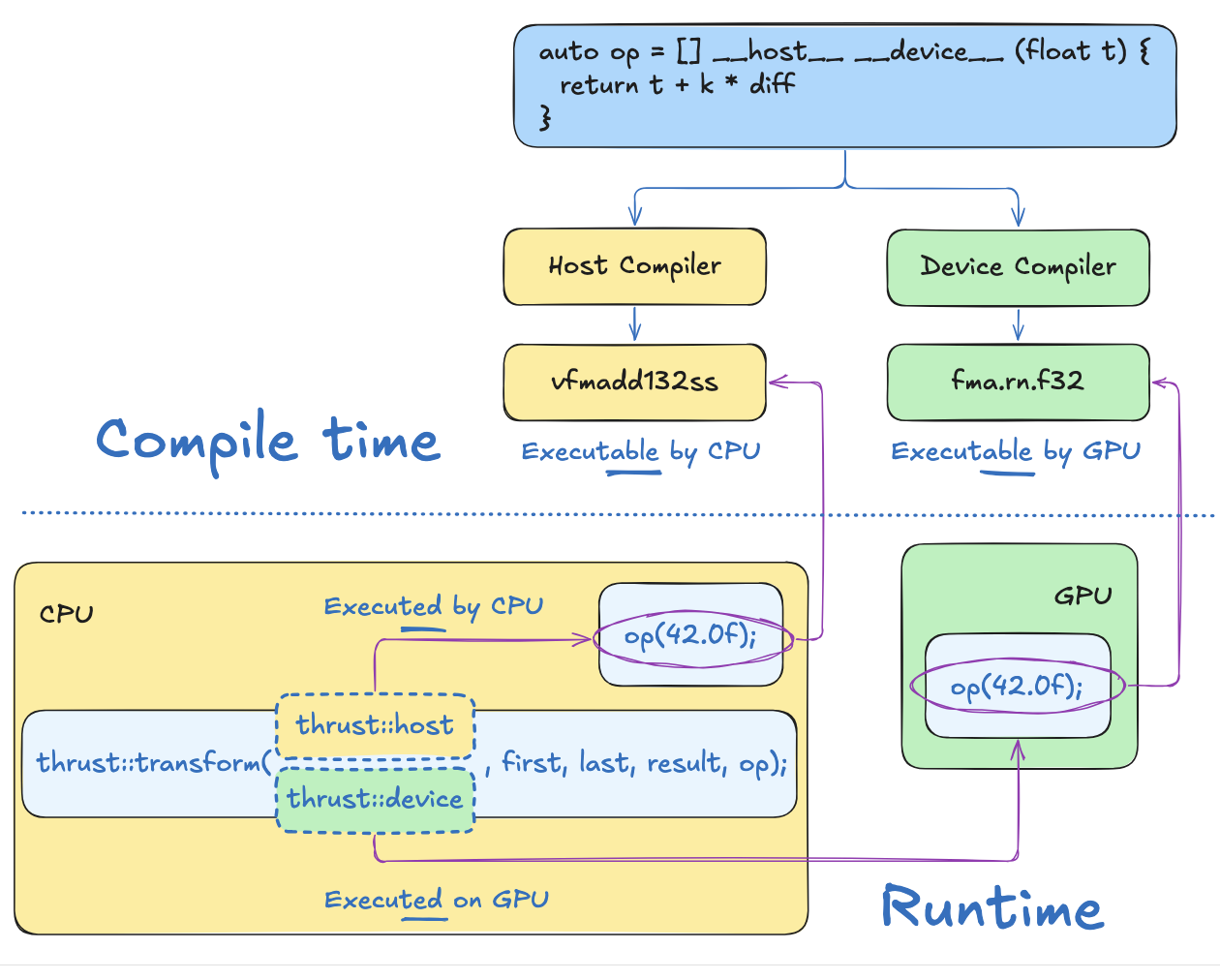
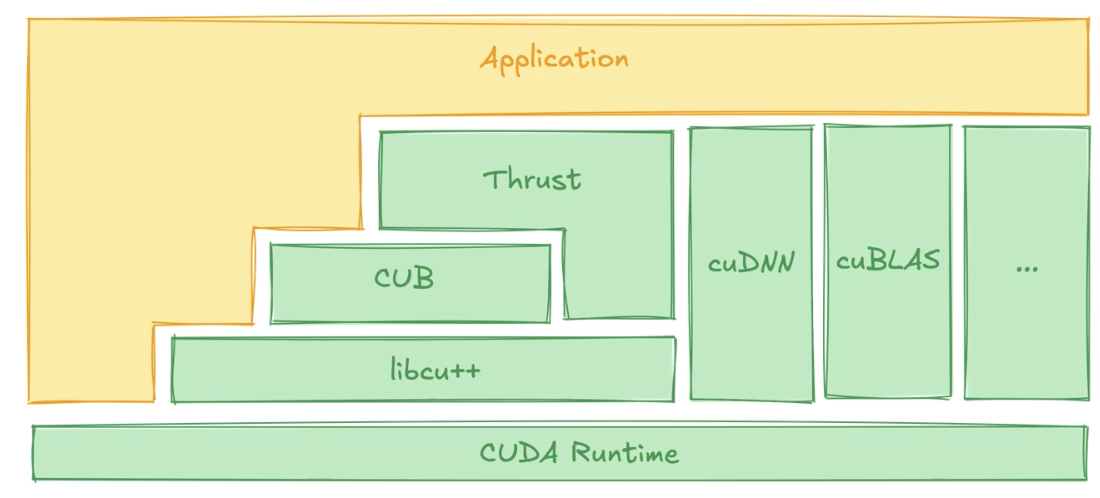
The CUDA Runtime itself covers many areas, and inside of the CUDA Runtime there are a ton of different libraries that can be used to actually execute instructions on GPU's for data:
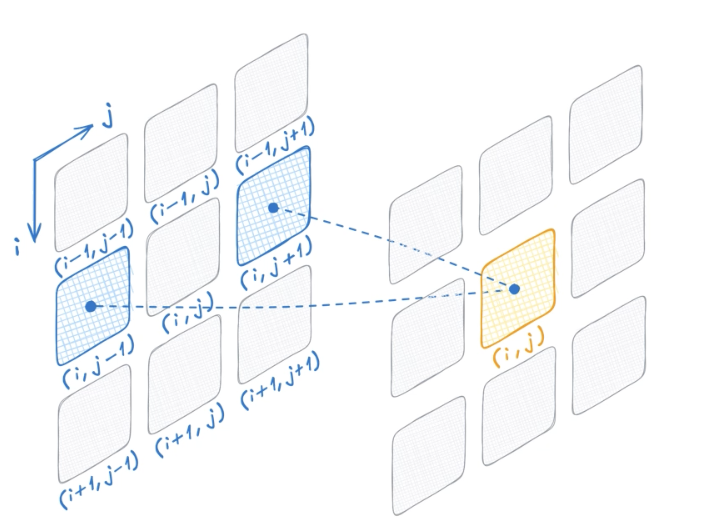
- Thrust builds pre-built components of common tasks for GPU for things like vectors, copying, sort, etc, except on a GPU
- The thrust example shows how
transformlambda function can go from a for loop over a vector to a GPU based SIMD instruction
- The thrust example shows how
- CuDNN helps on DNN's, and matrix pooling operations:
- CuBLAS helps on linear algebra
cuda:stdrecreates a majority of thestdlibrary for CUDA, including functions like flatten, span, etc- etc
That being said, if an algorithm doesn't fit into the standard CUDA Runtime / Libraries, how can we actually create it ourselves?
GPU Memory
Both GPU and CPU have directly attached Dynamic RAM (DRAM) chips, in systems with more than one GPU, each GPU has its own memory
From the perspective of device code, the DRAM attached to the GPU is called global memory, because it's accessible to all streaming multiprocessors on that GPU
DRAM attached to a CPU is called host memory!
GPU and CPU memory use a single unified virtual memory space, which means the virtual memory address range for each GPU in the system is unique and distinct from each GPU on the host. Therefore, for any given virtual memory address you can determine whether it's in GPU / CPU memory, and specifically you can determine which GPU it's actually on
There are CUDA API's to move data between each of these virtual memory spaces, which essentially allows for transferring data between CPU(s) and GPU(s)
Beyond shared memory, each GPU has it's own local on-chip memory, and each streaming multiprocessor has it's own register file and shared memory. The register file on a streaming multiprocessor stores thread local variables, typically allocated by the compiler, and the shared memory is accessible by all threads within a thread block or cluster (since a thread block is tied to a specific streaming multiprocessor)
Asynchrony and CUDA Streams
Writing parallel algorithms isn't a sufficient condition to writing performant CUDA applications. Apart of a performant application involves data transfer, parallelization, memory usage, and asynchrony. Asynchrony was enough of a pain point that apparently an entire section was dedicated to it!
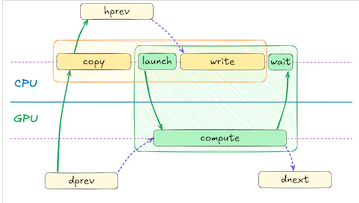
Asynchrony let's us overlap computation with I/O, and helps us to solve problems similar to below where the CPU / GPU would be idle while the other does work:
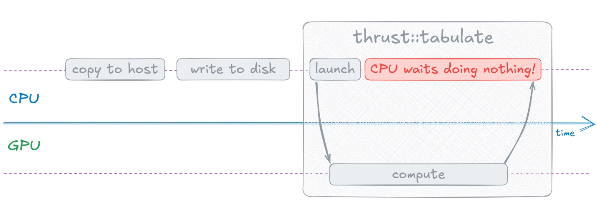
While the GPU is busy, the CPU can do many things! Most of them deal with I/O, which can specifically be from the GPU as well. In the heat transfer example, while the GPU is running simulation , the CPU can copy data from dprev device vector which holds the computation results from time
There's a standard CUDA library called cub (CUDA unBound) which helps to handle asynchronous computations, and CUB commands can launch work on the GPU and immediately return control to the CPU for it to continue handling I/O and OS level work. CUB is CUDA specific, and doesn't allow for any host side implementations specifically, but it can still be used to synchronize threads on the host CPU as the device GPU runs computations
cudaDeviceSynchronize can ensure the CPU waits for the GPU work to complete on a specific thread. CUB and Thrust have similar throughput and timing metrics, but the entire time the GPU is running on Thrust the CPU sits idle, whereas with CUB the CPU can be performing actual work
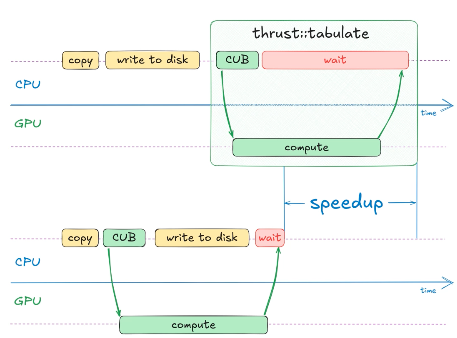
// thrust
auto begin = std::chrono::high_Resolution_click::now();
thrust::tabulate(thrust::device, out.begin(), out.end(), compute);
auto end = std::chrono::high_Resolution_click::now();

//cub
auto begin = std::chrono::high_Resolution_click::now();
auto cell_ids = thrust::make_counting_iterator(0);
cub::DeviceTransform:Transform(cell_ids, out.begin(), out.end(), compute);
cudaDeviceSynchronize(); // ---> without this, CUB looks like it runs 100x faster, but realistically it's just control back to CPU
auto end = std::chrono::high_Resolution_click::now();
Profiling CUDA Applications
To profile how the GPU, CPU, and overall application is doing with saturation, timings, etc NVIDIA provides a tool called Nsight Systems - this is the most useful tool for developing and debugging applications locally, and it also provides exports for OTEL tools for live applications
It can help show when GPU computations are launched, when data is transferred between host and device, and when each write to different portions of memory. Interpreting these reports is incredibly hard, and NVTX allows you to create custom ranges inside of an application, similar to debugging stop points, that help to break down the actual NSight reports