Storage
Storage
EBS Volumes
- EBS Volumes are network drives
- They are not physically coupled to instances
- Attach to one instance at a time
- Can have multiple EBS Volumes attached to 1 EC2 instance
- Linked to a specific AZ
- To transfer you snapshot and transfer
- Transfer across AZ, region, etc
- Incremental
- Only backup changed blocks behind the scnees
- EBS backups use IO so you shoudln't run them while application is handling a lot of traffic
- Snapshots stored in S3
- Not necessary to detach to do snapshot, but recommended
- Can make AMI from Snapshot
- Fast Snapshot Restore is a feature that pre-warms your EBS volumes for you so that once the instance is up and EBS volume attached all of the blocks are ready to go and no cold start problem
- To transfer you snapshot and transfer
- Can only scale them up
- Volume Types
g: General Purpose SSD for wide variety of workloadsiHighest Performance SSD for mission-critical low latency or high-throughput workloadsst 1Low cost HDD for frequent access and high throughputsc 1Lowest cost HDD for less frequently accessed workloads- Types characterized by Size, Throughput, and IOPS
- Encryption
- EBS volumes aren't encrypted by default
- Acct level setting to encrypt automatically new EBS volumes and snapshots
- EBS Multi-Attach
- This allows us to attach same EBS volume to multiple EC2 isntances in the same AZ
- you mentioned above this wasn't possible, so this service is only for very specific use cases
- Achieve higher app availability in clustered linux application
- Apps that manage concurrent write ops
- Must use FS that's cluster-aware
- Each instance has full read and write permissions to the volume
- Partitioned disks vs non-partitioned disks
- GPT vs MBR
- GPT = GUID Partition Table
GPT (GUID Partition Table) is the modern partitioning scheme. On Windows it supports up to 128 partitions per disk; MBR supports only 4 primary (or 3 + 1 extended)
- Use GPT when you need more than 4 partitions or disks larger than 2 TB. For “400 GB EBS, up to 10 partitions,” initialize as GPT
- MBR = Master Boot Record
- MBR is the older partitioning scheme. It supports up to 4 primary partitions per disk and disks up to 2 TB in size
- Use MBR when you need maximum compatibility with older operating systems. For “up to 2 TB EBS, up to 4 partitions,” initialize as MBR
- GPT = GUID Partition Table
GPT (GUID Partition Table) is the modern partitioning scheme. On Windows it supports up to 128 partitions per disk; MBR supports only 4 primary (or 3 + 1 extended)
- Partitioned disks need to be formatted and partitioned before use
- Non-partitioned disks can be used right away
- Linux uses
/dev/xvdfnaming convention - Windows uses
xvdgnaming convention
- GPT vs MBR
Amazon Data Lifecycle Manager
-
Automate creation, retention, and deletion of EBS snapshot and EBS backed AMI's
-
Schedules backups, copies, snapshots, and deletions
-
Use resource tags to identify resources
-
Can't manage snapshot / AMI outside of DLM
-
AWS DLM vs AWS Backup
- DLM for creation, retention, and deletion of EBS snapshots
- AWS Backup for management and monitoring of backups across AWS services from a single place
- Includes EBS volumes
AWS Backup
Centralized backup service to automate and manage backups across AWS services
Integrates out of the box with:
- EBS
- DynamoDB
- Full table backup
- EFS
- Full and item level restore available
- EC2 instances
- Storage Gateway (remember these are on-prem virtual machines that cache S3 objects locally, but store data long term in S3)
- RDS is special because it has its own snapshot system, but AWS Backup can manage these snapshots as well:
- You create replicas in other regions manually, and these replicas are updated async via WAL logs
- Outside of replicas, we can also backup RDS snapshots via AWS Backup
- These are full snapshots at instance level
- You cannot restore RDS snapshots into an existing instance, must create new instance from snapshot
- Therefore, when you restore a snapshot, you must specify instance class, storage type, VPC, subnet group, security groups, parameter groups, option groups, etc... because you are creating a new instance from the snapshot
Backup policies are then used to define:
- Backup frequency
- Retention period
- Backup window
- Lifecycle policies to transition backups to cold storage or delete them
- Cold storage, like Glacier, is cheaper but takes longer to restore from
- Can define transition to cold storage after X days, and deletion after Y days
- Backup vaults to store and encrypt backups
- And even if encrypted is used or not
- Cross account and cross region backup copies for DR
Backup vaults are where backups are stored, and a backup plan specifies when and how backups are created and retained, and which vault to store them in. Backup plans should ensure RTO and RPO requirements are met
If data restore is ever needed, AWS Backup can restore entire resources or specific files from EFS backups via CLI or UI commands. We can also run backups based on a trigger from EventBridge
Local EC2 Instance Store
-
EC2 instance store is the physical disk attached to physical server where EC2 is
-
Very high IOPS
-
Disk up to 7.5TB, if you strip or parallelize many you can get up to 60 TB
-
Block storage like EBS
-
Data is lost if hardware fails
-
Instance Store vs EBS
- IS physically attached to machine
- Data doesn't survive reboot
- EBS is network drive
- Data survives reboot
- IS physically attached to machine
EFS
- Elastic File System
- Managed Network File System (NFS) that can be mounted on many EC2
- Multiple EC2, multi AZ, and can be across on prem and on cloud
- Allows us to mount same file system on multiple EC2 instances
- Shared file storage for Linux based workloads
- POSIX compliant file system with file locking
- Use cases:
- Lift and shift apps that need shared file storage
- Content management, web serving, home directories
- Big data and analytics
- Media processing workflows
- Container storage
- DevOps tools
- Highly available, scalable, and expensive file system - you pay per GB used
- Use cases:
- Web serving, content management, data sharing, WordPress
- Need linux based AMI that's POSIX compliant
- NFS v4.1 protocol
- Encryption at rest via KLMS
- Can only attach to one VPC and one ENI (mount target) per AZ
- Scales automaticall
- Performance and Storage Classes
- EFS Scale
- 1k's of concurrent NFS clients
- 10 GB/s throughput
- Grow to petabyte scale NFS automatically
- Performance Mode
- General: latency sensitive
- Max I/O: higher latency, throughput, and highly parallel
- Throughput Mode
- Bursting: 1TB = 50 MB/s + bursts up to 100MB/s
- Provisioned: Set throughput regardless of storage size
- Elastic: Auto scales throughput up or down based on workloads
- Good for unpredictable workloads
- EFS Scale
- Storage Classes
- Standard: Frequently accessed files
- Multi AZ, good for prod
- Can use one single AZ for dev purposes
- Infrequent: Cost to retrieve files, but much lower to store
- One Zone IA is best to use
- Archive: Rarely accessed data, and 50% cheaper
- Implement lifecycle policies to move files between storage tiers
- Standard: Frequently accessed files
- Mount target configuration provides an IP address in your VPC subnet to mount EFS
- Each AZ needs its own mount target
- EC2 instances connect to mount target via IP or DNS name
- Security groups control access to mount targets
- Accessing EFS from Lambda
- Lambda functions in VPC can mount EFS file systems
- EFS provides highly scalable and shared file storage for Lambda functions
On Prem and VPC
-
Can use VPC peering for VPC-2-VPC connection between EC2 and EFS
- EC2 instance can use DNS or IP of EFS
-
Can use Direct Connect and/or Site-To-Site VPN for On-Prem server to connect to EFS
- Need to attach EFS to one or many ENI, and then On-Prem needs to connect to IPv4 address of ENI, they cannot use DNS address
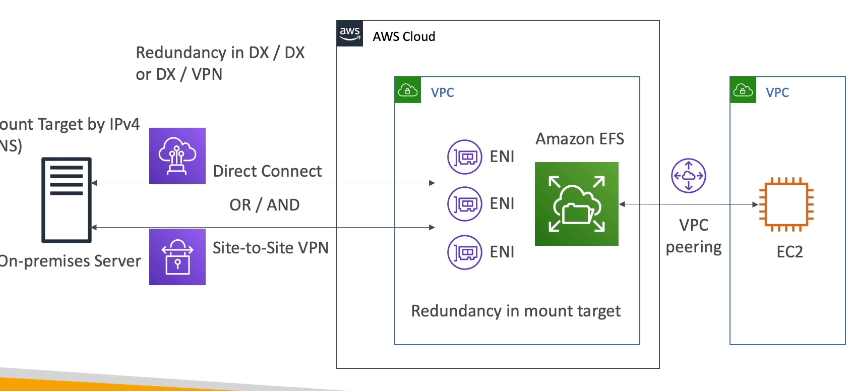
- Need to attach EFS to one or many ENI, and then On-Prem needs to connect to IPv4 address of ENI, they cannot use DNS address
-
Security:
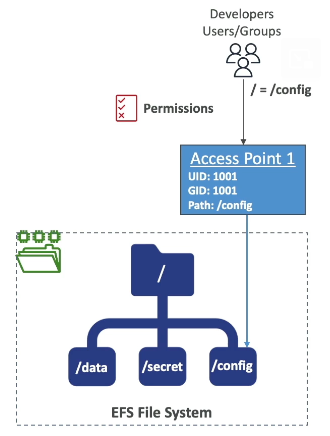
- Can use IAM + POSIX user and groups to control access to directories on file system
- File System Properties:
- Resource-based policy to control access to EFS file systems
- Same thing as S3, but can control read/write
- By default it grants full access to all clients
- Resource-based policy to control access to EFS file systems
- Can use IAM + POSIX user and groups to control access to directories on file system
-
Replication
- Cross region replication
- New and/or existing EFS file systems
- SAme exact FS in another region
- Doesn't affect throughput as this is done in backend away from EFS
- Use case:
- Meet compliance needs of DR / business continuity
S3
- Object storage, serverless, unlimited storage
- Good for static content like image and video
- Access object by key
- NOT A FILESYSTEM
- Anti Patterns:
- Lots of small files
- POSIX file system (use EFS instead since it has file locks)
- Search features, queries, and rapidly changing data
- Websites with dynamic content
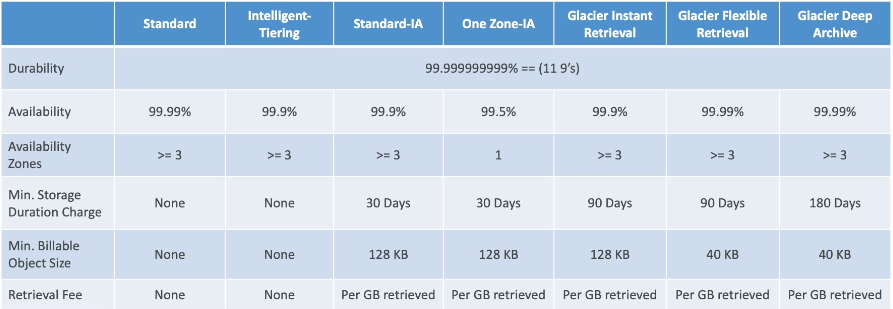
- Can use S3 lifecycle policies to move between these storage classes
- Replication
- Cross Region Replication (CRR)
- Same Region Replication (SRR)
- Can combine both of these with other lifecycle rules
- Helps to reduce latency and disaster recovery
- S3 Replication Time Control (S3 RTC)
- Replicates most objects that you upload to S3 in seconds with 99.99% of objects with SLA < 15 minutes
- Helps for ensuring SLA on compliance
- Event Notifications
- S3 can send event notifications to multiple targets
- Event types
- Object Created, Removed, Restored, Replicated, etc...
- Targets
- SQS, SNS, Lambda, or EventBridge
- With EventBridge a common architecture is to send every single S3 event there, and then EventBridge is able ot interact with 18 other AWS services that can all "do things"
- EventBridge can do advanced filtering with JSON rules
- Multiple destinations for one rule
- Proper PubSub of messages based on Events in S3
- Use cases:
- Thumbnail uploads onto S3 you want to return
- Baseline performance
- Automatically scales to high requests, with latency between
100ms - 200ms - Can achieve these metrics per second per prefix
3,500 PUT/COPY/POST/DELETE5,500 GET/HEAD- Prefix = everything after bucket name:
<bucket_name>/prefix.../../../ - Spreading reads across prefixes can get you to
22,000 rps
- Automatically scales to high requests, with latency between
- Higher performance
- Multi part upload
- Recommended for files > 100MB
- Can help parallelize uploads
- Chunk out file, upload all, then reconstruct back together on S3
- S3 lifecycle policy to abort multi-part upload of it doesn't complete
- S3 Transfer Acceleration
- Transfer file to AWS edge location which then forwards to S3 bucket in target region
- Compatible with multi-part upload
- Public location from client to edge location, then AWS backbone from edge to S3
- S3 byte range fetches (Downloads)
- Separate file into chunks of bytes
- Parallelize GET requests by requesting specific byte range
- If one part fails you just re-request that one part
- Also useful for only requesting headers of files, instead of GET whole file
- Multi part upload
- Tiering
- Each object stored in S3 has its own storage class
- Lifecycle policies to transition between storage classes
- Can set policies based on object age, size, prefix, or tags
- Types:
- Standard has 3 AZ's and millisecond access
- Standard IA has 3 AZ's, millisecond access, but lower cost for infrequent access
- One Zone IA has 1 AZ, millisecond access, lower cost for infrequent access
- Data is not replicated across AZ's, so if AZ goes down data is lost
- Intelligent Tiering automatically moves between frequent and infrequent access based on usage
- Glacier Instant Retrieval has 3 AZ's, 1-2 second access, lower cost for archival data
- Good for data that is rarely accessed, but needs immediate access when requested
- Glacier Flexible Retrieval has 3 AZ's, minutes to hours access, lowest cost for archival data
- You can't directly download these files in UI
- They would need to be restored first, which creates a temporary copy in S3 Standard for a set amount of time
- Same thing with CLI, SDK, etc...
- Glacier Deep Archive has 3 AZ's, 12 hours access, lowest cost for long term archival data
- Versioning
- Keep multiple versions of same object in S3 bucket
- Can recover from accidental deletes or overwrites
- Once enabled can't be disabled, can only be suspended
- MFA Delete
- Additional security for versioned buckets
- Requires multi-factor authentication for delete operations on versioned objects
- Can only be enabled / disabled via AWS CLI
- Object Locking
- Write Once Read Many (WORM) model
- Prevent object deletion or modification for a fixed amount of time or indefinitely
- Use cases:
- Regulatory compliance
- Financial records
- Healthcare records
- Modes:
- Governance Mode
- Users with special permissions can override lock
- Compliance Mode
- No one can override lock, even root user
- Governance Mode
- Retention Periods
- Fixed Retention
- Set retention period for objects
- Legal Hold
- Indefinite retention until legal hold is removed
- Fixed Retention
- S3 Access Points
- Simplify managing data access at scale for shared datasets in S3
- Unique hostname for each access point
- Each access point has its own policy to control access
- VPC Access Points
- Restrict access to S3 bucket to specific VPC
- Ensure data never leaves Amazon network
- Use Cases:
- Shared datasets for big data and analytics
- Simplified access management for large teams
- Caching
- AWS CloudFront in front of S3
- Cache static content globally
- Reduce latency for end users
- Offload S3 read requests
- AWS Storage Gateway
- LAN (Local Area Network) users will see these objects as some local file system or storage device, and on the backend these objects are stored in S3
- Can create these as proper EC2 instances in a VPC, or on-prem virtual machines, and then make accessible to corporate LAN via networking VPN's or Direct Connect
- Helps to reduce latency for on-prem users accessing S3 objects
- Hybrid cloud storage with on-prem caching of S3 objects
- Allows low latency access to frequently accessed data, and means on-prem servers don't have to do any further code changes to use S3
- Gateway Types:
- S3 File: On-prem objects sent here will be uploaded to S3 as objects
- At that point other services like Athena can query the data
- FSx: On-premise servers can use FSx as a file system
- Acts as a file system on-prem
- Actually has nothing to do with S3, but is a way to use FSx on-prem
- Tape: This enables cloud backups
- On-prem backup software writes to virtual tapes
- Virtual tapes are stored in S3 Glacier or Glacier Deep Archive
- Volume: On-prem block storage that asynchronously backs up to S3 as EBS snapshots
- S3 File: On-prem objects sent here will be uploaded to S3 as objects
- File Gateway
- NFS or SMB mount on-prem that caches S3 objects locally
- Write through cache, writes go to S3 and local cache
- Volume Gateway
- iSCSI block storage on-prem that asynchronously backs up to S3 as EBS snapshots
- Cached Volumes: frequently accessed data cached on-prem, full volume in S3
- Stored Volumes: entire volume stored on-prem, backed up to S3
- Tape Gateway
- Virtual tape library on-prem that backs up to S3 Glacier or Glacier Deep Archive
- Use existing backup software to write to virtual tapes
- LAN (Local Area Network) users will see these objects as some local file system or storage device, and on the backend these objects are stored in S3
- Deploying AWS Storage Gateway
- Can be deployed as:
- Virtual Machine on VMware ESXi, Microsoft Hyper-V, or KVM
- Amazon EC2 instance
- AWS Snowcone device for edge locations with limited connectivity
- Connect to AWS Management Console to configure and manage gateway
- Create storage volumes, file shares, or virtual tape libraries as needed
- Can be deployed as:
- AWS CloudFront in front of S3
S3 Access Lists
We can allow bucket objects to be accessible to other AWS accounts, public, or via Cognito via ACL's
We utilize bucket policies for more complex access control, which allow for conditional access based on IP, VPC, MFA, etc...
- Manage access to S3 buckets and objects using ACLs
- Bucket Owner Full Control
- When another AWS account uploads object to your bucket, they can give you full control over
- This is useful for cross-account uploads
- Predefined ACLs
- Private
- Public Read
- Public Read Write
- Authenticated Read
- Bucket Owner Read
- Log Delivery Write
S3 Storage Class Analytics
- AKA Storage Class Analysis
- Helps decide when to transition objects to the right storage class
- Recommendations for Standard and Standard IA
- Doesn't work for One-Zone IA or Glacier
- Report updated daily
- Visualize in AWS Quicksight
S3 Storage Lens
- Understand, Analyze, and Optimize storage across entire AWS org
- Find anomalies, cost efficiencies, and data protection best practices
- Aggregate data for Org, accounts, regions, buckets, or prefixes
- Summary Metrics:
- General insights about S3 storage
- StorageBytes, ObjectCount, etc.
- Use cases: Identify the fast growing, unused, and "normal" buckets and prefixes
- Cost Optimization Metrics:
- Provide insights to manage and optimize storage costs
- NonCurrentVersionStoragebytes, IncompleteMultipartUploadStorageBytes
- etc...
- Data Protection
- VersioningEnabledBucketCOunt
- etc - lots of metrics around if you are protecting data
- Access Management Metrics
- Event Metrics
- Performance Metrics
- Activity Metrics
- Detailed Status Code Metrics
- 20OKStatusCount
- Free vs Paid
- Free
- Automatically available for all cusomters
- 28 usage metrics
- Data available for 14 days
- Paid
- Additional + Advanced metrics
- CloudWatch Publishing
- Prefix Aggregation
- Data available for 15 months
- Free
S3 Solution Architecture For Exposing Static Objects
- Stand up EC2 with static content
- Use CloudFront in front of EC2 with EBS on it
- Caches static content globally
- CloudFront in front of ALB
- ALB in front of ASG of EC2 which are all connected to EFS
- EFS is on network, so it scales
- CloudFront in front of S3
- Works great for static objects that aren't updated often
Indexing Objects
- You can't natively index objects in S3, to do search we'd need to check all files / prefixes
- On new writes to S3 you can use an Event Notification to trigger a lambda function
- Lambda would write object metadata and update indexes on DynamoDB
- Search by date, total storage used by customers, find all objects w/ certain attribute, etc...
Dynamic vs Static
- To serve both dynamic and static content
- DNS query on Route53
- Dynamic content sent to API GW + dynamic backend
- Very little cyachying here
- Static content goes through CDN CloudFront layer
- Pulls from S3
- Lots of cyachying here
- Dynamic layer could upload data to S3 backing static layer
- Can use Event Notifications and Lambdas to talk between the 2 layers as required
- Dynamic content sent to API GW + dynamic backend
FSx
- Launch 3rd party file systems on AWS
- Fully managed systems
- Similar to RDS hosting database, but you host File Systems
- Types:
- Lustre
- Large scale distributed file system
- LinuxCluster = Lustre
- ML and HPC
- Video processing, financial modeling, etc
- SSD for low latency IOPS intensive lots of small file workloads
- HDD for throughput intensive large sequential file operations
- Integrates with S3, can use S3 as a FS into FSx
- Can write output back to S3
- Accessible from on-prem infra with VPN or DirectConnect
- 2 types:
- Scratch
- Temp storage, data not replicated, etc...
- Much higher burst and IOPS
- Short term processing of data and cost optimization
- Multiple compute across AZ's connect to ENI that sits on FSx
- Can replicate to S3 if needed
- Persistent
- Long term storage
- Data replicated within same AZ
- Replace failed files within minutes
- Use for long term processing and sensitive data
- Same architecture as above, but there are multiple disks backing up the FSx resource
- Scratch
- NetApp ONTAP
- Compatible with NFS, SMB, iSCSI protocol
- Move workloads running ONTAP or NAS to AWS
- Works with many Linux and Windows instances
- Scales storage automatically
- Replication, snapshots, compression, de-duplication, etc
- Point In Time instantaneous cloning
- Windows File Server
- Fully managed Windows shared drive
- SMB protocol and Windows NTFS
- Microsoft AD integration with ACL, user, and quotas
- Can be mounted on Linux EC2 instances? Lol
- Supports Microsoft Distributed File System Namespace to group files across multiple file systems
- on-prem and cloud, or just across multiple cloud file systems
- SSD or HDD based
- Data backed up daily
- Can be configured to Multi-AZ HA
- Accessible from on-prem infra with VPN or DirectConnect
- OpenZFS
- Only compatible with NFS protocol
- Move internal workloads running on ZFS to AWS
- Works with many Linux and Windows instances
- Snapshots, compression, etc
- Point In Time instantaneous cloning
- Up to 1M IOPS with < 0.5ms latency
- Lustre
FSx Soln Arch
- Single AZ to Multi AZ
- Use DataSync to replicate from FSx Single AZ to FSx Multi AZ
- Shut down Single AZ, manual backup to Multi, restore Multi AZ
- Decrease FSx volume size
- Can only increase
- If you take a backup, you can only restore to same size
- Therefore, you must use DataSync
- Standup smaller FSx
- Use DataSync for some portion of first FSx to smaller second FSx
- Some stupid lazy loading thing for FSx that shouldn't be on the test
- Any data processing job on Lustre with S3 as input can be started without Lustre doing a full download of dataset
- Data is lazy loaded, only the data that's actually processed is loaded
- This means you can decrease cost and latency!
- Just dive in to this super abstract and unnecessary feature, and ensure you are getting the most out of your AWS Service!
DataSync
- Synchronize data!
- Move large amounts of data to and from places
- On-Prem, other clouds, etc...
- Needs an agent on-prem or on the other cloud to do this
- One agent can use 10 GB/s, but you can setup a bandwidth limit too
- AWS Service to Service
- No agent needed
- Can sync to:
- S3
- EFS
- FSx
- Replication task can be scheduled hourly, daily, weekly
- File permissions and metadata are preserved
- Compliant with NFS POSIX
- This is the only service that can keep metadata during replication
- Multiple on-prem or other cloud servers can sync to one DataSync service
- you can also go the other way and sync services back to on-prem or other cloud
- Need DataSync agent in each network that needs to get synced
- AWS SnowCone
- This happens when you don't have network capacity for DataSync
- SnowCone device comes with agent pre-installed
- SnowCone pulls data locally, shuts down, and gets shipped to AWS to be uploaded onto cloud
- AWS Service to Service
- S3
- FSx
- EFS
- Can just sync to and from each
- Metadata is kept
- Metadata is kept
- Metadata is kept
- Not continuous, it is a scheduled job
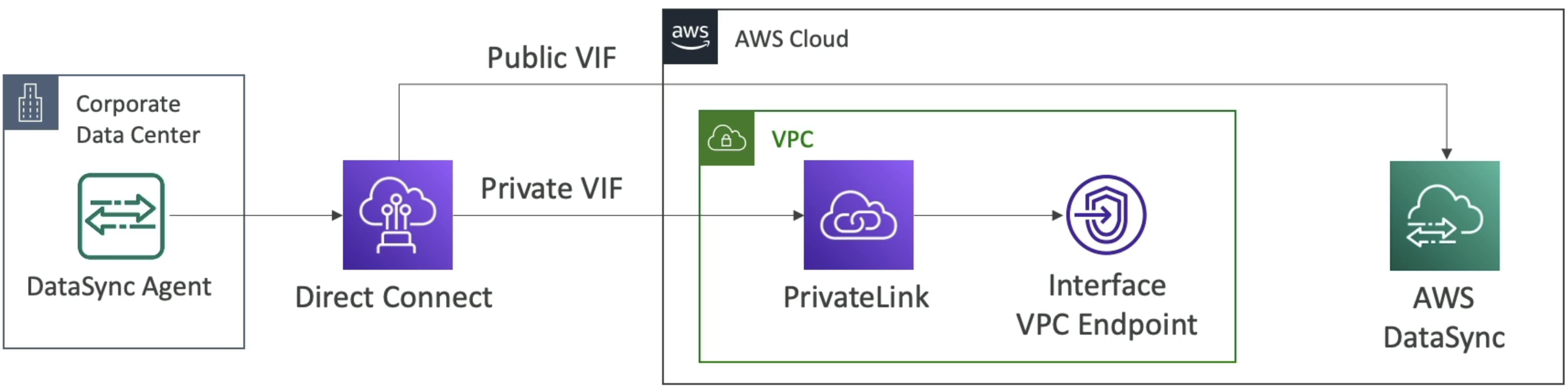
- How can you do AWS DataSync through private channels and not public?
- Need DirectConnect, PrivateLink, and Interface VPC Endpoint
Data Exchange
- Find, subscribe to, and use third-party data in cloud
- Once subscriped to you can use Data Exchange API to load directly into S3 or RedShift
- you can also license our own data through RedShift onto Exchange
Transfer Family
- Send data in and out of S3 or EFS via only the FTP protocol
- Protocols
- File Transfer Protocol (FTP)
- File Transfer Protocol over SSL (FTPS)
- Secure File Transfer Protocol (SFTP)
- Pay per provisioned endpoint
- Managed infra
- Integrate with existing auth system
- Used for sharing files and public dataset