Security
Security
AWS is compliant with many security standards and frameworks, including:
- SOC 1, SOC 2, SOC 3
- ISO 27001, ISO 27017, ISO 27018
- PCI DSS Level 1
- HIPAA
- FedRAMP
- GDPR
- CCPA
There's a shared responsibility model between AWS and the customer:
- AWS is responsible for the security of the cloud
- Physical security of data centers
- Network infrastructure
- Hardware and software that run AWS services
- Customers are responsible for security in the cloud
- Configuring security settings for AWS services
- Managing access to AWS resources
- Protecting data stored in AWS services
AWS has root user when you create an account, and then you create IAM users and roles for access control
- Best practice is to avoid using root user for day to day tasks
- Use IAM roles for applications and services that need access to AWS resources
- Use IAM policies to define permissions for users and roles
Roles are just generic identities that can be assumed by users or services, and policies define what actions are allowed or denied for those identities
Users also have policies, but users are typically tied to a single person or application
Below we cover IPv4 and debugging network traffic because it's just important to understand networking basics before diving into security services
IPv4/6 Addressing Basics
IPv4 addresses are used for network communication, and security groups and network ACLs are used to control inbound and outbound traffic to resources in a VPC
- Each portion of IPv4 address is 8 bits, and there are 4 portions, so total of 32 bits
- CIDR notation is used to define IP address ranges, e.g.
192.168.1.0/24/24means first 24 bits are network portion, last 8 bits are host portion- So
192.168.1.0/24includes all IP addresses from192.168.1.0to192.168.1.255
- IPv6 addresses are 128 bits long, represented as 8 groups of 4 hexadecimal digits, e.g.
2001:0db8:85a3:0000:0000:8a2e:0370:7334- CIDR notation is also used for IPv6, e.g.
2001:0db8::/32 /32means first 32 bits are network portion, last 96 bits are host portion
- CIDR notation is also used for IPv6, e.g.
Examining Network Traffic
Wireshark is a popular tool for capturing and analyzing network traffic
- Can capture packets on a network interface and display detailed information about each packet
- Useful for troubleshooting network issues and analyzing security incidents
- Can filter packets based on criteria like source/destination IP, protocol, port, etc.
On AWS, examing network traffic can be done using VPC Flow Logs, or by capturing traffic on EC2 instances using tools like tcpdump or Wireshark
CloudTrail
Allow us to log SDK, CLI, or Console calls / actions from IAM Users or IAM Roles
Event Types
- Management: Operations performed on resources in AWS accounts
- Logged by default
- Anything that alters resources in the account
- Attaching IAM policy, setting up logging, setting up data routing rules, etc...
- Read Events don't modify resources
- Write Events may modify resources
- Much more important, more destructure
- Data: Data events like S3 object level activity - Put, Delete, Get, etc...
- Not logged by default
- Can separate Read and Write Events like above too
- S3, Lambda API Invoke, etc...
- Insights: Helps us to find anomalies in our account
- Paid for resource
- Things like:
- Inaccurate resource provisioning
- Burst of IAM policies
- Only categorizes / analyzes Write Events
- These events also appear in Cloudtrail - usually a best practice to route these event types to Event Bridge or SNS to notify via email or something more than just logging
Common Architectures
- S3 + Athena: you can send them to AWS S3 or Cloudwatch Logs for further processing
- Logs stored for 90 days in CloudTrail
- Log to S3 for long term retention
- Some use Athena to query over S3
- EventBridge: Since all API's go through CloudTrail, you can filter and route specific ones to EventBridge
- CloudTrail filter send to EventBridge
- Event Bridge to
- Lambda for processing
- SNS for sending email
- Another account for further processing
- Common checks for SNS
- User assuming role
- User changing security group ingress rule
- etc...
Delivery to S3
- Can write CloudTrail directly to S3 using native integrations without anything in the middle
- SSE-S3 or SS3-KMS for in route encryption
- From there lifecycle policy can move these into glacier tier
- New files in S3 can then trigger S3 Events which send
Drop FileorFile Triggernotification that can be picked up by Lambda / SNS / SQS- Cloud Trail could go straight to SNS / SQS / Lambda, but it wouldn't be long term durable sitting in S3
- Why S3?
- Enable versioning
- Enable MFA deletion
- Enable S3 Lifecycle policy for archiving
- S3 objcet lock to stop deletion
- SSE KMS encryption
- SHA-256 Hashing for integrity validation!
- Blah blah blah, that's why you can use S3 and not straight to Lambda / SQS
- Can have a "Central Security Account" that has these central S3's, and then each LOB Member account can send CloudTrail logs there
- Useful for central cyber / tech groups, and then
- Need cross-account S3 bucket policy
- Can create cross-account IAM role in central account so Member accounts can assume this role to read
- Useful for central cyber / tech groups, and then
Cloudwatch Logs to Notification System
- you can stream CloudTrail directly to Cloudwatch Logs
- From here you can use Metric Filters, which has structured window filtering languages to create new filters
- If a metric threshold is passed, you can setoff a Cloudwatch Alarm and send the message to SNS
- This essentially allows us to create a Notification and Alerting system on AWS
- From SNS you could also pipe alarms to Opsgenie, Pagerduty, etc...
Organizational Trail
- Management account can create a CloudTrail Trail over all Member accounts!
- Any CloudTrail logs pipe back to Management account
- Then these can go to S3 in Management account, and the write directories are prefixed by the Member Account ID
Reactivity / SLA
- Cloudwatch, in worst case, takes 15 minutes to deliver an event
- EventBridge can be triggered for any API call
- Cloudwatch logs get events streamed to it from CloudTrail, and metric filter is a streaming tumbling window
- Events are delivered to S3 every 5 minutes, but with this you get durability, integrity, and many other features for ensuring data protection
KMS
AWS Key Management Service (KMS) is a way to use keys, certificates, and encryption in general across services and resources
- Policies:
- All keys in KMS are governed by Key Policies which define who can use the key (authentication) and for what purposes (authorization)
- Symmetric: Use same key to encrypt and unencrypt data
- Can't download key
- Must call KMS API to use, you can't get the key unencrypted
- Asymmetric: Public (encrypt) and private (decrypt)
- Can download public key, and usually you'd do so to send out to other users who can't access AWS
- Internal users who can call KMS would just call the API to encrypt data with a specific key!
- Usually used by users / apps outside of AWS that can't call AWS KMS API to encrypt data, so they'd download public key and encrypt data to send back to AWS account and then you can decrypt
- Can download public key, and usually you'd do so to send out to other users who can't access AWS
- Types:
- Customer Managed Keys: Keys you directly create and use via KMS API
- Can do rotation, key policy, and CloudTrail auditing
- AWS Managed Keys: Used by AWS services like S3, EBS, Redshift, etc whenever you say you want things encrypted at rest or in transit
- Managed by AWS fully
- Keys rotated once a year
- Key Policy is viewable, and audit trail in CloudTrail
- AWS Owned Keys: Created and managed by AWS
- Used by some AWS services for encryption
- Used in multiple AWS accounts, but not specifically our AWS accounts
- Used by AWS internally
- Maybe for serverless?
- What?
- Customer Managed Keys: Keys you directly create and use via KMS API
- Lifecycle
- We can manage rotation, access, deletion / lifetime, and other scopes
- Rotation and access are the 2 most important concepts
- Rotation means we can specify cron jobs of when to rotate these keys, and that rotation will invalidate any keys located on machines at the time - they'll need to repull the keys
- Automatic rotation is done annually, and shortest interval is 7 days
- When a key is rotated, that means a new cryptographic key is generated to replace the old one
- In asymmetric keys only the private key is rotated, the public key remains the same
- For symmetric keys versioning is enabled so old keys can still be used to decrypt data encrypted with them
- This goes into access then, as ideally we expose the necessary items (like the new key) in secrets manager, and then in application code the machines would just need to repull the secrets manager secret to get the new key
- Rotation means we can specify cron jobs of when to rotate these keys, and that rotation will invalidate any keys located on machines at the time - they'll need to repull the keys
- Key Source
- AWS KMS hosted, where KMS takes care of everything
- Exteral: Where you create keys and use sources outside of KMS, and you import it into KMS
- CloudHSM: Run CloudHSM and cryptographic operations directly on clusters in your own VPC. When someone calls KMS, it uses your high availability clusters (across regions / AZ's) to do cryptographic calculations
- KMS is multi-region, but it just copies the keys over physically
- AKA KMS Multi-Region Keys
- One primary, multiple followers
- Each key can be managed independently
- Allows us to encrypt + decrypt over different regions
SSM Parameter Store
- Secure storage for configurations and secrets
- Security via IAM
- Encryption via KMS
- Notifications with EventBridge + SNS
- IaC with CloudFormation
- Store parameters with a hierarchy
- Most parameters are private to us
- AWS has some parameters they store publicly for everyone, like latest IAM versions
- Advanced parameters:
- Can assign TTL expiration to parameters
ExpirationNotificationand other notifications can go via EventBridge- Can assign multiple policies at a time
Secrets Manager
- Store secrets! Like passwords, API Keys, etc...
- Formats are database, JSON key/value pairs, or plaintext
- Integrations with RDS, Redshift, DocumentDB, etc...
- Secrets manager can also test connections to these services to ensure secrets are valid, and then rotate them
- Replication across regions for DR
- Allows applications to retrieve secrets securely in application layer without embedding them in environment variables or config files
- Encryption at rest with KMS
- Access control with IAM policies and resource policies
- Audit access with CloudTrail
- Automatic rotation of secrets with Lambda functions
- Cron scheduling done in service, or can be done via EventBridge
- Can force rotation of secrets every X days
- Automatic generation of secrets on rotation, it uses a lambda function with cron job to run new insert / update
- Native support with almost everything - RDS, ECS, Fargate, EKS, etc...
- ECS task can pull secrets at boot time, create environment variables, and then use it to access RDS securely
Sharing
- Sharing secrets across accounts:
- Would encrypt the secret with a KMS Key
- Create a resource policy on the KMS Key that specifies the secondary account can Decrypt, and you can even specify
kms:viaServicewhich means the secondary account can only use the KMS key if it's using it to decrypt in a secrets manager call - Then give the secret in secrets manager a resource policy to let the secondary account
secretsManager:GetSecretValue
Secrets Store vs SSM Parameter Store
- Secrets manager is more expensive
- Automatic rotation
- This means every 30 days Secrets Manager spins up a lambda, changes password on RDS, and updates value in Secrets Manager
- KMS encryption is mandatory
- Lambda provided for AWS Services like RDS and Redshift
- Automatic rotation
- SSM Parameter Store is cheaper
- Simpler API
- No secret rotation, but can use lambda triggered by EventBridge
- Every 30 days EventBridge would need to wake up, change RDS password, and update value in SSM Param Store and ensure encryption and IAM done
- KMS optional
- Can pull Secrets Manager secret using SSM Parameter Store API
- Secrets Manager is basically just SSM Parameter store with extra integrations and best practices established
RDS Security
- RDS has multiple layers of security, encryption, and auth
- KMS encryption at rest for underlying EBS volumes / snapshots
- Basically means for the actual block storage for a live RDS, or for snapshot data, you can encrypt it at rest via KMS
- Transparent Data Encryption (TDE) for Oracle and SQL Server
- Apparently important to remember that TDE can only be done for managed database providers (Oracle, Microsoft)
- IAM Authentication for MySQL, MariaDB, and Postgres (basically the ope source ones). Therefore, you can do user authentication for the open source databases
- SSL encryption to RDS is possible for all databases
- All Authorization still happens in RDS no matter what - Authentication has many avenues, but Authorization is all apart of Database users and groups
- Can copy unencrypted RDS snapshot to an encrypted one
- CloudTrail cannot be used to track RDS queries
- You'll need a different observability solution for database query logging
Cryptography Overview
- Symmetric keys have a single key which is used to encrypt and decrypt messages
- Asymmetric encryption utilizes 2 keys (public and private)
- Public key can be out in the open and used to encrypt messages
- Private key is kept secret and used to decrypt messages
Hashing is a one way function that converts data into a fixed length string of characters - it doesn't involve keys
- Typically used for integrity and authentication
- Shows that data hasn't been altered, and that the data is from a trusted source
Data at rest means data stored on disk, while data in transit means data being transmitted over a network, and data encryption at rest means encrypting data stored on disk to protect it from unauthorized access, while data encryption in transit means encrypting data being transmitted over a network to protect it from interception and eavesdropping
Encryption in AWS revolves around:
- AWS Certificate Manager (ACM)
- AWS Key Management Service (KMS)
- S3 Encryption utilizing AES 256
- VPN Encrypted Tunnels
- SSL/TLS for web applications
- HTTPS is HTTP over SSL/TLS
Rotation, sharing, access management, and auditing are all important aspects of encryption key management and these are the typical things covered by AWS KMS along with other AWS services that integrate with KMS
Public Key Infrastructure
Hierarchy of dihital security certificates and certificate authorities (CA's) that verify and authenticate the validity of each party involved in an electronic transaction
Certificates are issued by a certificate authority (CA) and contain:
- Public key
- Information about the entity the certificate is issued to
- Information about the CA that issued the certificate
- Expiration date
- Digital signature of the CA (hashes of the certificate data encrypted with CA's private key)
Private untrusted CA's can be created using AWS Certificate Manager Private CA (ACM PCA), and they typically are used by large companies for internal applications and services that require secure communication - however these certificates won't be trusted by public browsers and operating systems by default, so they are only suitable for internal use within an organization (when you try to pip install from a company computer and it fails b/c no one trusts your companies palo alto proxy certificate)
PKI's main components:
- Certificate Authority (CA): Issues and manages digital certificates
- Registration Authority (RA): Verifies the identity of entities requesting certificates
- Digital Certificates: Contain public key and identity information
- Certificate Revocation List (CRL): List of revoked certificates
- Each PKI can be hierarchical with a root CA at the top, intermediate CA's below it, and end-entity certificates at the bottom
- PKI's can be assigned to users, devices, applications, or services to allow for secure communication and authentication
- Certificate lifecycle:
- Requesting
- Issuance
- Usage
- Revocation
- Certificate revocation list (CRL)
- Online Certificate Status Protocol (OCSP)
- Renewal
- Types:
- Wildcard Certificates: Secure multiple subdomains with a single certificate (e.g.,
*.example.com)- This covers any domain like
app.example.com,mail.example.com, etc...
- This covers any domain like
- Wildcard Certificates: Secure multiple subdomains with a single certificate (e.g.,
SSL/TLS and MITM
- Secure Socket Layer (SSL) is used to encrypt connections
- Client to Server
- One or Two Way
- Transport Layer Security (TLS) is a newer version of SSL
- Basically all certs are TLS, but a lot of people refer to it as SSL
- Public SSL/TSL certs are provider by Certificate Authorities (CA)
- SSL certs have an expiration date (you set)
- Types:
- Asymmetric Encryption is expensive (lots of CPU time to compute it)
- Symmetric Encryption is cheaper, and only uses one key
- Symmetric encryption uses the same key to encrypt and decrypt
- So:
- Asymmetric handshake is used to exchange a per-client Symmetric random key, and then Client and Server use Symmetric key to talk in the future
- This means that the asymmetric handshake is used strictly to create a shared session key, which can be used as a symmetric key to encrypt and decrypt information from the client to the server and vice versa
- The master key (or session key) in the SSL/TLS flow is a symmetric encryption key that is shared between the client and the server after the handshake process. It is used to encrypt and decrypt all subsequent communication between the client and server during the session.
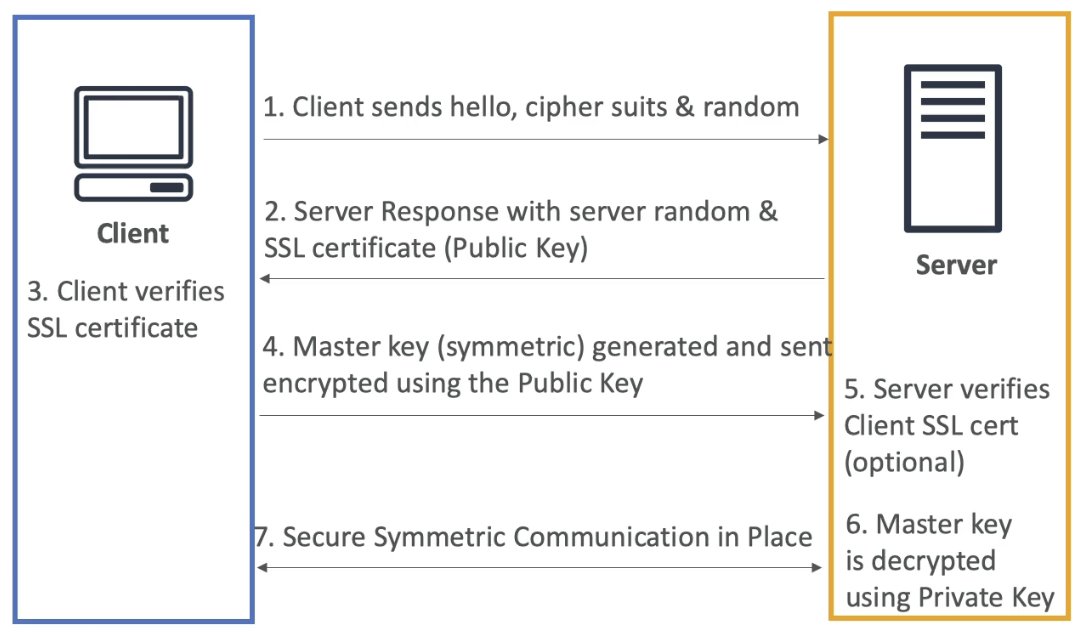
SSL/TLS Flow
- Everything from 1-3 is public plaintext, and everything afterwards, from 4+, is encrypted
-
Client Hello:
- The client sends a "hello" message to the server, including:
- Supported cipher suites (encryption algorithms)
- A randomly generated value (client random)
- The client sends a "hello" message to the server, including:
-
Server Hello:
- The server responds with:
- Its own randomly generated value (server random)
- Its SSL/TLS certificate, which contains the server's public key
- The server responds with:
-
Certificate Verification:
- The client verifies the server's SSL/TLS certificate using a trusted Certificate Authority (CA) or other means
- If the certificate is valid, the handshake continues
-
Master Key Generation:
- The client generates a pre-master key (or directly a master key, depending on the protocol version)
- The pre-master key is encrypted using the server's public key (from the SSL certificate) it sent in 2.2
- The encrypted pre-master key is sent to the server
- No one snooping could decrypt what this pre-master key is at this point, only the server can
-
Master Key Decryption:
- The server uses its private key to decrypt the pre-master key
- Both the client and server then derive the master key from the pre-master key, the client random, and the server random
- Server and Client Random could hypothetically be known by a MITM, but the pre-master key would be unreadable
-
Session Encryption:
- The master key is used to derive symmetric encryption keys for encrypting and decrypting all subsequent communication
- Both the client and server switch to symmetric encryption for the rest of the session
-
Optional Client Authentication:
- If mutual authentication is required, the server may request the client's SSL/TLS certificate for verification
-
Secure Communication:
- The client and server use the symmetric encryption keys (derived from the master key) to securely exchange data
Key Points About the Master Key
- The master key is never transmitted in plaintext.
- It is derived from the pre-master key, client random, and server random.
- It ensures that all communication after the handshake is encrypted and secure.
Updated SSL Flow Diagram
Client Hello (Client Random)  --->  Server Hello (Server Random + SSL Certificate)
       <---  Server Certificate Verification
Client generates Pre-Master Key
Client encrypts Pre-Master Key with Server Public Key
       --->  Encrypted Pre-Master Key sent to Server
Server decrypts Pre-Master Key with Private Key
Both derive Master Key (from Pre-Master Key + Randoms)
Secure communication begins using Symmetric Encryption
SSL on Load Balancers
- SSL Server Name Indication (SSL SNI) solves the problem of hosting multiple SSL Certificates for multiple websites on one computer
- One single VM can host websites 1-5, and each can have it's own SSL Certificate registered with the CA
- Without SNI, servers wouldn't know which certificate to present during SSL handshake
- Then, when a client goes to connect to one of the 5 websites, it can specify that hostname and the web server will use the corresponding SSL Certificate in the asymmetric handshake
- This is how both ALB, NLB, and Cloudfront are able to do SSL certification and offloading for multiple backend services
- SSL Offloading is the idea that ALB, NLB, or CloudFront can do SSL handshake, encryption, and decryption, and that logic can be removed from the application itself
- Each LB / Cloudfront will host a certificate for each of the backend services, and will use that for SSL verification and encryption / decryption
- The SSL Certificates are usually tied to target groups, where the target groups are related to hostname URL's
- This does not work for Classic Load Balancers, and for those we'd need to host a load balancer per domain, and have the singular SSL certificate on each load balancer
Preventing MITM Attacks
- Don't use HTTP, use HTTPS
- This will ensure traffic is encrypted, and any "server" you're talking to has been validated with a CA
- Since data is encrypted with HTTPS, attacker can't read or modify data
- Use a DNS with DNSSEC compliance
- Domain Name System Security Extensions (DNSSEC) adds more layers of security to DNS by ensuring the responses are authentic
- There's a second attack vector, even with HTTPS, where a DNS entry is forged / fake and you still use SSL to try to reach
goodwebsite.comand DNS ends up routing us to the incorrect bad one and it's still valid with the CA- This is known as DNS Spoofing
- Can bypass this by using a DNS Resolver thats DNSSEC compliant, and Amazon Route 53 is DNSSEC compliant, and even has KMS out of the box encryption for DNS queries
SSL on Load Balancer Architecture
- Using ALB:
- Setup ALB with SSL Cert(s) and for any incoming HTTPS request the ALB can do SSL handshake and then ALB sends HTTP data to auto-scaled target group of ECS tasks
- Maybe you want to use SSL directly onto an EC2 instance
- TCP to NLB, and route requests to EC2 instance level
- HTTPS from NLB to EC2
- Can setup user scripts on EC2 so that at boot time it retrieves SSL Certs from SSM Parameter Store, where Certs are protected by IAM permissions
- This is risky
- Storing certs on EC2's, those EC2s exposed to internet, IAM roels for getting plaintext SSL certs, etc...
- you can have the exact same architecture, except you replace SSM Parameter store with CloudHSM, and you use CloudHSM to do SSL offloading
- SSL PK never leavs HSM device
- CPU on EC2 doesn't get used to do decryption
- Must setup a Cryptographic User (CU) on the CloudHSM device
Disaster Recovery
The main metric objectives to be handled and tracked during disaster recovery are:
- Recovery Time Objective (RTO): The maximum acceptable amount of time that a system can be down after a disaster before causing significant harm to the business
- Recovery Point Objective (RPO): The maximum acceptable amount of data loss measured in time. It defines the point in time to which data must be restored after a disaster
There are multiple strategies for disaster recovery on AWS, each with different RTO and RPO characteristics:
- Backup and Restore: Data is backed up to AWS S3 or Glacier, and in the event of a disaster, data is restored from backups. This approach has a high RTO and RPO, as it can take hours or days to restore data and systems.
- Pilot Light: A minimal version of the system is always running in AWS, with critical components pre-configured. In the event of a disaster, the full system is quickly scaled up from the pilot light. This approach has a moderate RTO and RPO, as it can take minutes to hours to scale up the system.
- Warm Standby: A scaled-down version of the system is always running in AWS, with all components pre-configured. In the event of a disaster, the system is quickly scaled up to full capacity. This approach has a low RTO and RPO, as it can take minutes to scale up the system.
- Multi-Site Active-Active: The system is fully deployed and running in multiple AWS regions simultaneously. In the event of a disaster, traffic is automatically routed to the healthy region. This approach has the lowest RTO and RPO, as there is no downtime or data loss.
AWS Backup
AWS Backup is a fully managed backup service that makes it easy to centralize and automate the backup of data across AWS services
- Supports services like EBS, RDS, DynamoDB, EFS, and more
- Provides a single console to manage backups, set backup policies, and monitor backup activity
- Supports cross-region and cross-account backups for disaster recovery
- Provides backup scheduling, retention management, and lifecycle policies to automate backup processes
AWS Disaster Recovery Services
- AWS Elastic Disaster Recovery (DRS): Enables quick recovery of applications and data in AWS in the event of a disaster
- AWS CloudEndure Disaster Recovery: Provides continuous replication of applications and data to AWS for rapid recovery
- AWS Route 53: Can be used for DNS failover to route traffic to healthy endpoints in the event of a disaster
Elastic Disaster Recovery (DRS) is the next version of CloudEndure, and it allows us to replicate on-premises or cloud-based servers to AWS, and in the event of a disaster, we can quickly launch these replicated servers in AWS to minimize downtime and data loss
The difference between Elastic DRS and AWS Backup is that Elastic DRS focuses on continuous replication and rapid recovery of entire applications and servers, while AWS Backup focuses on scheduled backups of data for long-term retention and recovery, they're both focused on backups, but Elastic DRS is more about disaster recovery of entire systems, while AWS Backup is more about data backup and retention
Elastic DRS focuses on replicating data and applications to staging areas in AWS, and these are not live systems (closer to pilot light), while Multi-Site Active-Active involves running fully functional systems in multiple AWS regions simultaneously. Elastic DRS then has commands for launching entire systems in AWS from the staging area in the event of a disaster, and these systems can be scaled up as needed
AWS Certificate Manager ACM
- AWS ACM can host your publicly created certifiacte, and it can help provision and renew public SSL certificates for you free of cost
- ACM loads SSL Certificates on the following integrations:
- Load Balancers (including ones from ElasticBeanstalk)
- CloudFront Distributions
- APIs on API GW
- Uploading your own public certifiactes
- Must verify public DNS
- Must be issued by a trusted public CA
- Creating private certificates
- For internal applications
- You must create your own private CA
- Your applications must trust your private CA
- Certificate Renewal
- Automatically done if provisioned by ACM
- Any manually upload cert must be renewed manually
- ACM is regional
- Therefore each region needs its own SSL Cert, and you can't copy SSL Certs across regions
- AWS also acts as a public CA, and you can request public SSL certs for free
- These certs are trusted by all major browsers and operating systems
- AWS allows you to host a private CA using ACM Private CA
- This allows you to issue private SSL certs for internal applications and services
- These certs won't be trusted by public browsers and operating systems by default, so they are only suitable for internal use within an organization
- Private untrusted CA's can be created using AWS Certificate Manager Private CA (ACM PCA), and they typically are used by large companies for internal applications and services that require secure communication - however these certificates won't be trusted by public browsers and operating systems by default, so they are only suitable for internal use within an organization (when you try to pip install from a company computer and it fails b/c no one trusts your companies palo alto proxy certificate)
- Certificate usage:
- Authenticate users and devices
- Secure internal web applications
- Encrypt internal communications
- Sign code and documents
- Establish secure VPN connections
- Encrypt data at rest
- Secure HTTPS connections in a web-app
- SSL is deprecated, TLS is the modern standard (use TLS >= 1.2)
Private CA
Private CA's are used for internal applications and services that require secure communication, but they are not trusted by public browsers and operating systems by default. Therefore, you can't utilize these for public facing web applications
Root CA's are at the top of the hierarchy and issue certificates to subordinate CA's, which in turn issue certificates to end-entities (users, devices, applications, services)
- Typically suboordinate CA's are used to issue end-entity certificates, while root CA's are kept offline and only used to sign subordinate CA's
- You could think of this as suboordinate CA's per OU or department within an organization, but it's not required
- Once one is created, requesting a private key is similar to requesting a public key, and mostly involves ensuring you have a correct IAM policy to request the certificate from the private CA, and then you can use that certificate in your internal applications and services
- If your application has this certificate then, it can validate secure connections from other applications that have certificates issued by the same private CA
- As an example:
- App 1 has certificate 1 issued by Private CA
- App 2 has certificate 2 issued by Private CA
- When App 1 connects to App 2 over HTTPS, App 2 can validate App 1's certificate using the Private CA's public key, and vice versa
- This allows us to do a service mesh internally with mutual TLS authentication between services, but this is rarely required in most organizations as it's complex to manage
- Private certificates are hosted on the actual application instance itself (end-entity certificate + private key).
- The private key remains on the server and is never transmitted
- During TLS, the server presents its certificate (public key + identity) signed by the Private CA and proves possession of the private key
- The client authenticates the server by validating the certificate chain to the Private CA certificate installed in its trust store and by checking CN/SAN, validity period, and revocation (CRL/OCSP) as needed
- i.e. the client checks what the server is presenting with the known Private CA public key
- Distribute the Private CA certificate to clients via OS trust store/MDM, SSM/Secrets Manager, or image bake
- Clients do not retrieve the CA public key during the handshake; they rely on their preconfigured trust store
- For mutual TLS, clients also present certificates issued by the Private CA
- The server validates the client certificate against its trust store and authorizes based on subject/SAN or extended attributes
Therefore, ACM helps us host private CA's and issue private certificates for internal applications and services that require secure communication, it also exposes API's to manage the lifecycle of these certificates, and it also exposes API's to retrieve the public key of the Private CA for validating certificates issued by it. The only typical use case(s) for private CA's is internal applications and services that require secure communication, such as:
- Internal web applications
- VPN connections
- User and device authentication
Private CA features:
- Hierarchical PKI with root CA and subordinate CA's
- Can issue end-entity certificates for users, devices, applications, and services
- Certificate lifecycle management:
- Issuance
- Renewal
- Revocation
- Integration with AWS services:
- Load Balancers
- CloudFront
- API Gateway
- IoT
- Access control with IAM policies and resource policies
- Audit with CloudTrail
Public vs private certs:
- Public certs: Issued by public CAs; chain to roots trusted by browsers/OS; for internet-facing hosts
- When requesting public certs from ACM, you must validate domain ownership via DNS or Email
- The DNS record must also be CNAME type specifically
- Private certs: Issued by your org’s Private CA (e.g., ACM PCA); only trusted by clients where you’ve installed the CA cert; for internal services
Application Load Balancer with HTTPS
Typically ALB's are used to do SSL offloading for web applications, and we can integrate ACM with ALB to host SSL certificates for HTTPS connections
- ALB listens on port 443 for HTTPS traffic
- ALB uses SSL certificate from ACM for SSL handshake
- ALB can host multiple SSL certificates for multiple domain names using SNI
- ALB does SSL offloading, meaning it handles SSL handshake and encryption/decryption, reducing load on backend servers
- Backend servers can use HTTP or HTTPS
- SSL certificates can be managed with ACM, which can automatically renew them
To get target groups to use HTTPS, you must specify HTTPS as the protocol when creating the target group, and then ensure that the backend servers have SSL certificates installed and are configured to listen on port 443 for HTTPS traffic. To get certificates onto backend servers, you can use SSM Parameter Store, Secrets Manager, or CloudHSM to securely store and retrieve the certificates during server bootstrapping
- You can specify default SSL / TLS cetrtificate to be "From ACM" when creating the ALB listener, and then select the specific certificate from ACM to use for SSL handshake
- You
CloudHSM
- KMS gives us software
- HSM is when AWS provisions the hardware only
- Hardware Security Module (HSM)
- User manages the encryption keys entirely
- HSM device is tamper resistant
- Symmetric and Asymmetric encryption
- Common pattern and good option for using SSE-C encryption on S3
- IAM permissions on HSM Cluster for CRUD operations
- Everything else for authorization is on the CloudHSM cluster
- It's similar to open source RDS securirty - IAM does authentication, cluster for authorization
- CloudHSM Cluster should be deployed for highly available, durable deployment across multiple AZ's
- Comparison
- HSM is single tenant, KMS is multi-tenant
- Both compliant
- Both do symmetric and asymmetric
- HSM does Hashing and KMS doesn't
- KMS does key replication across regions, HMS can do VPC peering across regional VPCs for cross region clusters / access
- HSM is what allows TDE in Oracle and SQL Server
S3
SSE-S3encrypts S3 objects using keys managed entirely by AWSSSE-KMSencrypts S3 objects using keys stored in KMS, whether they're managed by us- Why is this useful?
- KMS has CloudTrail logs
- If for some reason the S3 bucket was made public, then GET requests would fail unless the user had KMS authorization as well
s3:putObjectalso would requireKMSauthorizations as well for the role the user assumes
- Why is this useful?
SSE-Cencrypts S3 objects with our own keys, and encryption is done server-side- Client side is when you encrypt and decrypt data client side
- Any data in Glacier is AES-256 encrypted with keys under AWS control
Encryption in Transit
- AWS S3 exposes:
- HTTP endpoint which is not encrypted data
- HTTPS endpoint which has encryption in flight
- HTTPS is mandatory for
SSE-C - To enforce, use a Bucket Policy to force
aws:secureTransport
- HTTPS is mandatory for
S3 Events
- S3 access logs:
- Detailed records for requests into a bucket
- May take an hour to deliver
- May be incomplete - best effort
- S3 Events Notifications
- Receives notifications for specific S3 events
- Typically delivered in seconds, but could take minutes for intense tasks that include versioning or checksums
- Destinations for this can be SNS, SQS, Lambda, etc...
- Trusted Advidor
- Check bucket permissions for public exposure
- AWS Event Bridge
- Need to enable CloudTrail object logging onto S3 first
- Target can then be Lambda, SQS, SNS, etc...
S3 Security
-
User based:
- IAM policies
- IAM defines which API calls should be allowed for a specific user from an IAM console
-
Resource based:
- Bucket policies are bucket wide rules
- Use for:
- Grant public access to bucket
- Force objects to be encrypted at upload
- Grant access to another Cross-Account
- Optional conditions:
SourceIporVpcSourceIpcan give IP or CIDR, or VPC ID of where a request can come from and be authorized- SourceIP doesn't work with private IP's
- PrivateIP's don't change over starts and stops, but Public IP's most likely will
SourceVPCorSourceVPCEndpointCloudFront Origin Identitycan explain which CloudFront CDN's can access- MFA
- Use for:
- Object Access Control List (Object ACL) is fine grained control over objects
- Bucket Access Control List (Bucket ACL) is bucket wide access lists
- Bucket policies are bucket wide rules
-
Pre signed URLs
- Sign URL with IAM credentials
- TTL is usually 1 hour
- Users inherit permissions of whoever signed it
- Sign URL with IAM credentials
-
VPC Endpoint Gateway for S3
- When a VPC has an Interet Gateway, and you use the public internet to access a public S3 endpoint
- For this you'd put a bucket policy on for
AWS:SourceIpand you'd use the IGW IP
- For this you'd put a bucket policy on for
- Instead of a public subet, you can use VPC Endpoint Gateway
- This allows our subnet to stay private
- All traffic remains on AWS network, and stays private
- Then you can directly go to S3 Endpoint
- Can have bucket policies on
AWS:SourceVPCEfor VPC Endpoint, orAWS:SourceVPCfor all resources under that VPC
- When a VPC has an Interet Gateway, and you use the public internet to access a public S3 endpoint
-
S3 Object Locks
- S3 Object Lock is Write Once Read Many (WORM)
- Can do same thing for Glacier Vault Lock (i.e. have WORM) and then you lock the policy for future edits
-
S3 Access Points
- If you have tons of directories and objects in one S3 bucket, you can create crazy policies, or you can use Access Poiints
- Access Points grant Read/Write access to different directories across buckets
- Pushes policy from S3, to another resource, i.e. Access Points
- These Access Points are granted to different User Groups
- Each Access Point has it's own DNS name
- VPC Origin
- Can be private, so that no traffic goes over internet
- Need to create VPC Endpoint from requesting VPC to the Access Point
- Need to create Endpoint Policy, Access Point Policy, and S3 bucket Policy for this to work
- Can be private, so that no traffic goes over internet
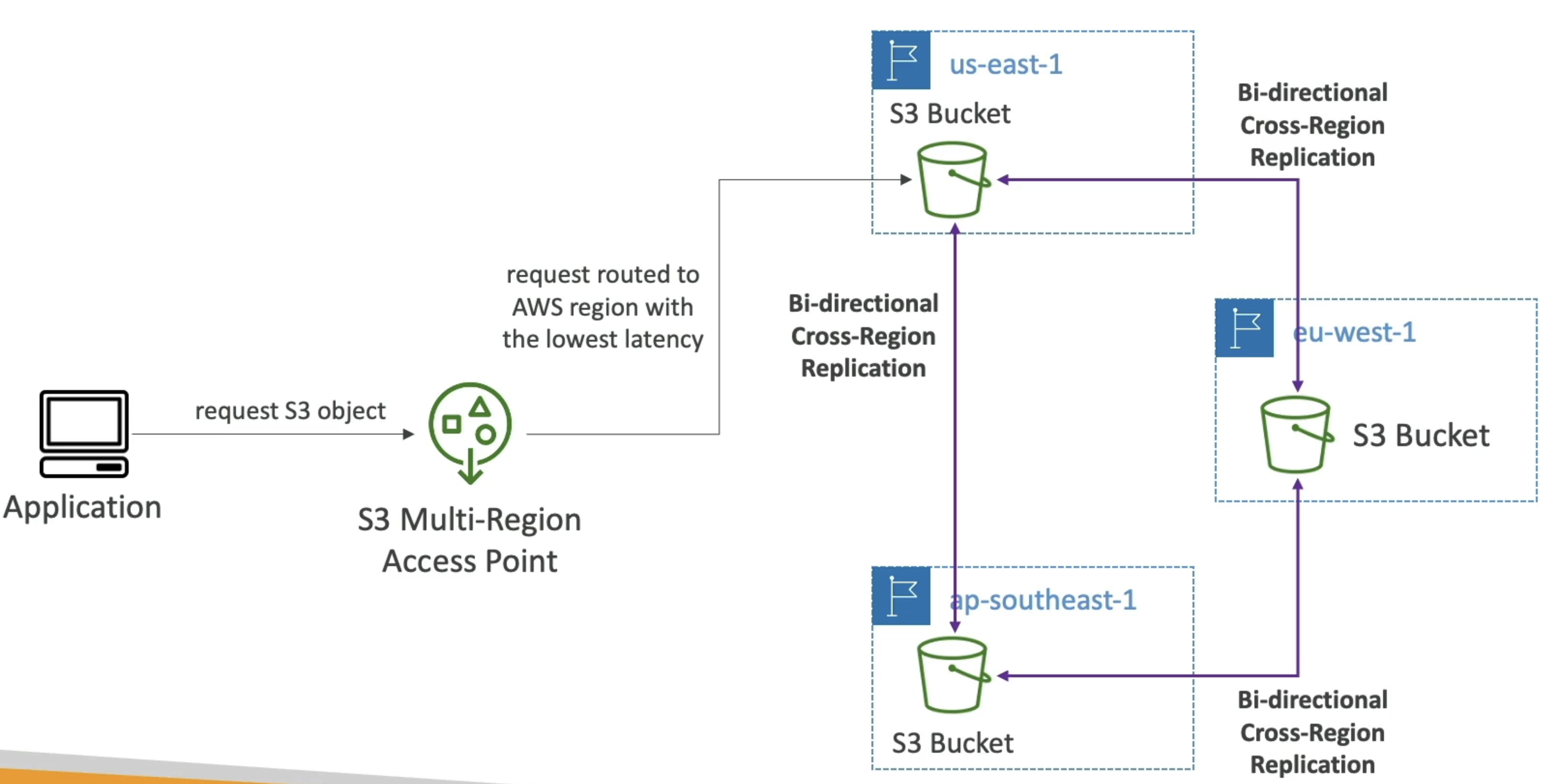
- Multi Region Access Points
- Dyanmically routes requests to nearest S3 bucket to the region the user is in
- Syncs / duplicates data between regions for you
- If closest region fails, requests failover to next closest region or our passive choice
-
S3 Object Lambda
- Allows us to change an S3 Object before it's retrieved by a calling application
- Might be used to mask/redact some data as an object is called
- Only runs once the object is retrieved
- Arch:
- You create an Access Point on top of S3
- Lambda that can read frmo Access Point
- S3 Object Lambda Access Point on top of the Lambda
- Calling applications call that Lambda Access Point
- Can also do this on top of databases too
- These basiaclly allow you to redact and alter data on the fly during read from S3 or Database
- Redact, Mask, Create Watermark, Transform XML, etc...
- Allows us to change an S3 Object before it's retrieved by a calling application
Other Random Services
DDOS Attacks
- Distributed Denial of Service (DDOS) are Network Based Attacks attacks on EC2 instances and web servers can take down web servers
- When a service is unavailable b/c of a flood of requests
- SYN Flood (Layer 4): Too many TCP connection requests
- UDP Reflection (Layer 4): Get other servers to send big UDP requests
- DNS flood attack: Overwhelm DNS so legitimate users can't get IP / DNS Records
- Slow Loris: Many HTTP conections are opened and maintained
- Application Attacks:
- All depend on app configs, caches, etc...
AWS Shield
- Shield is for DDoS! WAF is for other firewall and Xss stuff
- Standard Shield protects against DDoS attacks for web apps at no additional costs
- Covers SYN/UDP Floods, Reflections, and other L3/L4 attacks
- Covers entire OSI model layers
- Packet headers can be mapped to OSI layers:
- Ethernet header (layer 2): MAC address
- IP header (layer 3): Source and destination IP addresses
- TCP/UDP header (layer 4): Source and destination ports, sequence numbers
- Application layer headers (layer 7): HTTP headers, cookies, etc
- Packet headers can be mapped to OSI layers:
- Advanced is premium 24/7 DDoS protection
- Protects EC2, ELB, Cloudfront, Route53 and others
- Also acts as insurance for incurred costs from DDoS attacks on services that run up auto-scaling costs
- And there's 24/7 AWS Support
- CloudFront and Route53: Protect CDN Cloudfront and Route53 DNS
- Separating static resources and placing them on Cloudfront / S3 is always a good practice
- AWS WAF: Web Application Firewall can filter specific requests based on rules
AWS Web App Firewall (WAF)
- Protects web apps from common web exploits on Layer 7
- Deploy on:
- ALB
- API GW
- CloudFront (globally edge)
- AppSync (GraphQL API's)
- WAF IS NOT FOR DDOS
- Define Web Access Control Lists (WebACL)
- Rules can include IP addresses, HTTP Headers, HTTP body, URI's, etc...
- Help protect from XSS, SQL Injection, and other common L7 app exploits
- Size constraints
- Geo Matching
- Rate based rules and rate limiting
- Rule Actions:
- Count, Allow, Block, CAPTCHA, Challenge
- Could Count before Blocking
- Count, Allow, Block, CAPTCHA, Challenge
- Managed Rules:
- Baseline rule groups protect from common threats / patterns
- Use case specific give protection for specific applications like SQL, Windows, etc...
- IP Reputation rule groups give us the AWS reputable IP's (spam or scammers)
- Bot control managed group can help to reject bots
- WAF Logging
- CloudWatch Logs
- Small SLA's
- S3 Bucket
- Every 5 minutes
- Kinesis Firehose
- Only limited by Kinesis SLA's
- CloudWatch Logs
- Architecture with CloudFront
- Can setup WebACL's in front of CloudFront
- On CloudFront you can create a custom HTTP Header
-
X-Origin-Verify:xxxxxxwherexxxxis a secret string - ALB behind CloudFront in front of EC2 Web Apps
- WAF Firewall on our ALB for headers to filter down to only those headers from CLoudFront with the secret string
- Stops anyone from directly accessing the ALB URL
- Lambda function from Secrets Manager can replcae the secret on CloudFront and the ALB header filter every X days
AWS Firewall Manager
- Manage all Firewall rules in all accounts in AWS Organization
- Set a security policy which is a common set of security rules
- WAF Rules
- AWS Shield Advanced
- Security groups for EC2, ALB, etc...
- AWS Network Firewall on VPC Level
- AWS Route53 Resolver DNS Firewall
- Policies created at regional level
- Rules are automatically applied to new resources as they're created
- We'd define all of our rules in WAF, Shield, etc... and then you can use AWS Firewall Manager with AWS WAF to automtate these rules over all new resources
- Example: Blocking an IP address
- First line of defense is Network ACL on our VPC Subnet
- Security group on EC2 could also deny it
- EC2 instance could run firewall software
- Could have an N/ALB in a public subnet, and EC2 in a private subnet
- EC2 SG can restrict it's security group to only that N/ALB
- Then you can manage security at N/ALB level
- Can use Network ACL here still at public subet level
- ALB's, and ALB only, can do IP address filtering via WAF before sending to EC2
- you could also have CloudFront before Network ACL
- Can have AWS WAF at CloudFront level, and it won't matter if you have a Network ACL or not since WAF takes care of it
- Could do IP restriction, GeoFiltering restriction, etc...
Amazon Inspector allows us to run automated security assessments
- EC2
- Using AWS Systems Manager (AWS SSM) agent, you can analyze network and OS level vulnerabilities
- Only for running EC2 instances
- ECR Container Images
- Assessment of container images as they're pushed
- Lambda Functions
- Identifies software vulnerabiltieis in function code and package dependencies
- Can report and integrate into AWS Security Hub
- Can also send finding to EventBridge
- Checks against database of vulnerabilities (CVE)
- Each time it's updated, Inspector will rerun and check OS and netowrk vulnerabilities
AWS Config
- Helps for auditing and compliance of resources, and how they change over time
- Config doesn't prevent actions from happening, but it records configurations and changes over time
- Can help us showcase audits and to send alerts (SNS) notifications for any changes
- SSH access in security groups
- S3 public access
- ALB configuration changes over time
- ...
- It creates a dashboard to have red or green on resources over time
- CloudTrail can show us who made the changes
- Can create ouw own config rules
- Need to use a lambda function to create the custom config rules
- Rules can be evaluated / triggered
- Triggered off config change via EventBridge
- Evaluated at regular cron time intervals as well
- Can triggooer an Event to EventBridge if the rule isn't compliant
- Destination can be SNS
- Rules can have automations via SSM Automations
- If a resource isn't compliant, you can trigger auto-remediation
AWS Managed Logs
- Logs that can be produced by AWS Services
- Load Balancer Access Logs can go
- To S3
- Access and IP logs for Load Balancers
- CloudTrail Logs can go
- To S3 and CloudWatch Logs
- Logs for API calls made within the account
- VPC Flow Logs
- To S3, Cloudwatch, and Kinesis
- IP traffic in and out of network interfaces on VPC
- Route53
- To CloudWatch Logs
- Queries that Route53 receives
- S3 Logs
- To S3
- Server accesss provides detailed records foor requests made to the bucket
- CloudFront Access
- To S3
- Info about every user request that CloudFront receives
- AWS Config
- To S3
Amazon Guard Duty
- ML for intelligent threat discovery
- Goes through all logs from above to find anomalies
- VPC, CloudTrail, and DNS are required
- S3, Lambda, EKS, EBS, etc... are optional
- If there's a finding, it goes to EventBridge
- Can go to Lambda or SNS
- An AWS Organization member account can be a Delegated Administrator for all other member accounts under an organization
- The Org Mgmt account needs to delegate the specific member account
IAM Conditions
- AWS allows conditional logic in IAM policies
aws:SourceIPwould mean you can condition that an IP address is or is not in / apart of a certain CIDR range- Can have
Effect: DenyforAction:*onResource: *based on Conditions
- Can have
aws:RequestedRegionallows us to allow or deny access to services in other specified regionsec2:ResourceTagcould allow us to start instances only if they have a specific tagaws:MultiFactorAuthPresentallows us to require MFA to do specific actions- Can do this on IAM Roles, Resource Policies like S3
- Resource policies
aws:PrincipalOrgIDcan help us to ensure S3 actions aren't able ot be done unless the Principal Org ID is from our Org account, bascially allows any member account to perform the actions
- Connecting to EC2 via SSH
- When you allow SSH on an EC2, what happens is that when a User tries to connect it will hit a EC2 Instance Connect API
- This API will
- Upload a private key to the EC2
- Respond to user with a public key
- Allow us to connect for 60 seconds before disabling
- Security group rules deny or allow access to EC2 Instance Connect API
- This API will
AWS Security Hub
- Yet Another Dashboard for security and compliance
- Allows us to do this over multiple accounts
- Then aggregates info from basically every single other service you listed above
- Issues and Findings to EventBridge
- AWS Detective can help us figure out RCA / cause of these findings
AWS Security Hub Controls
- A control is a safeguard within a security standard that helps you achieve a specific security objective. A control is related to a resource in your AWS environment
- When you enable controls, Security Hub runs automated checks against your AWS resources to determine whether they comply with the control's requirements
- Control categories:
- Each control category represents a group of controls and items you can implement to ensure the security of AWS environment, and understanding of it
- Identify: Develop the organizational understanding to manage security risk to systems, people, assets, data, and capabilities
- Identify is about understanding your environment, inventorying resources, and establishing governance frameworks
- Includes:
- Asset Management
- Inventory - have tags been assigned, what resources does the service use, are there unused resources
- Logging - Have you enabled all relevant logging services, are logs being stored securely
- Protect: Develop and implement appropriate safeguards to ensure delivery of critical infrastructure services
- Protect is about implementing security controls to safeguard data, applications, and systems
- Includes:
- Access Management - are IAM policies following least privilege, are MFA enabled, are roles being used instead of users
- Data Protection - is data encrypted at rest and in transit, are backups being taken
- Network Protection - are security groups and NACLs properly configured, is VPC flow logging enabled
- Protective Services - are WAF, Shield, and GuardDuty enabled
- Secure Coding - are secure coding practices being followed, are code repositories scanned for vulnerabilities
- Detect: Develop and implement appropriate activities to identify the occurence of a security event
- Detect is about monitoring and identifying potential security threats and anomalies
- Includes:
- Anomalies and Events - are CloudWatch Alarms set up for critical metrics, are unusual activities being detected
- Continuous Monitoring - is AWS Config enabled, are resources being monitored for changes
- Detection Processes - are incident response plans in place, are detection processes regularly tested
- Respond: Develop and implement appropriate activities to take action regarding a detected security event
- Respond is about having processes and procedures in place to respond to security incidents effectively
- Includes:
- Response Planning - are incident response plans documented, are roles and responsibilities defined
- Communications - are communication channels established for incident response, are stakeholders informed
- Analysis - are incidents analyzed to determine root cause, are lessons learned documented
- Mitigation - are steps taken to contain and mitigate incidents, are vulnerabilities addressed
- Improvements - are response processes reviewed and improved regularly
- Recover: Develop and implement appropriate activities to restore capabilities or services that were impaired due to a security event
- Recover is about having plans and processes in place to recover from security incidents and restore normal operations
- Includes:
- Recovery Planning - are disaster recovery plans documented, are recovery objectives defined
- Improvements - are recovery processes reviewed and improved regularly
- Communications - are communication channels established for recovery, are stakeholders informed during recovery
- So back to laymens terms:
- Identify means do you have the abilities to query and inventory your resources, and do you have logging enabled to track activity
- Protect means are you following best practices to secure your resources, data, and applications
- Detect revolves around ability to capture anomalies and events, and the continuous monitoring of them
- Respond is about having plans and processes to respond to security incidents
- Recover is about having plans and processes to recover from security incidents and restore normal operations