IAM
IAM
Identity and Access Management (IAM) allows us to define users and roles over resources via Effects, Actions, and Resources.
Key Concepts
Identities
- Identities in AWS IAM are Users, Groups of Users, or Roles, and you can attach Policies to Identities or Resources
- IAM Principals are Users or Roles
User
- A User represents an individual person or service that inteƒracts with AWS resources
- Users can have:
- Keys (Access Key ID and Secret Access Key)
- Secrets
- Logins (for the AWS Management Console)
- Permissions are attached to Users via IAM Policies
User Group
- A User Group is just an aggregation of Users
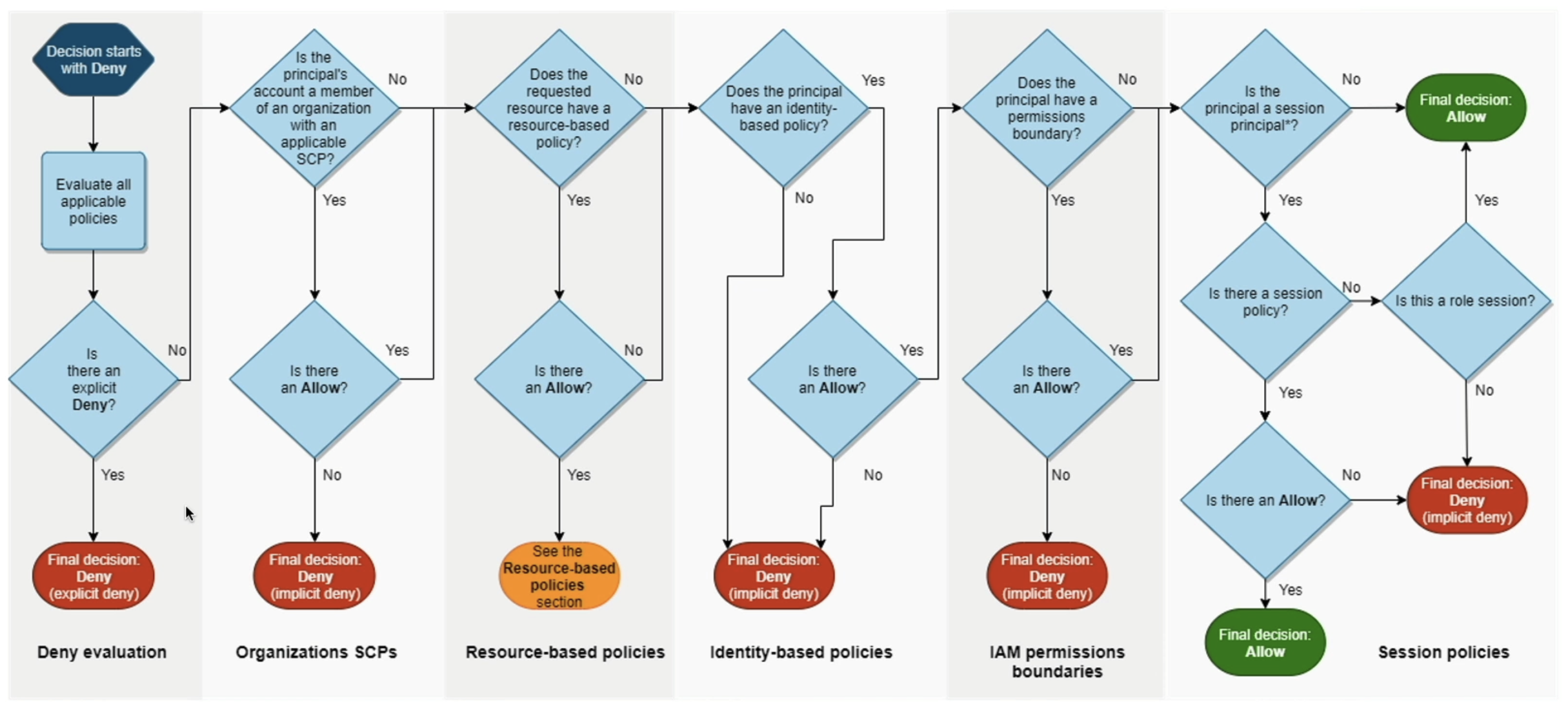
- Similar to other policies, denies on User groups would take precedence over Allows to a specific User
- Otherwise User Groups follow the same standards, and a User having their own policies, multiple Group policies, and Org SCP policies would have different outcomes based on the precedence levels
- Groups cannot be nested inside of other Groups
Role
- A Role is a temporary identity that can be assumed by Users, Services, or Applications
- Key characteristics:
- Credentials are temporary when a Role is assumed
- When a User assumes a Role, the User gives up their own permissions and adopts the permissions of the Role
- Resource Based Policy
- Using these, a User doesn't have to give up their permissions, and they can directly access specific resources
- Use Cases:
- Cross-account access, like EC2 spin up from Control Planes of 3rd party providers
- Service-to-service communication (e.g., an EC2 instance accessing an S3 bucket)
Resources
- Resources are AWS entities that can be identified by ARNs (Amazon Resource Names)
- Examples:
- S3 buckets
- EC2 instances
- DynamoDB tables
Actions
- Actions correspond to API operations that can be performed on resources
- Examples:
s3:ListBucketec2:StartInstances
Principals
- Principal Element:
- The Principal element in the trust policy specifies who can assume the role
- Examples of principals:
- IAM Users or Roles: arn:aws:iam::123456789012:user/ExampleUser
- AWS Services: ec2.amazonaws.com (for EC2 instances)
- AWS Accounts: arn:aws:iam::123456789012:root (to allow all users in an account)
Effects
- Effects define whether an action is allowed or denied on a resource
- Key rules:
- Explicit Deny takes precedence over Allow
deny s3:*andallow s3:ListBucket, still meansdeny s3:*since it takes precedence
- Allow and notAllow have the same "level."
- Example:
- If you explicitly deny
s3:*but allows3:ListBucket, the deny takes precedence, and the action is still denied
- If you explicitly deny
- To deny all
s3:*except fors3:ListBucket, you can:- List every single Deny except for
ListBucket - Use carefully scoped Allow statements to achieve the same result
- List every single Deny except for
Variables
- IAM supports variables like
aws:Usernameto dynamically scope permissions - Example:
- You can scope each User to resources with their own username without defining individual IAM policies for each User
Policies
Policies define Permissions, and you attach Policies to Identities (Users or Roles)
-
Identity-based policies – Attach managed and inline policies to IAM identities (users, groups to which users belong, or roles). Identity-based policies grant permissions to an identity.
- Identity-based policies are JSON permissions policy documents that control what actions an identity (users, groups of users, and roles) can perform, on which resources, and under what conditions. Identity-based policies can be further categorized:
-
Resource-based policies – Attach inline policies to resources. The most common examples of resource-based policies are Amazon S3 bucket policies and IAM role trust policies. Resource-based policies grant permissions to the principal that is specified in the policy. Principals can be in the same account as the resource or in other accounts
- Here is where you can allow specific Identities to perform specific Actions on this specific Resource
-
Permissions boundaries
- Use a managed policy as the permissions boundary for an IAM entity (user or role). That policy defines the maximum permissions that the identity-based policies can grant to an entity, but does not grant permissions. Permissions boundaries do not define the maximum permissions that a resource-based policy can grant to an entity.
-
AWS Organizations SCPs – Use an AWS Organizations service control policy (SCP) to define the maximum permissions for IAM users and IAM roles within accounts in your organization or organizational unit (OU). SCPs limit permissions that identity-based policies or resource-based policies grant to IAM users or IAM roles within the account. SCPs do not grant permissions.
-
AWS Organizations RCPs – Use an AWS Organizations resource control policy (RCP) to define the maximum permissions for resources within accounts in your organization or organizational unit (OU). RCPs limit permissions that identity-based and resource-based policies can grant to resources in accounts within your organization. RCPs do not grant permissions.
-
Access control lists (ACLs) – Use ACLs to control which principals in other accounts can access the resource to which the ACL is attached. ACLs are similar to resource-based policies, although they are the only policy type that does not use the JSON policy document structure. ACLs are cross-account permissions policies that grant permissions to the specified principal. ACLs cannot grant permissions to entities within the same account.
-
Session policies
- Pass advanced session policies when you use the AWS CLI or AWS API to assume a role or a federated user. Session policies limit the permissions that the role or user's identity-based policies grant to the session. Session policies limit permissions for a created session, but do not grant permissions. For more information, see Session Policies.
- These allow things like
AssumeRoleWithSAMLso that someone can Assume a Role via cookies / authentication for a short lived time - This is tied into AWS Federated Users which are users who access Resources using credentials from an External Identity Provider (IdP) rather than creating AWS user identities
Permission Boundaries
- Permission Boundaries allow you to set a standard set of permissions that can be applied to a Role or User
- Key rules:
- Permission Boundaries are not additive
- The effective permissions are the intersection of the IAM Policy and the Permission Boundary
- Example:
- If a Permission Boundary allows
s3:*, kafka:*and the IAM Policy allowsEC2:*, the User or Role will only haves3:*, kafka:*permissions, not the union of all three
- If a Permission Boundary allows
Directory Services
AWS Directory Services allow us to manage users and groups in a centralized way, and integrate with on-premise Active Directory if needed.Directory services are typically thought of as a centralized network configuration database that stores information about users, groups, computers, and other resources in a network - the most used example is Microsoft Active Directory (AD)
AWS Simlpe AD and AWS Managed Microsoft AD are both managed directory services provided by AWS, but they have some key differences in terms of features, scalability, and use cases:
- AWS Simple AD:
- A cost-effective, managed directory service that is compatible with Microsoft Active Directory
- Suitable for small to medium-sized businesses or simple use cases
- Supports basic AD features like user and group management, Kerberos-based authentication, and LDAP
- Limited scalability and features compared to AWS Managed Microsoft AD
- Does not support advanced AD features like trust relationships with on-premises AD, Group Policy Objects (GPOs), or schema extensions
- Supports small (up to 2,000 objects) and large (up to 20,000 objects) directory sizes
- Mimics active directory by using Samba 4, but isn't a full AD implementation
- Doesn't support MFA, domain trusts, RDS SQL, SSO, etc... so you can't use Powershell , but you can use standard AD tooling for it
- Must specify admin password and DNS name at creation - this ensures Simple AD is only accessible within the VPC it was created in
- AWS Managed Microsoft AD:
- A fully managed, cloud-native Microsoft Active Directory service
- Suitable for larger organizations or complex use cases that require advanced AD features
- Standard and Enterprise editions available, Standard supports up to 5,000 objects, Enterprise up to 500,000 objects
- Supports all standard AD features, including trust relationships with on-premises AD, GPOs, schema extensions, and more
- Highly scalable and can handle larger workloads and more complex directory structures
- Provides better integration with other AWS services that require AD authentication
- AD Connector:
- A proxy service that allows you to connect your AWS resources to your on-premises Microsoft Active Directory without caching any information in the cloud
- Suitable for organizations that want to maintain their existing on-premises AD infrastructure while leveraging AWS services
- Does not provide a standalone directory service; it simply acts as a bridge between AWS and your on-premises AD
- Supports features like user authentication, group membership, and Kerberos-based authentication
- Does not support advanced AD features like trust relationships with other AD domains or schema extensions
- One connector config per on-prem AD domain
- Users can continue to use on-prem AD credentials to access AWS resources without an IAM user being created
- Amazon Cognito User Pools:
- A user directory service that provides sign-up and sign-in options for web and mobile applications
- Not a traditional directory service like AD, but rather a user management service that can integrate with social identity providers (e.g., Google, Facebook) and SAML-based IdPs
- Suitable for applications that require user authentication and management without the need for a full-fledged directory service
- Supports features like multi-factor authentication (MFA), user profile management, and customizable authentication flows
- Can be used in conjunction with AWS Managed Microsoft AD or Simple AD for more complex use cases
EC2 instances that are joined to an AWS Managed Microsoft AD or Simple AD can use domain credentials for authentication and access control - ultimately this involves DNS resolution to the directory service, correct IAM permissions to access the directory, and proper network connectivity (VPC, subnets, security groups) to reach the directory service endpoints. The actual benefit and functionality comes from the directory service itself, not just the EC2 instance being joined to it, but joining the instance allows it to leverage the directory's capabilities for authentication and access control
- What happens on join:
- The instance points DNS to the domain controllers and syncs time.
- A computer account is created in AD; the instance establishes a secure channel using a machine account secret.
- Kerberos/NTLM are enabled for logon; SPNs can be registered for hosted services (IIS, SQL, SMB).
- Group Policy applies at join and on refresh, enforcing security baselines, scripts, and config.
- Benefits:
- Centralized authentication/SSO with AD credentials.
- RBAC via AD groups for local rights, file shares, SQL Server, and apps.
- Policy-driven hardening and compliance through GPOs.
- Enables Windows Integrated Auth (Kerberos) and features like constrained delegation.
- Required by several services: FSx for Windows File Server, Amazon WorkSpaces/AppStream, SQL Server integrated auth, legacy LDAP/Kerberos apps.
- Linux can also join (realmd/sssd) for central user auth and sudo policy.
- You can RDP into the EC2 instance utilizing AD credentials.
- In an admin account on an EC2 you can just create users, groups, and other AD resources like you normally would on-premise
- Common use cases:
- Lift-and-shift Windows apps that expect AD.
- File services (FSx), IIS with Kerberos SSO, SQL Server with AD logins.
- Hybrid environments using on‑prem AD via VPN/DX and trusts.
- WorkSpaces/AppStream fleets needing domain policies and profiles.
- Prereqs and plumbing:
- Directory: AWS Managed Microsoft AD (preferred), Simple AD (limited), or on‑prem AD with trust.
- VPC: enable DNS hostnames/support; routes to DC subnets; security groups allow AD ports (53, 88, 123, 135, 389/636, 445, 3268/3269, and high RPC).
- Join methods: EC2 launch “Domain join” with AWS Managed Microsoft AD, SSM AWS-JoinDirectoryServiceDomain, or OS-native join scripts/user data.
- Note: AD/domain join is for OS/app auth; AWS API access still uses IAM/SSO.
Shared Services vs AWS Organizations
- Shared Services Account:
- A centralized account that hosts shared resources and services used by multiple accounts within an organization
- Examples: centralized logging, monitoring, security services, networking components (e.g., VPN gateways, transit gateways)
- Benefits:
- Centralized management and control of shared resources
- Simplified billing and cost allocation for shared services
- Improved security and compliance through centralized policies and monitoring
- Considerations:
- Requires careful planning and governance to ensure proper access controls and resource sharing
- Potential for increased complexity in managing cross-account access and dependencies
- AWS Organizations:
- A service that allows you to centrally manage and govern multiple AWS accounts within an organization
- Provides features like consolidated billing, service control policies (SCPs), and account management
- Benefits:
- Simplified account management and governance
- Centralized billing and cost optimization
- Ability to enforce policies and controls across multiple accounts
- Considerations:
- Requires careful planning and governance to ensure proper account structure and policy enforcement
- Potential for increased complexity in managing cross-account access and dependencies
Lots of questions around "if you need to manage multiple AWS accounts for X, Y, or Z issue, what tool should you use" and most of the time shared services are useful for hosting shared resources like logging, monitoring, and security services that multiple accounts need to access - whereas AWS Organizations is more about managing the accounts themselves, billing, and applying policies across those accounts. For example if you need to setup directory services for networks across accounts or centralized logging, you'd use a Shared Services account
STS
Security Token Service allows us to retrieve and impersonate IAM roles in other accounts that specify you can act on their behalf
Impersonation / Assuming means you can have role1:account1 and specify, via STS, that user2:account2 can assume it's identity, meanning user 2 can act inside of account1 with the same persmissions as role1 - similar to user2:role1:account1
SSO, Federated Users, and Microsoft AD
Federated Users / Identity Federation provides access to externally authenticated users to your AWS account via this STS exchange
Typically happens with corporations that have their own identity system like Active Directory, or if a Web/Mobile App wants to access resources on AWS but you don't want to create a user for the app user, just authenticate
Identity Providers (IdP's) are the external systems that authenticate users, and then provide tokens to AWS IAM to allow access to resources, while Service Providers (SP's) are the systems that consume those tokens to provide access to resources. In our case a central companies Okta or AD system is the IdP, and AWS IAM is the SP. Claims are pieces of information about the user that the IdP sends to the SP, like username, email, group membership, etc...and they give information about what the user is allowed to do. A Claim can contain anything, and AWS IAM can use these claims to map users to specific roles or permissions
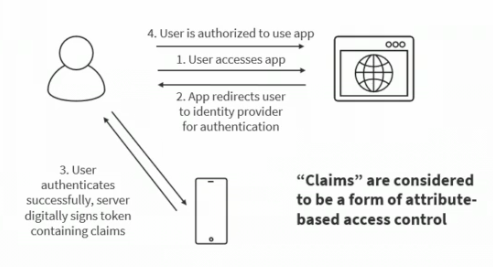
In this federated access, we typically use AWS IAM Identity Center (FKA AWS SSO) or straight up AWS IAM to manage the trust relationship between the external IdP and AWS IAM, and then AWS Security Token Service (STS) to handle the actual token exchange and role assumption
So where can you assume roles from?
- Straight up
sts:AssumeRolecan be done, and is the most straightforward where you list out users who can do it - SAML / OIDC
AssumeRoleWithSAMLandAssumeRoleWithWebIdentityallow us to use other IdP's to authenticate users before they are allowed to assume roles- Amazon Cognito is the AWS IdP that provides OIDC compatibility
GetSessionTokenworks to get the actual session token provided to us from there- Each of these users would be a Federated User, where they authenticate elsewhere and don't have explicit AWS Users
GetFederationTokenobtains temporary credentials for a federated user, and typically a corporate app has a proxy in network that assigns these OIDC credentials out, and you can allow userrs to authenticate this way
- Security Access Markup Language (SAML) 2.0 is an open standard used by many providers
- This is a historic method, and isn't used much anymore
- IdP's would have to be SAML 2.0 compliant for us to use them for authentication, and many are
- Allows us to not create IAM users for each of the users in our SAML 2.0 provider
sts:AssumeRoleWithSAML
- Web Identity Federation uses OIDC web providers like Google, Facebook, etc. to authenticate clients to AWS
sts:AssumeRoleWithWebIdentitywill get temporary security credentials to access AWS- Cognito on AWS is a preferred service to use in the middle instead of STS
- In this flow the Web Identity Token (JWT) provided from the web provider gets sent to Cognito, Cognito sends back a Cognito Token, and that token is exchanged with STS to obtain temporary credentials
- Cognito helps to support:
- Anonymous users
- MFA
- Data Synchronization
- With WIFedertation you are able to use IAM Policy variables so that the client can only access resources assigned to them
- In this scenario you use a variable
www.amazon.com:user_id, and you'd set that on S3 buckets or other resources to restrict user access
- In this scenario you use a variable
- Azure Active Directory (AAD) and Azure Directory (AD) and Azure Directory Federation Service (ADFS) all allow us to use Azure Directories to provide SSO and SAML across our organization
- It has a domain controller that hosts all of the user / password / permissions objects
- Allows us to login to a computer using a specific user/pass from anywhere? I think?
- AWS Components:
- AWS Managed Microsoft AD is simply a Microsoft AD in the cloud
- Supports MFA
- Trust with local on-prem AD if needed
- Direct (DX) or VPN Connection
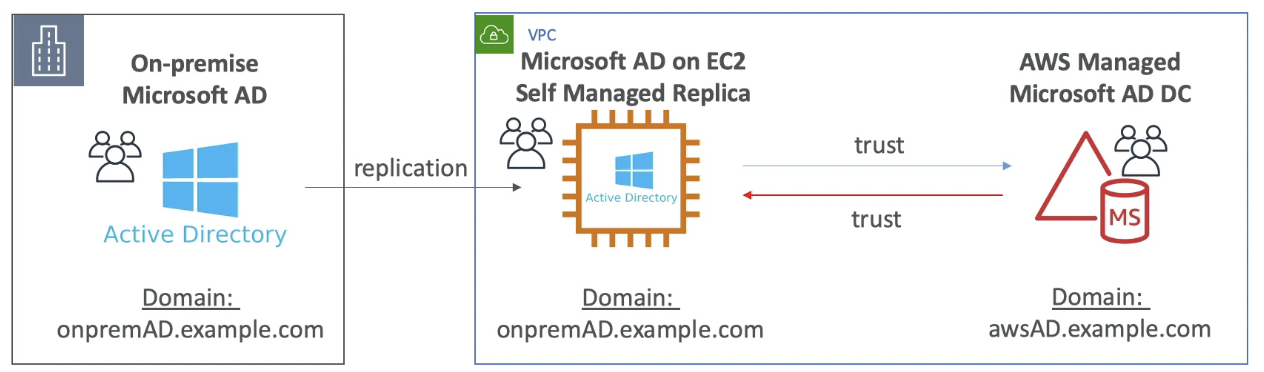
- Forest Trust Relationships:
- AWS trusts On Prem
- On prem trusts AWS
- Two way trust
- Replication is not supported, a user on-prem is not automatically replicated to AWS
- Deploy Microsoft AD in VPC
- Setup EC2 Windows AD instances
- Can use these AD instances to integrate with RDS SQL, AWS Workspaces, and to provide SSO capabilities (BYO IdP)
- Can scale up AD instances with availability and replication
- Only way to replicate On-Premise Microsoft AD to cloud is to self manage Microsoft AD on an EC2 server, replicate the users over, and then have a Two Way Forest Trust with AWS Managed Microsoft AD
- AD Connector is a proxy to amke a link from Cloud AD to on-prem AD
- Still manage users on-prem, but use AD Connector as a proxy
- AD Connector is literally just a gateway connector / proxy...all services that need AD API calls go through it and end up on-premise
- Doesn't support MFA, RDS, SQL, SSO, etc...
- Simple AD
- AD Compatible API in AWS
- Can't be joined with on-prem AD
- Doesn't support MFA, RDS, SQL, SSO, etc...
- AWS Managed Microsoft AD is simply a Microsoft AD in the cloud
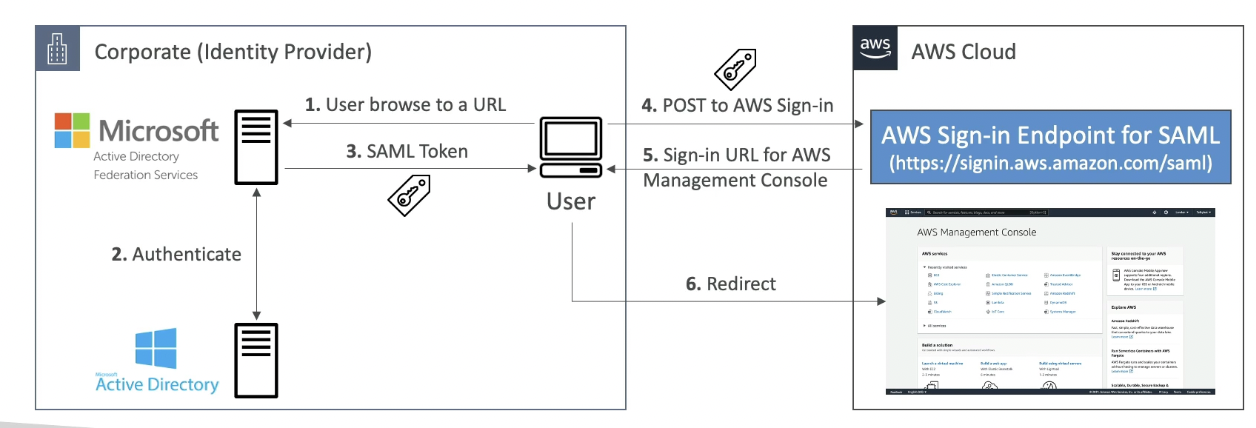
So how is this trust set up in AWS to trust that central identity provider? It typically involves setting up public keys and certificates between the IdP and AWS IAM
- Centralized identity provider will digitally sign a security token with it's private key when it authenticates a user
- After that, AWS IAM will need to utilize a public key from that identity provider to verify the signature on the token
- These trusted identity providers can span one or more organizations, and you can have multiple identity providers in AWS IAM
ADFS SAML
AD Replication
AWS Organization
- Root Organization (OU) has an overall Management Account
- An OU is a logical grouping of AWS accounts within an AWS Organization
- Member Accounts (Sub-Accounts)
- OU's act as a tree / hierarchy
- you could have HR / Finance as 2 OU's, and each one has dev/stg/prod
- Or you could have dev/stg/prod and each one has 2 sub OU's
- If a Management Account creates a Member Account, then it will automatically have an established IAM role inside of that Member Account
- This is called
OrganizationAccountAccessRole, and the Management Account can Assume this Role and get full admin permissions on the Member Account - This role could be assumed by an IAM user if they're authorizedm but they shouldn't be
- This is called
- Multiple strategies for resources inside of Accounts and how to organize it
- Features
- Consolidated Billing you can consolidate billing features into the Management Account
- Single Payment Method will get pricing benefits because you're aggregating usage across accounts
- Treat all accounts as the same singular account
- All accounts in Org can receive the hourly cost benefit of Reserved Instances that are purchased by another account
- This sort of savings plan can be turned on and off for different Member Accounts by the Management Account
- All Features (Default):
- Consolidated Billing
- Invited Accounts / Member Accounts must approve enabling all features of Management Account
- Ability to apply SCP to prevent Member accounts from leaving the Org
- Movement: you are able to move Member accounts across different Management Accounts by removing and inviting
- Consolidated Billing you can consolidate billing features into the Management Account
SCPs
- Define AllowList or BlockList IAM actions
- Applied to OU or Account level, but doesn't apply to the Management Account
- If a Management Account applies an SCP, it affects all OU's and Accounts underneath it though
- Applied to all Users and Roles in account, including Root
- SCP doesn't affect service linked roles
- Explicit Denies always take precedence over Any Allows
- Really very powerful, you can do things like enforce Tags, enforce regions, etc..
- SCP's only define the maximum permissions for an account, they don't grant any permissions
- So if an SCP allows
s3:*but the IAM policies in the account don't allow anything, then no one can access S3
- So if an SCP allows
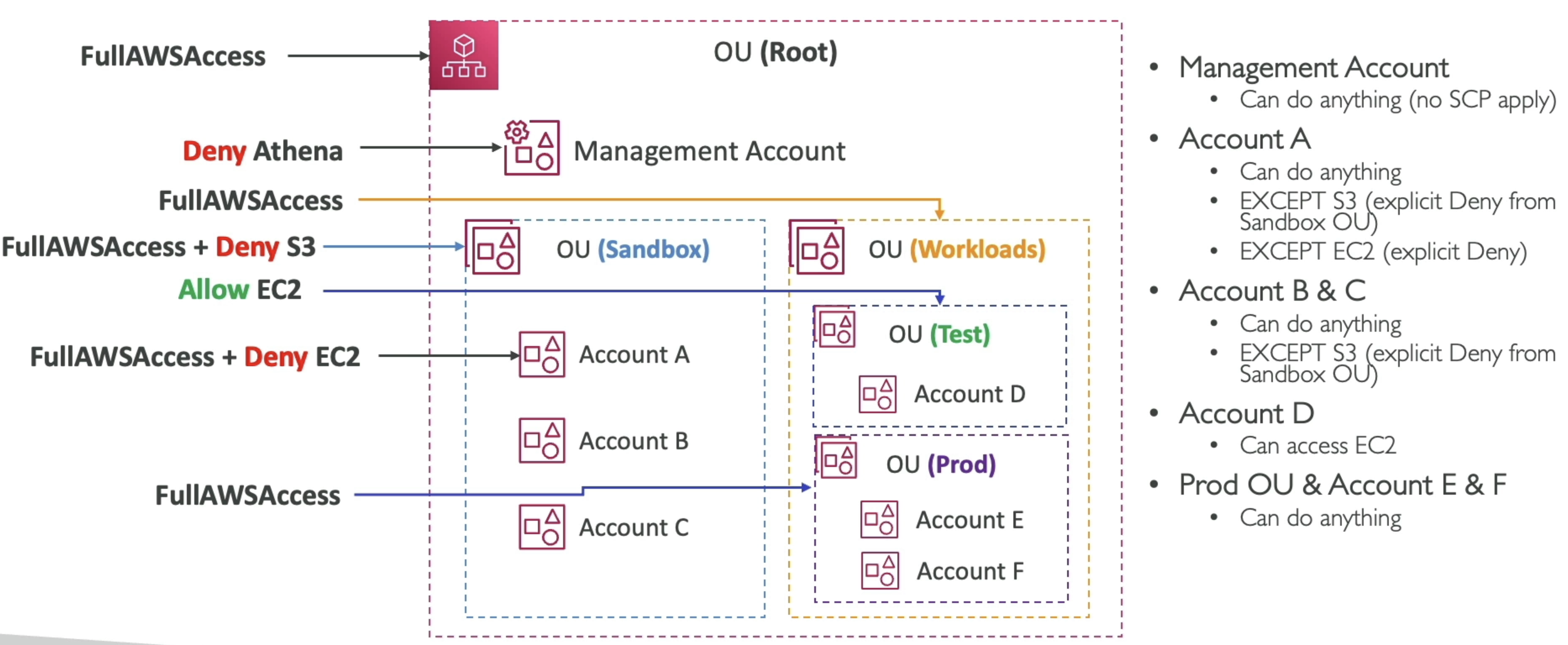
- In the example above what will happen if you
Deny Athenain the Management Account SCP?- Management Account specifically is not affected by SCP's, so it will be ignored
- No Account will be able to access Athena
- No Sandbox Account can access S3
- Account A cannot access Athena, S3, or EC2
- An Accounts permissions are all of it's Denies (taking precedence) with some Allows
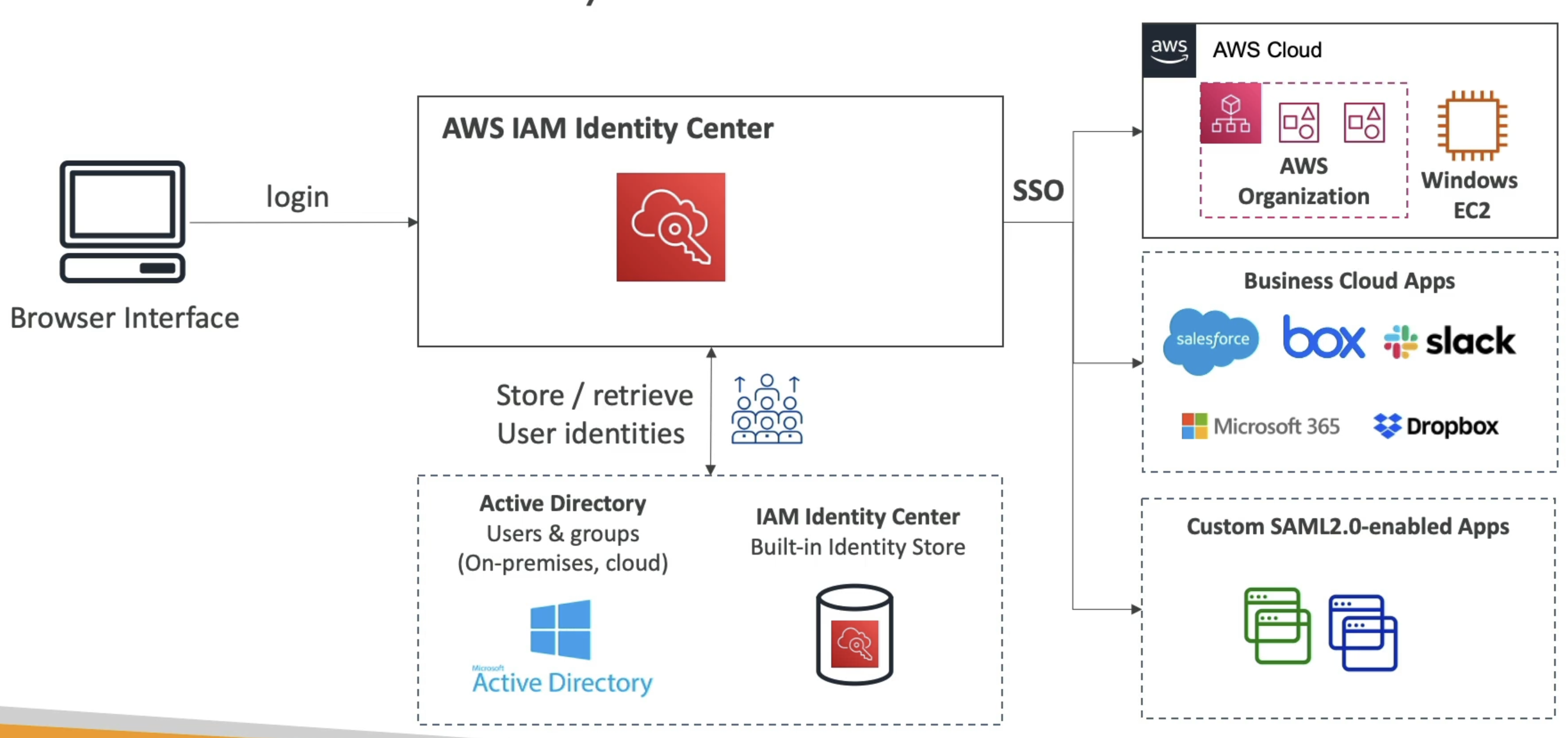
AWS IAM Center (AWS SSO)
- AWS IAM Center (FKA AWS SSO) allows us to have one single sign on for all:
- AWS Accounts and Orgs
- Business Apps
- SAML Apps
- you can do this with IdP's:
- Built in IAM Identity Center IdP
- 3rd party: AD, OneLogin, Okta, etc...
- Flow:
- Login via Browser / SDK
- Route to AWS IAM ID Center
- Retrieve User Identities from IdP (AD / Okta / IAM ID Center Built In)
- Check against Permission Sets (what apps / things they can access)
- Permission Sets are a collection of one or more IAM policies asigned to users and groups which help define AWS access
- Permission Sets allow us to do Attribute-Based Access Control (ABAC) for the most fine grained permissions based on users attributes
- All of this helps us to provide SSO access to many SAML 2.0 business apllications after we've defined the URLs, Certificates, and other Metadata to AWS IAM ID Center
- Send JWT and approval back
- Route authenticated user, via SSO, to:
- AWS Cloud
- Business Cloud Apps (Slack, Teams, etc...)
- SAML 2.0 Enabled Apps
External ID
External ID's allow us to mitigate the Confused Deputy problem
role1:account1allowsuser2:account2to assume it's role, and to perform some actions over resourcesaccount2is usually a 3rd party provider like a consulting company
account3, which is acting nefariously, tellsaccount2it also has a role for it to assumeaccount3tellsaccount2to userole1:account1, and then ifaccount3specifies some actions to run,account2will accidentally call those options onaccount1and notaccount3- In this way
account3could perform actions inaccount1without ever being explicitly allowed
- The External ID allows us to uniquely assign an ID to
account2, and the company that ownsaccount2should assign A unique External ID for all of it's customers - STS Session Tags in STS force each of the STS Assume Role calls to have specific tags brought along with it, which is another layer similar to External ID's, but more for internal users
IAM Access Analyzer
Allows us to check what resources are allowed externally, so you can establish a "ring of trust" and if anything has access to our resources outside of that, it's a Finding
AWS Control Tower
AWS Control Tower helps to automate and establish multiple accounts under a management OU following best practices and supplying interactive dashboards
AWS CT is a service that helps you setup and govern a secure, multi-account AWS env known as a "landing zone" based on AWS best practices - it automates the setup of your environment using AWS Organizations, AWS IAM Identity Center (AWS SSO), and other AWS services to help you manage your accounts, apply policies, and monitor compliance
Guardrails in AWS control tower provide ongoing Governance solutions
- Preventative methods via SCP's
- Detective methods via AWS Config
- Types:
- Mandatory
- Strongly Recommended
- Elective
Missed a lot of things in QnA about Control Tower, but it's basically a way to quickly setup an AWS Organization with multiple accounts following best practices - it helps with governance, preventative guardrails, and detective guardrails:
- Governance at scale means we can apply policies and controls across multiple accounts
- Preventative guardrails use SCP's to prevent actions across all accounts as universal rules
- Detective guardrails use AWS Config to monitor compliance and report violations across accounts
AWS Resource Access Manager
- AWS Resource Access Manager (RAM) allows us to share AWS reosources that you own with other AWS accounts
- Share within any account in your Organization to avoid resource duplication
- Allows us to share VPC's over Accounts
- No more VPC peering and crap
- Pretty much all of our Cloud Teams Platforming can be removed, but they did it for physical separation so I don't take all IP's frmo coworker
- There's probably ways to apply an SCP for that, but that's too many IAM rules
- Prefix List: Predefined list of CIDR's you can share with Security Groups, other accounts, etc...
- Allow us to centrally manage prefixes
- Route53 Outbound Resolver: Allows us to share our forwarding rules of our DNS services, so you can share this with other accounts so that if you update a DNS list in one account it moves to all other accounts
Example - Azure AD Integration with AWS
Say there's an Azure AD hosted in Azure Cloud, and you wanted to reuse the user pool in AWS for multiple reasons, how can you go about this?
If your company uses Azure Active Directory (Azure AD) in Azure Cloud and you want to reuse it in AWS, you can do following to integrate Azure AD with AWS for identity federation, single sign-on (SSO), and access management.
1. Use Azure AD for Identity Federation with AWS IAM
IAM Identity Center (AWS SSO) or AWS IAM basically allows us to create Federatd Users for AWS. This is what allows us to login to corporate SSO and then access AWS as a LOBUser/myname
Once you login you automatically assume a role, and that role can be governed by IAM and SCP policies
- What It Does:
- Azure AD acts as an identity provider (IdP) for AWS, allowing users to authenticate with Azure AD and assume roles in AWS.
- How It Works:
- Configure AWS IAM Identity Center (formerly AWS SSO) or AWS IAM to trust Azure AD as an external IdP.
- Users log in to Azure AD, and Azure AD issues a SAML assertion or OpenID Connect (OIDC) token to AWS.
- AWS uses the token to grant access to specific AWS resources based on IAM roles.
- Steps:
- Set up a SAML 2.0 application in Azure AD for AWS.
- Configure AWS IAM Identity Center or IAM to trust Azure AD as a SAML IdP.
- Map Azure AD groups to AWS IAM roles for role-based access control.
- Use Case:
- Centralized identity management for users across Azure and AWS.
- Single sign-on (SSO) for AWS Management Console and CLI.
2. Use Azure AD with AWS IAM Identity Center (AWS SSO)
This is similar to the above use case, except it allows us to go into multiple accounts
Would need to use permission sets and group to account mappings
- What It Does:
- AWS IAM Identity Center integrates with Azure AD to provide SSO for AWS accounts and applications.
- How It Works:
- Azure AD is configured as an external IdP for AWS IAM Identity Center.
- Users authenticate with Azure AD and are granted access to AWS accounts and roles via AWS IAM Identity Center.
- Steps:
- Enable AWS IAM Identity Center in your AWS account.
- Configure Azure AD as an external IdP in AWS IAM Identity Center.
- Map Azure AD groups to AWS IAM Identity Center permission sets.
- Use Case:
- Simplified SSO for multiple AWS accounts.
- Centralized user and group management in Azure AD.
3. Use Azure AD with AWS Cognito for Application Authentication
This AWS Cognito setup would allow us to host applications in AWS, and have them call Azure AD for IdP authentication
Essentially the tight coupling of AWS Services with AWS Cognito handled the app level code, and then Cognito will call Azure AD for authentication, and handle all of the back and forth
Once complete Cognito will issue a token back to the client
- What It Does:
- Azure AD acts as an IdP for Amazon Cognito, allowing users to authenticate with Azure AD for your applications hosted in AWS.
- How It Works:
- Configure Azure AD as an OIDC or SAML IdP in Amazon Cognito.
- Users authenticate with Azure AD, and Cognito issues tokens (ID, access, refresh) for use in your application.
- Steps:
- Create a user pool in Amazon Cognito.
- Configure Azure AD as an external IdP in the Cognito user pool.
- Update your application to use Cognito for authentication.
- Use Case:
- Applications hosted in AWS that need to authenticate users from Azure AD.
- Centralized authentication for multi-cloud applications.
4. Use Azure AD with AWS Directory Service
you mention these specifics above, but this would allow us to extend our directory service into AWS
There are many factors here around replication, syncing, and hosting that come into play
Once completed users in our Azure AD (not replicated onto our AWS managed / hosted Azure AD) can authenticate to AWS resources
This is the situation where you setup forest trust or other trust mechanisms between AWS Azure AD and Azure AD on Azure Cloud
- What It Does:
- Integrate Azure AD with AWS Managed Microsoft AD or Simple AD to extend your directory services to AWS.
- How It Works:
- Set up a trust relationship between Azure AD and AWS Managed Microsoft AD.
- Users in Azure AD can authenticate to AWS resources that rely on Active Directory (e.g., Windows-based EC2 instances, RDS SQL Server).
- Steps:
- Deploy AWS Managed Microsoft AD in your AWS environment.
- Establish a forest trust between Azure AD DS (Azure AD Domain Services) and AWS Managed Microsoft AD.
- Configure AWS resources to use AWS Managed Microsoft AD for authentication.
- Use Case:
- Hybrid cloud environments where Active Directory is required for authentication.
- Seamless integration of Windows-based workloads across Azure and AWS.
5. Use Azure AD for API Gateway Authentication
This is just using Azure AD as the OIDC provider for API GW
- What It Does:
- Azure AD acts as an OIDC IdP for Amazon API Gateway, enabling secure access to APIs hosted in AWS.
- How It Works:
- Configure Azure AD as an OIDC IdP in API Gateway.
- Users authenticate with Azure AD, and API Gateway validates the OIDC token before granting access.
- Steps:
- Register your API in Azure AD as an application.
- Configure API Gateway to use Azure AD as an OIDC IdP.
- Update your API clients to authenticate with Azure AD.
- Use Case:
- Secure API access for users authenticated via Azure AD.
6. Use Azure AD for Cross-Cloud SSO
- What It Does:
- Azure AD provides a unified SSO experience for applications and resources across Azure and AWS.
- How It Works:
- Configure Azure AD as the central IdP for both Azure and AWS.
- Users authenticate once with Azure AD and gain access to resources in both clouds.
- Steps:
- Set up Azure AD as an IdP for AWS (via SAML or OIDC).
- Configure Azure AD Conditional Access policies for cross-cloud access.
- Use Case:
- Unified identity management for multi-cloud environments.
Comparison of Options
| Option | Use Case | Integration Type |
|---|---|---|
| Identity Federation with IAM | Centralized identity management and SSO for AWS resources. | SAML or OIDC |
| AWS IAM Identity Center (AWS SSO) | Simplified SSO for multiple AWS accounts. | SAML |
| Cognito for Application Auth | Authenticate Azure AD users for AWS-hosted applications. | OIDC or SAML |
| AWS Directory Service | Extend Azure AD to AWS for Windows-based workloads. | Active Directory Trust |
| API Gateway Authentication | Secure API access for Azure AD users. | OIDC |
| Cross-Cloud SSO | Unified SSO experience across Azure and AWS. | SAML or OIDC |
Best Option for Your Use Case
- For SSO Across AWS Accounts: Use AWS IAM Identity Center with Azure AD as the IdP.
- For Application Authentication: Use Amazon Cognito with Azure AD as the IdP.
- For Windows Workloads: Use AWS Managed Microsoft AD with a trust relationship to Azure AD.
- For APIs: Use API Gateway with Azure AD as an OIDC IdP.