Data Engineering
Databases
This whole section is going to be on serverless Dynamo I bet
Pricing will always come to On-Demand vs Reserved Instances...on demand typically more expensive, reserved instances cheaper but need to commit to a certain usage level over a certain year period
DynamoDB
- NoSQL DB, fully managed, massive scale (1M req / sec)
- Similar architecture to Apache Cassandra
- No disk space, max object size is 400KB
- Anything larger store in S3 and store reference in DynamoDB
- Capacity and provisioning
- Write Capacity Unit (WCU): Governs write throughput
- 1 WCU = 1 write per second for an item up to 1KB in size
- Item larger than 1KB consumer more than 1 WCU, and it's always rounded up
- Dynamo Streams does not consume WCU's
- Read Capacity Unit (RCU): Governs read throughput
- 1 RCU = 1 strongly consistent read, or 2 eventually consistent reads per second
- For items up to 4KB in size
- DynamoDB Streams also does not consume RCU
- Only direct reads and writes from DynamoDB consume W/R CU's
- Autoscaling
- On Demand
- Write Capacity Unit (WCU): Governs write throughput
- Supports CRUD ops
- Read:
- Eventually consistent
- Strongly consistent
- Supports ACID transactions across multiple tables
- Backups available with Point In Time (PIT) recovery
- Table classes:
- Infrequent
- Standards
DyanmoDB Basics
Most of these basics are covered in the NoSQL Walkthrough TLDR; is that DynamoDB is schemaless K:V store with tables, primary keys, items, and attributes, it can scale almost infinitely, meaning it's partitioned, and it has local and global secondary indexes for different query patterns. Authenticating to RDS involves security groups, IAM policies, and KMS encryption at rest, because at the end of the day it's just a number of servers running a DB engine in a VPC somewhere (DynamoDB is serverless so you don't have to manage the servers, but RDS you do)
- Made of tables
- Each table has a Primary key
- Primary Key is either Partition Key, Partition and Sort Keys, or Combo Key
- Must be decided during creation time
- Responsible for hash calculation and partitioning
- Options:
- Partition Key only (hash)
- Partition key must be unique per item
- Must be "diverse" so that data partitions are uniform, no hot partitions
- Partition Key + Sort Key
- Combo of 2 must be unique
- Data grouped logically by partition key
- Sort Key AKA Range Key
- Timestamp usually good for sort key
- Partition Key only (hash)
- Each table can have an infinite number of items (infinite number of rows)
- Each item has attributes
- Can change and evolve over time
- Can be NULL
- This is how you get to "schemaless" and not a rigid SQL schema
- Max item size is 400KB
- Data Types:
- Scalar: String, Num, Boolean, etc
- Document: List, Map
- Set: String Set, Number Set, etc,...
- Indexes:
- Object = Partition Key + Optional Sort Key + Attributes
Local Secondary Index:- Keep the same Primary Key
- Select an alternative Sort Key
- Must be defined at table creation time
- Can use index inside of partition, it's local so doesn't go across partitions
Global Secondary Index:- Can change Primary Key and Optional Sort Key
- Completely new index
- Can be defined after
- Spans all partitions, would be basically new memory across entire cluster
Features
TTLcan automatically expire row after a specified epoch dateDynamoDB Streams- React to changes to DynamoDB tables in real time
- Basically CDC Stream
- Can be read by Lambda, and probably other services
- Forward to OpenSearch, Kineses
GlobalTables(cross region replication)- Active active replication, many regions
- Can CRUD on any of the replicas, and it will get replicated to all other DynamoDB clusters on other regions
- Must enable DynamoDB Streams
- i.e. it's CDC based replication
- Useful for low latency DRecovery purposes
- Active active replication, many regions
- Kinesis Data Streams for DyanmoDB
- Called it up there
- Can use Kinesis streaming from CDC based Streams on Dyanmo
- Sounds like it's a managed equivalent to Debezium CDC + Kafka
- Use Kinesis Data Streams to capture item-level changes in DynamoDB
- Can use Kinesis Firehose to read the data and store it wherever
- Can use Kinesis Data Analytics for real time filter, agg, transform transformations and write that back to DStreams, to Firehose, or other services
- Sounds like Firehose and Data Analytics are managed services off of Flink or Samza, but they abstract it into diff services
- Custom and longer data retention period (24 hr in DB Streams), but long term storage in other services
- DynamoDB Accelerator: DAX
- Cache for DynamoDB
- No app rewrite at all, app still GET or PUT, and caching handled by DAX
- Solves hot key problem
- 5 min TTL
- Multi AZ (3 nodes min for prod)
- Encryption at rest
- DAX vs ElastiCache
- Use DAX when a client directly wants to access DynamoDB and doesn't want to interact wiht other caches / services
- DAX good for both individual object caches and query / scan caching
Solution Architecture - Indexing
- S3 does not have the best search functionality, and there's lots of info that S3 has problems going through
- A common scenario is that on S3 events, you trigger a lambda and that lambda will update a DynamoDB table that acts as an index on multiple different attributes
- This allows us to:
- Search by date
- Get metrics and aggregations like total storage used by a customer
- List all objects with certain attributes
- Find all objects within some date range
OpenSearch (ElasticSearch)
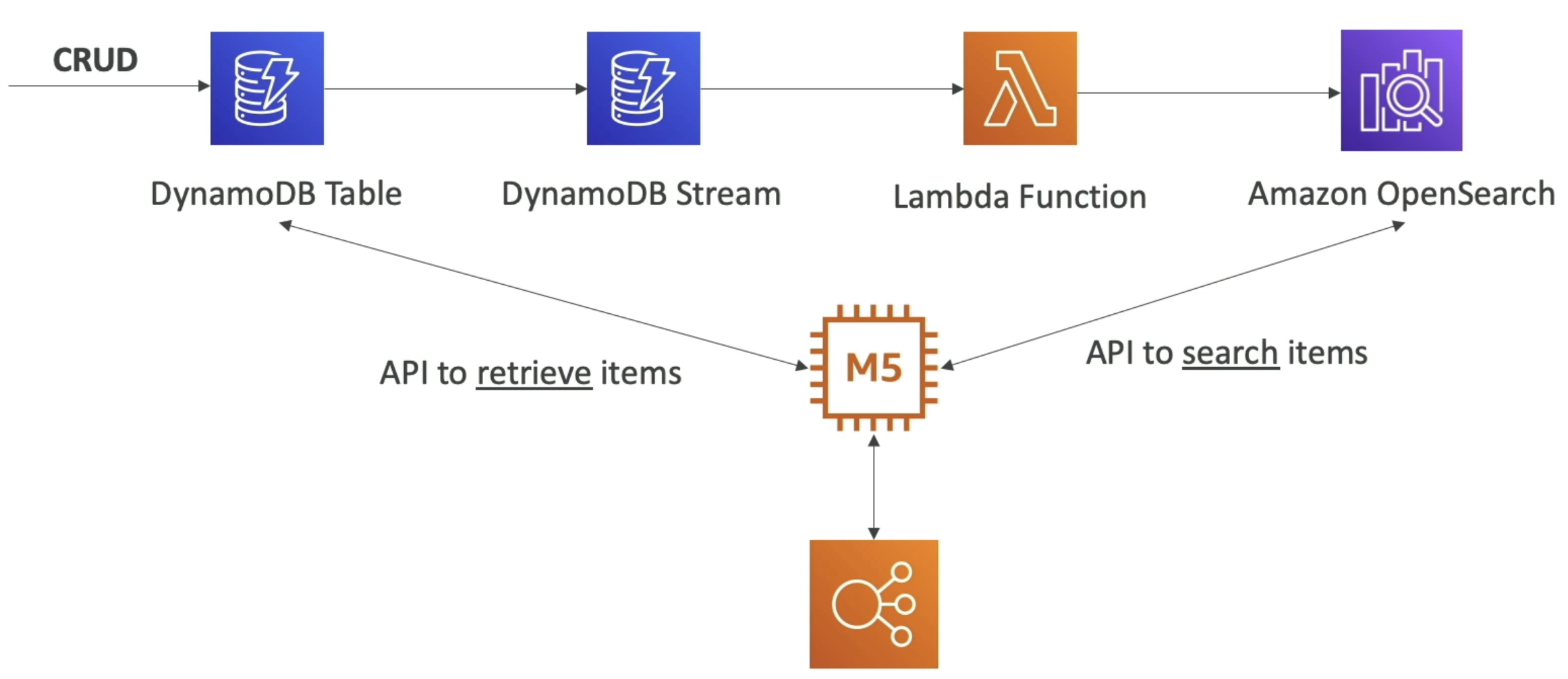
Opensearch is a way to index and search over large amounts of semi-structured data. It's commonly used for log analytics, real time application monitoring, and full text search use cases. OpenSearch is based on a fork of ElasticSearch, and OpenSearch Dashboards is based on a fork of Kibana. It writes all of this / indexes all of the logs that are on disk, and then provides an endpoint to search over disk backed indexes. OpenSearch can be integrated with DynamoDB streams or CloudWatch logs to provide search capabilities over data stored in those services too, and it's often used in conjunction with DynamoDB to provide search capabilities over data stored in DynamoDB tables
Searching over DynamoDB tables with OpenSearch is a common pattern. Since DynamoDB is a key-value store, it doesn't have great search capabilities out of the box. By using DynamoDB streams to capture changes to the DynamoDB table, you can use a Lambda function to process those changes and index (push) the relevant data into OpenSearch. This allows you to perform complex searches, full text search, and analytics on the data stored in DynamoDB without creating even more indexes in DynamoDB itself
- Renamed from ElasticSearch to OpenSearch
- Fork of ES b/c of licensing issues
- OpenSearch Dashboards === Kibana Dashboards for ElasticSearch
- Managed vs Serverless
- Managed allows us to choose more granular controls over infra
- Use cases:
- Log analytics
- Real time app monitoring
- Full text search
- Clickstream analytics
- Indexing
- Suite:
- OpenSearch:
- Search and indexing capabilities
- OS Dashboards:
- Monitoring and metrics of OS data
- Logstash:
- Log ingestion mechanism
- Alternative to CW Logs where you can decide retention and granularity
- OpenSearch:
- OpenSearch + Dynamo or CW
- Common pattern is CRUD ops into DynamoDB
- DynamoDB Streams for CDC
- Lambda or Kinesis for computing over streams
- Send CDC data to OpenSearch
- Allows for search API's over data sitting in DynamoDB
- Full text search, similarity, traversal, etc...
- Then use response from OS to GET data from DynamoDB
- Can do the same thing but have CloudWatch and send logs to OSearch
- Lambda for real time
- Kinesis for near real time (it does batching)
- Allows for more robust search over logs
- What does OpenSearch allow us to do then:
- Storage:
- Indexing and storing large amounts of semi-structured data
- Search:
- Full text search, structured search, and analytics
- Search is done over indexes (which are faster) or just raw data
- Analytics:
- Real time analytics and visualization with OS Dashboards
- Visualization
- Create dashboards and visualizations for data stored in OpenSearch
- Reporting
- Generate reports based on search and analytics results
- CSV or HTML
- Storage:
The TLDR of why this is useful is that the data is sitting on disk, and allows us to do a ton of search and analytics over it that would be hard to do in DynamoDB or other services directly, and the number of integrations from other services to here makes it a great search and analytics engine for semi-structured data
Some groups will use this for OTEL / monitoring, and it's a common pattern to have logs and metrics go into OpenSearch for searching and alerting, but it's not meant for notifications or alerting directly - that's what CloudWatch is for
RDS
- Relational Database Service
- Engines:
- MarioDB, Postgres, MySQL, IDM DB2, Oracle, MS SQL Server
- Managed Service so provisioning, backups, patching, monitoring, etc all covered
- Deployed in a VPC, usually private
- Lambda that wants access needs to be deployed in private VPC since lambda and other serverless services are deployed on AWS
- Storage by EBS, and can increase volume size automaitcally via auto-scaling
- Scaling here is similar to plugging in a new hard drive to a server rack on-premise
- If we attach new disks to an RDS instance, somehow the RDS engine will need to know about the new disks and be able to use them
- RDS handles this for us
- Backups allow PIT recovery, and they expire
- Can set backup retention period from 1 to 35 days
- Automated backups happen during a specified backup window
- Backups stored in S3
- Snapshots are manual, and can help DR plans and send full databases across regions
- RDS events send events similar to S3 to SNS
- Not CDC, events like operations, outages, etc...
- Multi AZ + Read Replicas
- Multi AZ
- Standby instance in case of outage
- R/W only on leader DB
- Synchronous replication
- Read Replicas
- Helps increase throughput
- Eventual consistency via asynchronous replication
- Reads can go anywhere, writes only to leader
- Route53 helps us to route traffic to distribute over RR's without needing PGBouncer or other tools
- Can use Route53 health checks to ensure our RR's are still available, and R53 can alter route sets if a health check fails
- Multi AZ
- Security
- KMS encryptuion at REST for underlying EBS volumes / snapshots
- Transparent Data Encryption (TDE) for Oracle and MS SQL Server
- SSL encryption to RDS is possible for all DB in-flight
- Security groups help for firewall and whitelisting
- IAM authentication to MySQL, Postgres, and MariaDB
- Authorization still happens within RDS
- Need to tie users to abilties inside of DBase
- Authentication happens via IAM and RDS API calls
- Auth token lifetime of 15 minutes
- Only used for connecting
- RDS Service provieds auth token
- Can copy un-encrypted RDS to encrypted one
- Can go back and forth via Snapshots
- CloudTrail can't track queries
- RDS for Oracle gotchas:
- RDS backups for backups & restores to RDS for Oracle
- Oracle RMAN recovery manager is for backups, the restores RMAN provides cannot be used to restore to RDS, it only provides restores to non-RDS databases
- Real Application Clusters (RAC)
- RDS Oracle does not support RAC
- To get RAC you need to install Oracle on EC2 instance where you have full control
- RDS for Oracle supports Transparent Data Encryption to encrypt data before it's written to storage
- DMS works on Oracle RDS
- On-prem Oracle DB DMS RDS Oracle
- Allows us to replicate DB's, common pattern is replicating an on-prem DB to cloud one
- RDS backups for backups & restores to RDS for Oracle
- IOPS
- RDS supports both Provisioned IOPS and General Purpose SSD
- Provisioned IOPS good for high performance DB's that need low latency and high throughput
- General Purpose SSD good for dev / test or low traffic DB's
- SSD better for OLTP high throughput workloads, HDD better for OLAP workloads
- HDD isn't supported on RDS, only on EC2 installed DB's
- RDS for MySQL gotchas:
- Can use
mysqldumpto migrate RDS DB to non RDS- External MySQL DB can run on prem or EC2 or wherever
- RDS Proxy for AWS Lambda
TooManyConnectionsexception sometimes when you use Lambda functions with RDS since they open and maintain connections- RDS Proxy can take care of cleaning up idle connections, managing connection pools, etc.
- Supports IAM Auth
- RDS Proxy is a service outside of RDS itself - it can be deployed in other subnets if needed
- Can use
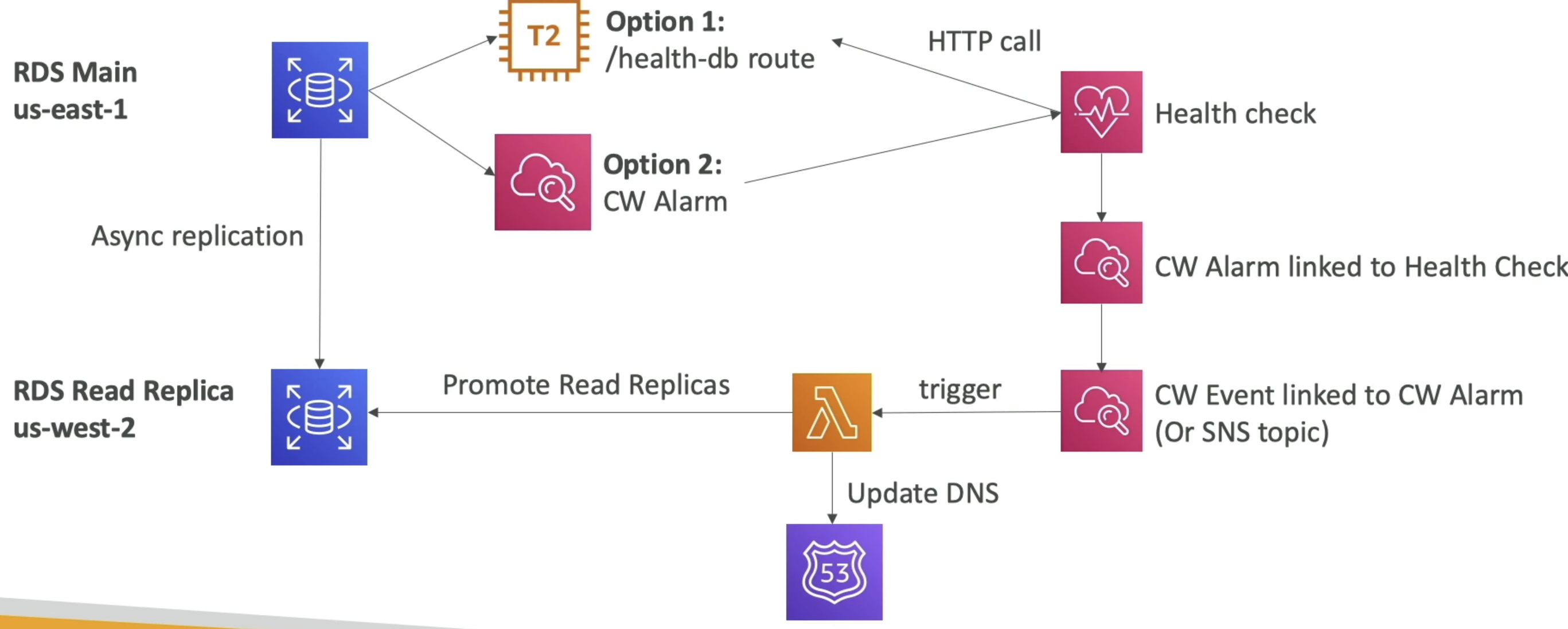
Solution Architecture - Cross Region Failover
- Can use RDS events and CW health checks together to get notified of downed RDS clusters
- These CW Events or RDS events or anything else can trigger lambdas that update DNS and promote read replicas to leader
- Can't use DNS health checks only because you need to promote RR to leader, and that can't be done without custom logic stored in lambda
Aurora
- Tabular DBase, compatible with MySQL and Postgres
- Managed Service, handles provisioning, patching, backups, monitoring, etc...
- Engines: Postgres compatible and MySQL compatible
- Storage automatically frows by 10GB increments to 128TB max
- 6 copies of data across multi AZ by default
- Up to 15 RR's
- Cross region RR entire database is copied
- Load / offload data directly to / from S3
- Backup, Snapshot, and Restore exactly same as RDS
- AWS SCT and DMS work with Aurora, and can migrate from on-prem or other cloud DB's to Aurora
HA and Scaling
- Peer to peer replication + durability is fully discussed in KV Store Deep Dive Peer to Peer
- 6 copies of data across 3 AZ's
- 4 out of 6 needed for writes
- 3 out of 6 for reads
w = 3, r = 4, n = 6, w + r > n- Self healing with peer-to-peer replication
- Storage striped across 100's of volumes
- Single leader for writes, 15 RR followers
- Auto failover of leader in < 30 seconds SLA
- All RR's able to serve reads
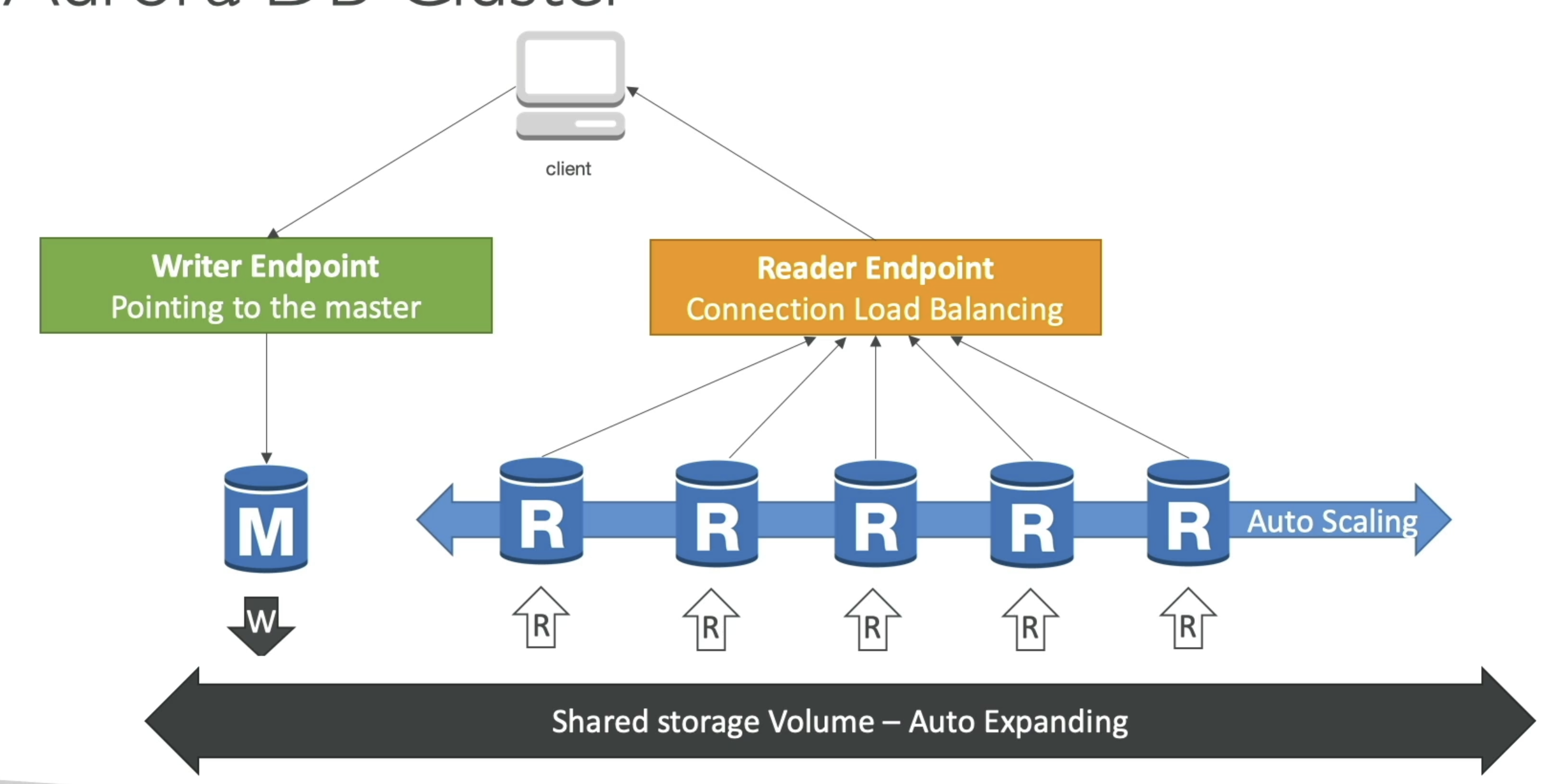
- Aurora Cluster: Read and Write
- Read and Write endpoints for client app
- Shared volume auto expanding storage underneath
- Aurora Endpoints
- Endpoint = cluster address + port
- Write Endpoints
- Connects to primary and is used for all write ops
- Reader Endpoints
- Does load balancing for read only cnxnx
- Only for read queries
- Custom Endpoints
- Represents a set on DB instances that you choose in Aurora cluster
- Use when you want to connect to specific subset of DB's with different capacities / configs
- Basically when different DB's in cluster have different DB parameter groups, you can use custom endpoint to only reach those RR's
- Instance Endpoints
- Connects to specific DB instance in Aurora Cluster
- Use for diagnosis or fine tuning of one specific instance
Logs
- Can monitor the following log files:
- Error
- Slow query
- General
- Audit
- Downloaded or published to CW Logs
- Troubleshooting:
- Can use performance insights tool
- Waits, SQL Statements, Hosts, and Users
- Helps to see if specific actors / queries are hogging resources
- CW Metrics:
- CPU
- Memory
- Swap usage
- Enhanced monitoring metrics at host / process level
- Go through logs
- Can use performance insights tool
Aurora Serverless
- From client perspective you just access 1 single proxy fleet endpoint
- It scales nodes and volumes for you
- Access Aurora Serverless with simple API endpoint
- No JDBC connections needed
- Proxy fleet endpoint manages connections
- Secure HTTPS endpoints to run SQL Statements
- Users need access to Data API and Secrets Manager
- RDS Proxy
- Allows us to create our own proxy for read only replicas if you desire
- RDS Proxy handles connection pooling, auth, etc...
- This is different from the Aurora Serverless Proxy Fleet, but similarly helps to manage connections to a database cluster
- RDS proxy also helps reducing failover times by maintaining warm connections to DB instances
- So when failover happens, RDS Proxy already has connections to the new leader DB instance, and we don't have to wait for DNS resolution or new connections to be made
- No change in application code needed to access new database leader if it changes
- Global Aurora
- 1 primary region
- 5 secondary regions for read only
- Replication lag is < 1 second SLA
- Good for Disaster Recovery and decreasing latency next to users
- Write forwarding
- Secondary DB clusters can forward writes made to them to primary DB cluster
- Allows all nodes to accept write queries, but only primary does the actual computations
- Reduces ## of endpoints to manage, and all apps can just send reads and writes to the endpoint they know
RDS To Aurora
- Can take snaoshot into S3 and restore to Aurora DB Instance
- Create Aurora RReplica on RDS DB Instance
- Gets replicated via synchronous replication
- Once it's replicated, just promote it
Caching
Caching is covered in Elasticache Section in Cache Document, but can give a high level overview here
Elasticache is a managed caching service that supports both Memcached and Redis engines - a common use case is having a private subnet database, VPC endpoint for Elasticache, and pointing app servers to the Elasticache endpoint to reduce read and write latency to the database
Elasticache sits in front of databases to help reduce read latency and offload read traffic from the database itself. It can also be used as a write through cache to help with write latency as well. Elasticache supports both Memcached and Redis engines, and Redis is the more fully featured of the two. Elasticache is a managed service, so AWS handles patching, monitoring, scaling, etc... for you. Common use cases are session stores, leaderboards, caching of frequently accessed objects or query results, and pub/sub messaging systems
Memcached is for simple K:V data, no built in replication, persistence, or advanced data structures
Redis supports more advanced data structures like lists, sets, sorted sets, hashes, bitmaps, hyperloglogs, and geospatial indexes. Redis also supports replication, failover, clustering, persistence to disk, and has Lua scripting capabilities. Redis is often used when you need more than just simple K:V caching