Networking
VPC
Virtual Private Clouds are about how you can deploy VM's, storage, and other resources into:
- "virtual" meaning not physical but logically separated
- "private" meaning you don't share things in this logically separated unit
- "cloud" which is just us using someone elses VM's
So a VPC is a way for us to logically separate a group of VM's, typically by IP addresses
TLDR for all of this - Use a Transit Gateway as it's the best hub-and-spoke setup, if it doesn't work good luck
Basics
- CIDR is a block of IP addresses denoted by
X.X.X.X/sizewhereX'sdenote addresses- They have 32 bits in total, or 4 slices of 1 byte
192.168.0.0/24means the first 24 bits of the address are used to designate the network "slice" and the remaining 8 bites are used by any host inside of it- Whatever amount of remaining bits are leftover denotes the size
- means you have 256 IP addresses to use in this network
- Private IP are IP's only avaialble inside of a private network
- These are the only IP's able to be used as private IP's, and any other IP is public
- Technically most people's IP in their homes if they want to have 2 computers talk on local network will be
192.168.X.Xbecause they're private - If you wanted to have 2 computers talk over 2 different local networks they'd need to be relayed / have their own public IP's
- Technically most people's IP in their homes if they want to have 2 computers talk on local network will be
10.0.0.0 - 10.255.255.255which represents10.0.0.0/8is used for big corporate networks172.16.0.0 - 172.31.255.255192.168.0.0 - 192.168.255.255are used for personal local networks
- These are the only IP's able to be used as private IP's, and any other IP is public
- Defintion of VPC
- Must have a defined list of CIDR blocks that cannot be changed afterwards
- Each CIDR within a VPC has minimum
/28and max/16 - VPC is private so only private IP CIDR ranges are allowed
- Subnets are logical separations of your VPC based on CIDR blocks
- Subnets are sub-networks (subsets of networks)
- Instances in subnets are defined by CIDR block of subnet
- First 4, and last 1, IP in subnet are reserved by AWS for networking purposes
- Route Tables
- Used to control where network traffic is directed to
- Can be associated with specific subnets
- The most specific routing rule is always followed
- Route tables have the purpose of directing traffic to specific targets based on destination IP address
- Targets can be IGW, NAT GW, ENI, Peering connections, TGW, etc
- Internet Gateway (IGW) allow our VPC to connect to the internet
- HA, scales, yada yada
- Acts as a NAT for instances that have a public IPv4 or IPv6 IP address
- Any instance that have traffic routed to the IGW (via route tables) will have internet access, any instances that do not will not!
- IGW also facilitates inbound traffic from internet to instances with public IP's
- If you have a private instance, and you route traffic to IGW, it will not work because private instances don't have public IP's
- This is typically solved by first routing to a NAT GW or NAT Instance in a public subnet, which then routes to IGW
- Internet traffic can flow back through to the private instance via NAT at this point
- Public Subnets have a route table that sends
0.0.0.0/0traffic to IGW- This is the "most broad rule", so if nothing "more specific" is defined in the route table then all instances are public and internet enabled
- If route table has more specific rules, then some of the VM's may not be internet enabled
- Elastic IP (EIP)
- An AWS resources in it of itself
- Allows for static IP addresses that can be associated with EC2 instances
- Typically used for instances that need a fixed public IP
- If you launch an instance in a public subnet, you can just auto-assign it an IP address but it will not be fixed / static
- NAT Instance
- EC2 instance you deploy in a public subnet
- Edit route in private subnet to route
0.0.0.0/0to NAT instance - Not resilient to failure, it's a single EC2
- Must disable Source/Destination check (EC2) setting
- NAT instance should get elastic IP so public internet knows who it's talking to / allow whitelist
- NAT Gateway
- Managed solution with scalable throughput
- Bandwidth scales automatically
- Must dpeploy multiple NAT for multiple AZ for HA
- Has an elastic IP, external services see IP of NAT GW if a private instance utilizes it
- Cross-region NAT GW isn't possible, and best practices are to have one per AZ as cross-AZ costs money
- Service endpoints can be used to avoid NAT GW costs for specific AWS services
- Internet access
- Instances must have IPv4 IP to talk to internet
- Or in a Private (non-public) Subnet instances can access internet with a NAT instance or NAT Gateway setup in a Public Subnet
- Must edit routes so that
0.0.0.0/0routes traffic to NAT
- Must edit routes so that
- Network ACL (NACL)
- Stateless firewall defined at subnet level, applies to all instances within
- Support for allow and deny rules
- Stateless
- Return traffic must be explicitly allowed by rules
- Helpful to quickly and cheaply block specific IP addresses
- Dynamic Host Configuration Protocol (DHCP)
- Automatically assigns IP addresses to instances in a VPC
- Centralized IP configuration or IP protocol, instead of manually doing it ourselves
- DHCP options set can be configured for VPC
- VPC's are associated with DHCP option sets
- DHCP option sets are a collection of settings that can be applied to instances in a VPC
- Options:
- Domain name (suffix in DNS lookup)
- Domain name servers describe what actual servers we'll be using for DNS - typically this stays to the default of AmazonProvidedDNS
- NTP servers for keeping time in sync on instances
- Can't alter a DHCP option set after it's been created, need to create new one and associate it with the VPC
- Why would anyone do this?
- IP address suffixes and DNS servers allow us to route traffic / identify instances that are apart of different services
- Security Groups
- Applied at instance level
- Stateful
- Return traffic automatically allowed regardless of rules
- Can reference other security groups in the same region
- VPC Flow Logs
- Log internet traffic going through VPC
- 3 levels
- VPC level
- Subnet level
- ENI level
- Very helpful to capture "denied internet traffic" to figure out why networking isn't working
- Can be sent to CloudWatch Logs and S3
- Bastion hosts
- SSH into private EC2instance through a public EC2
- You manage these yourselves
- Avoid these, just use SSM
- IPv6
- All are public
- 4.3 billion
- Apparently, there's "so many" that they can't be scanned online, so they appear as pseudo-random
- VPC supports IPv6
- Public subnet
- Create instance w/ IPv6 support
- Route table entry
::/0(IPv6 all) to IGW
- Private subnet
- Instances cannot be reached by IPv6, but they can reach IPv6 instances / addresses
- Create an egress only IGW in VPC
- Add route entry for private subnet from
::/0(IPv6 all) to Egress only IGW
- Public subnet
VPC Peering
- Connect 2 VPC's privately using AWS backbone network
- Can be across regions, across accounts, etc
- Entire goal is to allow services to communicate via private IP addresses
- Make them behave as if they were the same network
- Must not have overlapping CIDR
- Not transitive
- Must create peer between
- Must update route tables in each VPC subnet to ensure instances can communicate
- Once and have setup peering, the route table for A needs to include a route to B's CIDR block and the method for getting there would be the peering connection
- routing table:
- Destination: CIDR
- Target: Peering connection
- VPC Peering can work inter-region and cross-account
- Can reference security group of a peered VPC (cross-account)
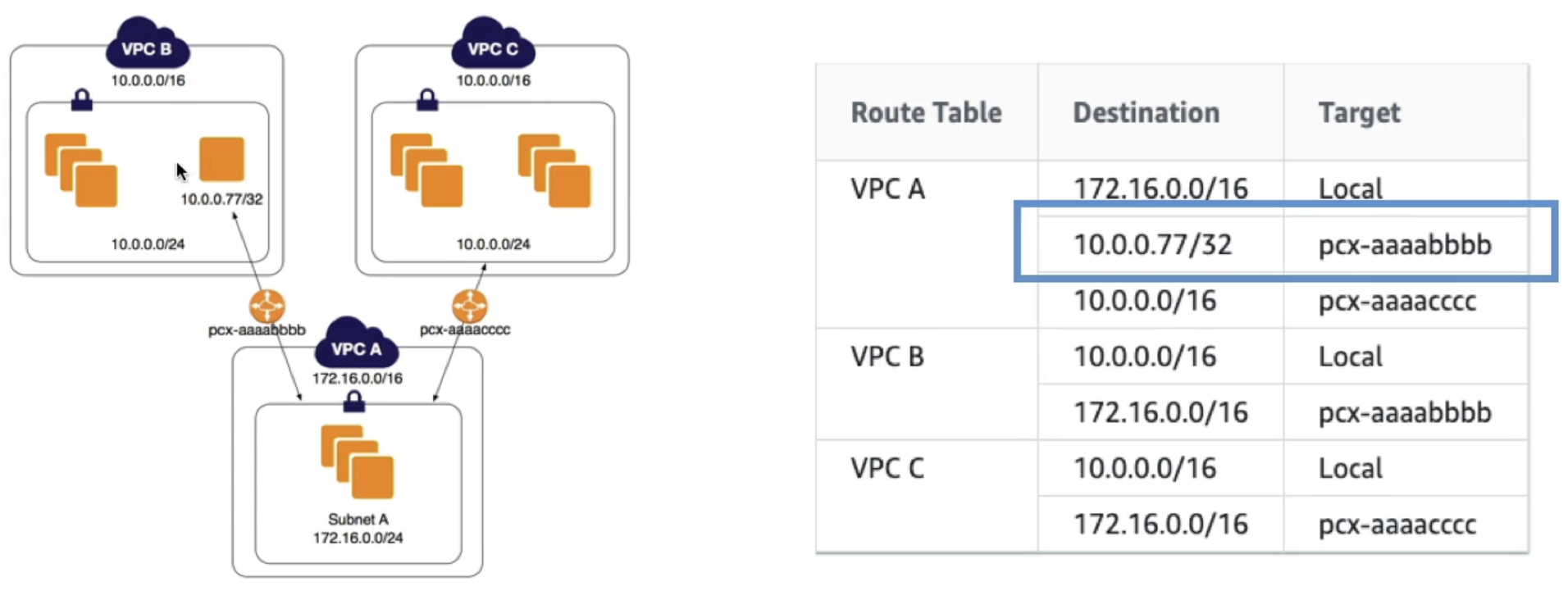
- Longest prefix match
- VPC uses longest prefix match to select most specific route
- If you have 2 VPC's with similar CIDR that you peer to frmo a central VPC, you have to use specific route table rules to ensure you send traffic to specific instances
- In the below example you want to send some traffic to a specific instance in VPC B, and the rest to VPC C
- Invalid configurations
- Overlapping CIDR (even just one!)
- No transitive VPC peering
- No edge to edge routing (same as transitive VPC peering)
- Specifc to VPN, Direct Connect, IGW, NAT GW, VPC Endpoints (S3 and Dynamo)
- These services also don't allow transitive routing based on peering
- This means if you have private VPCs, let's say 5, and then one central VPC with a NAT Gateway and an IGW
- If the NGW is peered to the IGW, and our private subnets are peered each to the NGW, that doesn't mean you can access the IGW from the instances
- This is definition of "edge to edge routing" and it's not allowed, we'd need to connect each instance to IGW itself
- Side note - typical
ping <IP>ICMP protocols don't work over VPC peering connections- This is because security groups and network ACL's block this by default, you can set it up to work
- To test out connectivity, use TCP-based tools like
telnetornc(netcat)
Transit Gateway
- Everything above becomes complicated, there are directed relationships and edge-to-edge considerations
- Transit Gateways are Transitive
- Transit Gateways help to solve this!
- They allow for transitive peering between thousands of VPCs, on-premise networks, and 3rd party networks
- Most of the extra connections are done via AWS Direct Connect and VPN Connection resources
- Transit Gateways allow for hub-and-spoke (star) connection model
- They allow for transitive peering between thousands of VPCs, on-premise networks, and 3rd party networks
- Regional resource
- Can peer Transit Gateways themselves across regions
- One TGW in each region, and then peer all of those together
- Attach each resource to a TGW via TGW Attachment
- Similar to VPC Peering, you must update route tables:
- Destination: Some other Subnet CIDR
- Target: TGW Attachment
- Because of having to update route tables, there's still a ton of work on updating each connected resource in the network mesh, but you do not have to manually accept and deny each of the peering requests anymore
- It's still much smaller than peering all of them
- If there are VPC's, then you would need peering connections (fully completed graph), versus just connecting each of the , once, to the TGW
- you would still need to update all route tables, but this is typically more scalable and easier to accomplish
- Share cross account via Resource Access Manager (RAM)
- Route tables allow us to limit which VPC's can talk to each other
- Works with Direct Connect, VPN Connections
- Supports IP Multicast (which is not supported by any other AWS Service)
- Allows instances in any VPC to access following resources in other VPC's that are attached to TGW:
- NAT GW
- NLB
- PrivateLink
- EFS
- More
- Using a Transit Gateway allows us to alleviate the problem in VPC Peering where you couldn't have a central NAT GW!
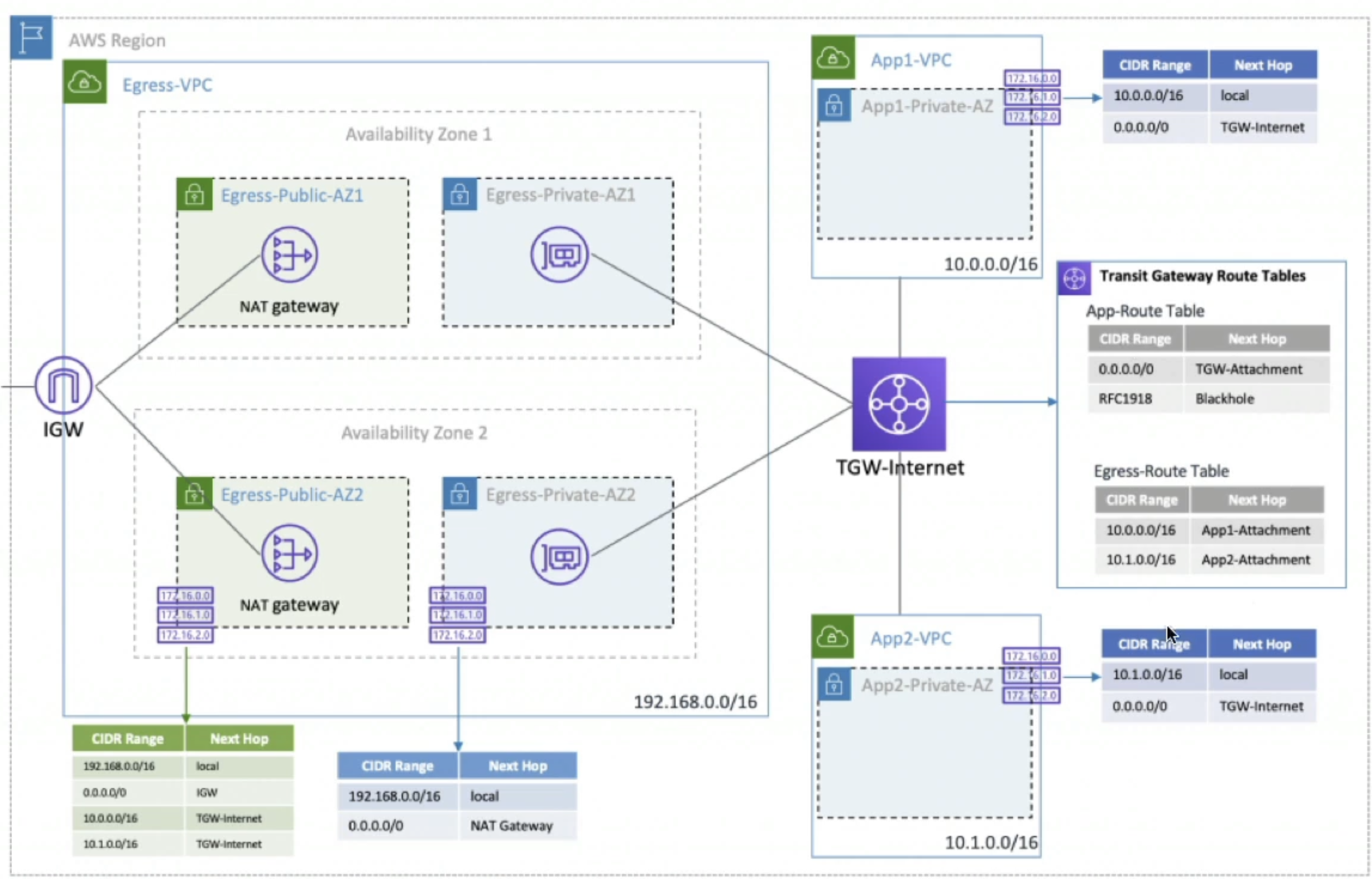
- Below you can see our Egress-VPC has all of the required NAT GW and IGW setup with correct routing tables
- Shows how Egress-VPC routes any traffic from
10.0.0.0/16back to TGW-Internet to route to App-VPC's - And then how App-VPC's route traffic to TGW-Internet, and any route not back to
10.0.0.0/16gets routed out to IGW out to the internet- Q: TGW-Internet is actually being routed to ENI's, which then route to NAT GW, and this is because:
- That's just the way things work
- For TGW to attach to VPC's it needs some sort of entry/exit point, and that is the sole purpose of ENI's
- The NAT GW itself is implemented as an ENI in a public subnet
- Therefore, traffic from TGW-Internet is routed to ENI of NAT GW which then performs NAT before forwarding traffic to IGW
- Q: Also NAT GW need to come before IGW because:
- Private instances cannot route directly to an IGW - they have to go through NAT GW which translates private IP to public
- IGW only allows outbound traffic from public IP's...the NAT GW provides that public IP
- If you bypass NAT GW the private instances wouldn't have valid public IP's for internet access
- Q: TGW-Internet is actually being routed to ENI's, which then route to NAT GW, and this is because:
- Shows how Egress-VPC routes any traffic from
- Below you can see our Egress-VPC has all of the required NAT GW and IGW setup with correct routing tables
- Can use AWS RAM to share a TGW for VPC attachments across accounts or Organizations
- Allows the Share, Accept, Use flow to happen a lot faster
- Use different routing tables to prevent VPC's from communicating that you don't want
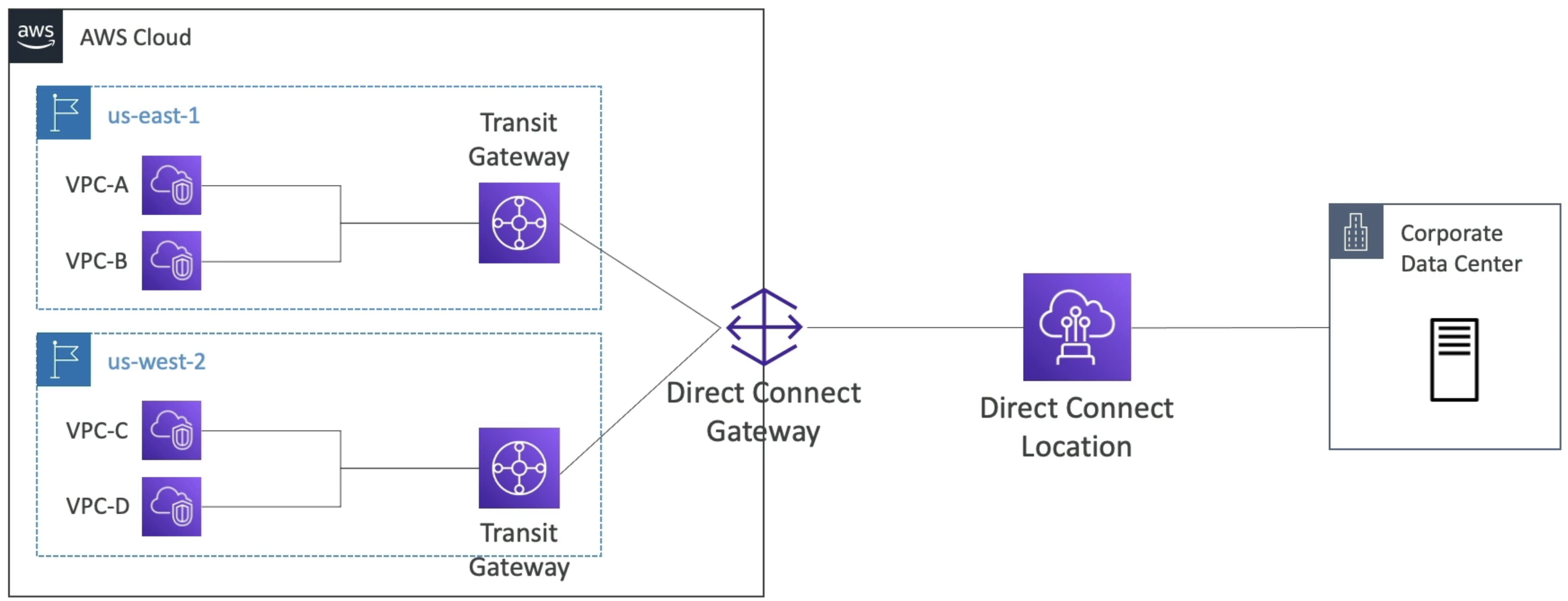
- Allows us to do Direct Connect to corporate data centers from multiple regions
- Intra and Inter region peering
- Allows for data mesh architecture where you can have a Hub TGW per region that connects multiple resources and accounts in that region, and then for every region you have you connect the Hub TGW's to create a mesh of TGW's across all regions
End-to-end flow: Private subnet → Internet via NAT GW + IGW
So the main question that always comes up is "I have an instance in a private subnet, how does it reach the internet?"
The solution involves using a NAT Gateway in a public subnet to translate private IP's to public ones, which then routes to an Internet Gateway which requires a public IP being sent to it, and then the IGW routes to the internet
- Nat GW allows traffic out to internet, but not back in
- A NAT GW performs Network Address and Port Translation (NAPT): it rewrites the source private IP and ephemeral port to the NAT GW Elastic IP and a mapped port
- This operates at the IP and transport layers (L3/L4) on TCP/UDP packets
- NAT GW does require an IGW to actually reach the internet
- We can then route
0.0.0.0/0traffic from private subnet to NAT GW, and it can go out into the world
- A NAT GW performs Network Address and Port Translation (NAPT): it rewrites the source private IP and ephemeral port to the NAT GW Elastic IP and a mapped port
- IGW allows traffic both ways, but only for public IP's
- These make subnets public
- Allows internet to reach instances with public IP's
- Egress-only IGW for IPv6 outbound only (this is a very specific use case for IPv6)
With the 2 above components we can allow private instances to reach the internet
-
Prereqs:
- Private subnet route table:
0.0.0.0/0nat-xxxxxxxx - Public subnet (where NAT GW lives) route table:
0.0.0.0/0igw-xxxxxxxx - NAT GW has an Elastic IP (EIP). NAT Instance alternative must have Src/Dst check disabled.
- Private subnet route table:
-
Outbound (private EC2 → Internet):
- Private EC2 sends packet to public dest (e.g., 1.2.3.4). Src IP = 10.x.x.x (private).
- VPC router matches
0.0.0.0/0in the private subnet route table forwards to NAT GW ENI in a public subnet. - Subnet NACLs are evaluated (SGs on EC2; NAT GW does not use SGs).
- NAT GW performs source NAT:
10.x.x.x:ephemeralEIP:ephemeral, stores the translation state. - NAT GW forwards to IGW (via the public subnet route table default route).
- IGW egresses to the AWS edge public Internet remote service.
-
Return (Internet private EC2):
- Remote service replies to the NAT GW’s EIP.
- Packet enters AWS at the IGW and is delivered to the NAT GW ENI.
- NAT GW uses the flow state to translate dest back:
EIP:ephemeral → 10.x.x.x:ephemeral. - Packet is sent into the VPC to the private subnet; NACLs evaluated; EC2 SG allows the stateful return.
- EC2 receives the reply.
-
Notes:
- NAT GW supports only outbound-initiated flows; unsolicited inbound to private EC2 is blocked.
- NAT Instance variant: replace steps with instance target; instance SG applies; it performs NAT then forwards to IGW.
- IPv6: use an Egress-Only IGW (no NAT); outbound is allowed, inbound unsolicited is blocked.
VPC Endpoints
- Allow us to privately connect to AWS services without going over internet or needing IGW, NAT GW, VPN, Direct Connect
- Two types:
- VPC Endpoint Gateway
- VPC Endpoint Interface
- Scale horizontally and are redundant
- No more need for NAT GW --> IGW --> Back to whitelisted service to access our other public services
- VPC Endpoint GW used for S3 and DynamoDB to access these resources using AWS backbone without going over internet
- Must update route table entries
- Destination needs to have target of
vpce-ID- S3 destinations have a specific IP that will show up when you try to enter it in route table...can come from name, but you'll see it
- This is public hostname, use this not public IP
- Allows full private access from EC2 to S3
- DNS Resolution must be enabled
- GW endpoint can't be extended outside of VPC via peering
- Same for Dynamo
- S3 destinations have a specific IP that will show up when you try to enter it in route table...can come from name, but you'll see it
- Destination needs to have target of
- Gateway defined at VPC level
- Must update route table entries
- VPC Endpoint Interface used for all other services to access without going over internet
- Endpoint Interfaces are ENI's so it must live in a subnet
- This ENI has some private hostname
- you leverage security groups for security
- To reach this you need Private DNS
- Public hostname of service will resolve to private endpoint interface hostname
- DNS Hostnames and DNS Support must be enabled
- Interfaces shareable across Direct Connect or Site-To-Site VPN
- In case of issues using these you can check DNS Settings resolution or route tables to figure out why routing isn't working
- Endpoint Interfaces are ENI's so it must live in a subnet
VPC Endpoint Policies
- JSON documents, similar to IAM policies, that allow us to configure authorization
- Applied at VPC Endpoint level
- These documents do not override or replace IAM user policies, or service policies
- Someone could circumvent this and go directly to the resource, but these policies allow us to filter actions on final resources through VPC Endpoint
- We'd have to update final resource policy (S3, Dynamo, etc) to disallow any actions not from VPCE
- Conditions like
aws:sourceVpce: IDcan disallow anything not from that VPCE- This only works for VPCEndpoints and private traffic
- S3 policies can only restrict access from public IP's
VPC Endpoints + Service Endpoints
- VPC Endpoints: Private connectivity to AWS services inside a VPC, there are two types
— Gateway (S3, DynamoDB; route table targets
vpce-*)- Interface (ENI per subnet; secured by security groups). No IGW/NAT required. Private DNS can map public service hostnames to the endpoint inside the VPC.
- Service Endpoints: Public HTTPS endpoints for AWS APIs (regional or global). Reachable from anywhere over the internet, Direct Connect public VIF, or VPN, without creating VPC resources
- Overlap: You call the same AWS service APIs
- With Private DNS on, public service hostnames resolve to VPCE private addresses inside the VPC
- IAM and resource policies still apply
- VPCE policies add an extra authorization layer and can be enforced with conditions like
aws:sourceVpce
- Scope:
- VPCE are regional and live within a single VPC (Gateway endpoints cannot be used via peering/TGW
- Interface endpoints can be reached through TGW/VPN/DC)
- Service endpoints are regional or global depending on the service (e.g., DynamoDB is regional; IAM is global)
- Routing:
- Gateway endpoints require route table entries pointing to
vpce-*targets - Interface endpoints rely on ENI + security groups and Private DNS, typically without route table changes
- Gateway endpoints require route table entries pointing to
- VPC Endpoints allow private subnet resources access to other AWS VPC's or AWS services that aren't configured with public internet access
- This means no IGW, no NAT GW, no public IP's
- This is not the same as VPC Peering which allows private IP communication between VPC's
- Service Endpoints are just endpoints for AWS specific services like:
- S3
- DynamoDB
- EC2 API
- SSM
- SNS
- SQS
- KMS
- CloudWatch
- Service Endpoints are regional, or multi-region services
- IAM is just a standalone URL endpoint, and doesn't have region specific endpoints
- Dynamo DB is region specific, so VPC Endpoint is region specific
- Typically, services that require region specific data storage have region specific endpoints
- FIPS endpoints available for some services as well
- These are just service endpoints that comply with Federal Information Processing Standards (FIPS), which include TLS 1.2 encryption and other security standards

Endpoint Types:
- Gateway Endpoints
- S3
- DynamoDB
- Route table target is
vpce-* - This allows private instances to reach public AWS services without NAT GW or IGW
- AI Quote: "AWS Interface Endpoints (powered by AWS PrivateLink) are specifically designed to let resources in private subnets connect privately and securely to AWS services or custom services (Endpoint Services) without traversing the public internet. They create Endpoint Network Interfaces (ENIs) with private IPs in your subnets, acting as private entry points, allowing traffic from your private EC2s to reach services like SQS, API Gateway, or your own private services as if they were local, all while keeping traffic off the public internet"
- Interface Endpoints
- This will use an ENI as an entrypoint for a service in a specific subnet
- Essentially allows a private instance to reach a specific service, be it custom or AWS, without IGW or NAT GW
- ENI per subnet
- Secured by security groups
- No IGW/NAT required
- Private DNS can map public service hostnames to the endpoint inside the VPC
- This will use an ENI as an entrypoint for a service in a specific subnet
- Gateway Load Balancer Endpoints
- Allows private instances to access 3rd party load balanced applications without IGW or NAT GW
- Only major difference from Interface Endpoint is the load balanced portion / protocol
- Used to deploy 3rd party virtual appliances in VPC
- Appliances are deployed behind Gateway Load Balancer
- Endpoint is ENI in subnet that routes to GWLB
- Allows private instances to access 3rd party load balanced applications without IGW or NAT GW
PrivateLink
- AKA / FKA AWS VPC Endpoint Services
- Most secure way to expose a service to 1000's of VPC's (across multiple or one account)
- Doesn't require VPC peering, IGW, NAT GW, route tables, etc
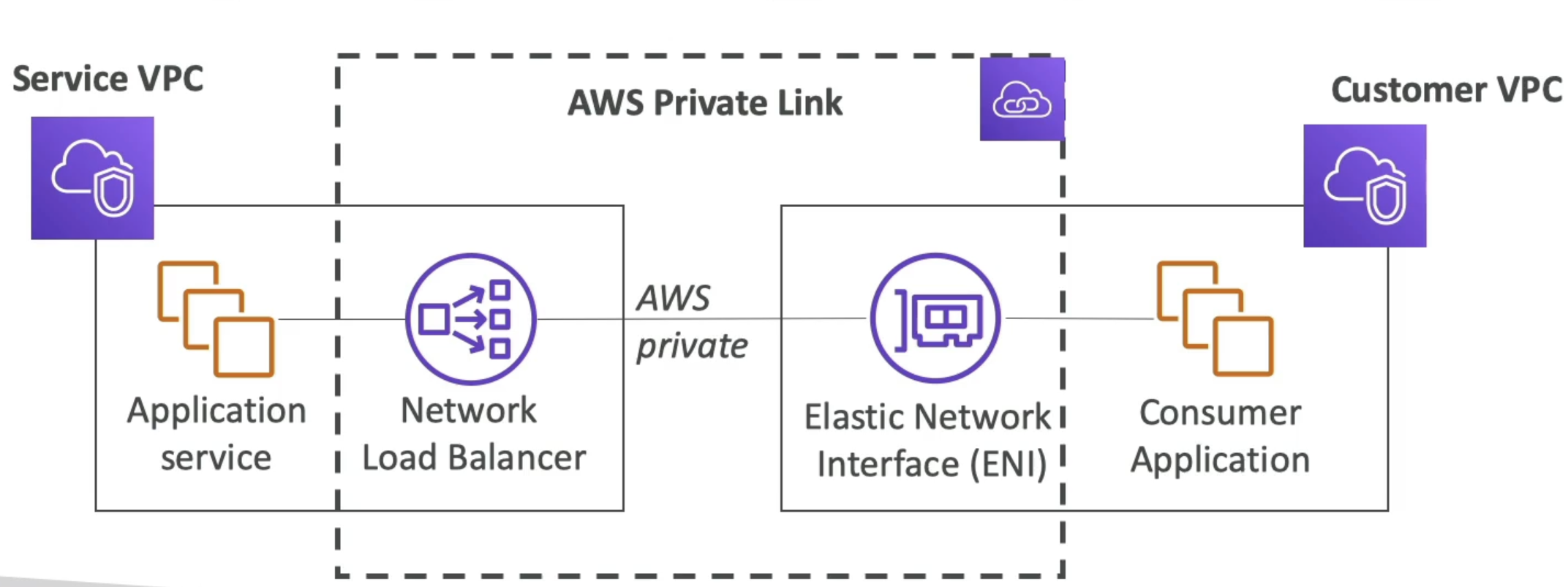
- Requires a NLB in service VPC and ENI in Customer VPC
- AWS Private Link then establishes a private link b/t ENI and NLB
- Client talks to ENI, ENI forwards to NLB, NLB talks to service applications
- This ensures thousands of VPC's (thousands of ENI's) can talk to 1 single NLB in service VPC
- NLB and ENI's can be made multi-AZ as well to be fault tolerant
VPN Solutions
VPN's are just encrypted tunnels over some network (usually public internet) to connect private networks together
On AWS the thought would be that we can use VPN's to connect corporate data centers, corporate phones, or other VPC's together, and the actual resulting VPN software can be a managed service on AWS that we don't have to manage ourselves
Taking the phone example above, most people in an office would have laptops and phones that connect to a single NAT router in their office which has a public IP, and this public IP address is used to access the internet - in this scenario we'd want the VPN's on each device to utilize that single public IP address to connect to AWS VPC by way of the public internet. Over the public internet all of the data would be unreadable as it's encrypted, and then once it reaches AWS VPC it would be decrypted and sent to the appropriate private instances
AWS VPN solutions:
- Site to Site VPN (AWS Managed VPN) would link entire corporate data center to VPC
- There'd have to be some sort of hardware or software VPN appliance on-premise with a public IP to connect to the AWS resource that represents the VPN endpoint on AWS side
- This is known as a Customer Gateway (CGW), and must be created by the customer with a specific public IP address
- Typically the public IP of the VPN appliance on-premise is used
- This is known as a Customer Gateway (CGW), and must be created by the customer with a specific public IP address
- This resource is typically an AWS Virtual Private Gateway (VGW) attached to a specific VPC
- We can then connect multiple VPC's to the VGW VPC via Transit Gateways, and at that point the entire corporate data center can reach multiple VPC's privately
- There'd have to be some sort of hardware or software VPN appliance on-premise with a public IP to connect to the AWS resource that represents the VPN endpoint on AWS side
- AWS Client VPN
- This is similar to the Site to Site VPN above, but it's focused on individual devices connecting to VPC
- This would be used for personal computers, laptops, phones, etc
- The device would need to have VPN Client Software installed (OpenVPN based)
- This uses OpenVPN protocol to connect to a specific ENI in a VPC subnet
- This ENI is the entry point for the VPN connection
- Once connected the personal computer can reach private instances in VPC, and if TGW is used, then any VPC attached to TGW
- AWS Direct Connect (not a VPN, but private connection)
Setting Up Site to Site VPN (AWS Managed VPN)
TLDR;
- Corporate Data Center and VPC that you want to connect over public internet
- They could connect over private IP with infra above, but let's focus on public
- Setup software or harddware VPN appliance on-prem
- On prem VPN should be accessible using a public IP
- AWS Side you setup a Virtual Private Gateway VGW and attach to VPC
- Setup Customer gateway to point the on prem VPN appliance
- Two VPN conncetions (tunnels) are created for redundancy
- At this point the VGW can talk to the Customer Gateway
So we know we need 2 main resources:
- Customer Gateway on-prem (needs public ip address)
- BGP ASN number uniquely identifies the customer gateway
- Default is 65000, but you can change it to something else
- Must be in private ASN range (64512 - 65534)
- Public IP address of on-prem VPN appliance
- This is typically given by the ISP or whoever manages the public IP's for the corporate data center
- After Site to Site VPN is created AWS provides configuration files for many different types of VPN appliances
- These config files have all of the pre-shared keys, tunnel IP's, routing options, etc
- We must add this to the actual hardware / software device to finalize connectivity
- BGP ASN number uniquely identifies the customer gateway
- Virtual Private GW in AWS
- This is a representation of the AWS side of the VPN connection
- Attached to VPC
- ASN is also an option, default is 64512
- Must be in private ASN range (64512 - 65534)
- Then we create a VPN Connection resource that links the two together
- This creates 2 tunnels for redundancy
- Each tunnel has its own public IP address on AWS side
- Each tunnel has pre-shared keys for authentication
- Each tunnel has routing options (static or dynamic using BGP)
- Static routing means you manually enter all of the routes on both sides
- Dynamic routing means BGP is used to share routes automatically
- 2 tunnels are created for redundancy purposes to ensure if one connection is broken it doesn't bring down the connectivity for the company
- Further configurations are helpful such as:
- Route propogation which takes care of updating route tables automatically when using dynamic routing
- It takes any routes from on-premise and adds them to route tables in VPC subnets
- Tunnel options such as:
- Encryption algorithms
- Hashing algorithms
- Diffie-Hellman groups
- Route propogation which takes care of updating route tables automatically when using dynamic routing

Setting Up A Client VPN
- Create a Client VPN Endpoint resource
- This represents the VPN endpoint in AWS
- You can specify authentication options (Active Directory, Mutual Auth with certs, etc)
- You can specify server certs for encryption
- Specify DNS servers to use when connected
- Specify split-tunnel or full-tunnel
- Split-tunnel means only traffic destined for VPC goes through VPN, rest goes through local internet
- Full-tunnel means all traffic goes through VPN
- Create target network ENI in VPC subnet
- This is the entry point for the VPN connection
- You can create multiple ENI's in multiple subnets for HA
- On the actual client device you'll need to
- Download OpenVPN client software
- Download Client VPN configuration file from AWS
- Import config file into OpenVPN client
- Connect using credentials
Route Propogation
- How can instances communicate to VGW?
- Route table!
- Need to set this up so that if an instance tries to reach Corporate Data Center, it gets routed via VGW, and vice versa
- Static routing is easy - you just write all of the IP's in via CIDR
- Any changes must be manually updated
- Dynamic routing is tougher
- Border Gateway Protocol (BGP) allows us to share routes (route table) automatically (eBGP for internet)
- you don't update route table, it's done for us automatically
- Just need to specify Autonomous System Number (ASN) for CGW and VGW
- ASN's are defined and show on each of the 2 gateways, so they're easy to find
- Then you just specify you want dynamic routing and things are updated automatically
- Site To Site VPN and Internet Access
- At this point you now have a public subnet with NAT GW and IGW in AWS VPC
- Can you provide internet access to corporate data center via IGW?
- No!
- What if you use a NAT Instance instead?
- For some f'ing reason yes!
- "Because you manage the software on NAT instance you can"
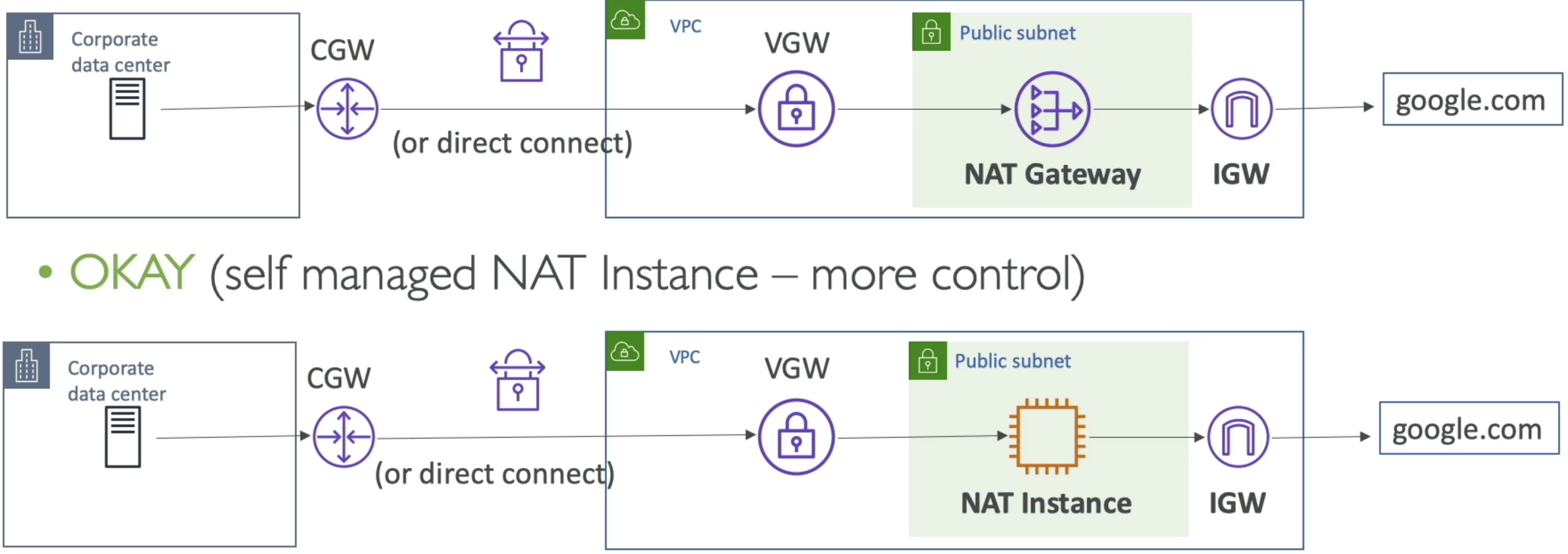
- Another valid solution is to flip things around and have an on-premise NAT in corporate data center, and have private instances in VPC get to internet there
- TLDR; If you own NAT software on EC2 instance or on-premise, you can do this
- A "blackhole" route is a route that goes nowhere
VPN CloudHub
-
Allows us to connect up to 10 customer gateways for each VGW
-
Essentially allows AWS to be a central hub for up to 10 customers on premise networks via VPN
- These customers would all be able to talk to each other as well
-
Low cost hub-and-spoke model
-
Provides secure communication between sites and uses IPSec for secure communication
-
If there are multiple VPC's on AWS, and one single on-premise corporate network with a Customer Gateway, AWS recommends making one VPN connection from each VPC to CGW
-
Another option here is to use Direct Connect Gateway, but that comes later
-
Another option is a Shared Services VPC
- Site-To-Site VPN and then replicate services, or deploy a fleet of proxies on VPC, so that any number of VPC's in AWS account can just peer to the Shared Services VPC
- Transit Gateway hub-and-spoke model so that you don't have to establish all of these VPN's to our corporate data center
AWS Client VPN
-
Connect from personal computer using OpenVPN to private network on AWS and on-prem
-
Can connect to EC2's using private IP
-
Allows us to setup multiple peering architectures:
- AWS S2S VPN or VPC Peering from AWS to Corporate data center
- Setup ENI in private subnet on AWS
- Enable Client VPN to connect to Client VPN ENI
- This would allow personal computers to access corporate data center and AWS VPC in a private connection
-
Internet Access
- Since IGW require public IP addresses you could also setup an ENI in a public subnet
- Connect to ENI via AWS Client VPN from personal computer
- At that point we'd be able to reach the internet via ENI and resources in VPC
- If you have Private Subnets as well, then we'd need NAT GW in Public subnets and ENI in private subnets
- ENI provides entry/exit point in private subnets (as you described in TGW) which is routed to NAT GW
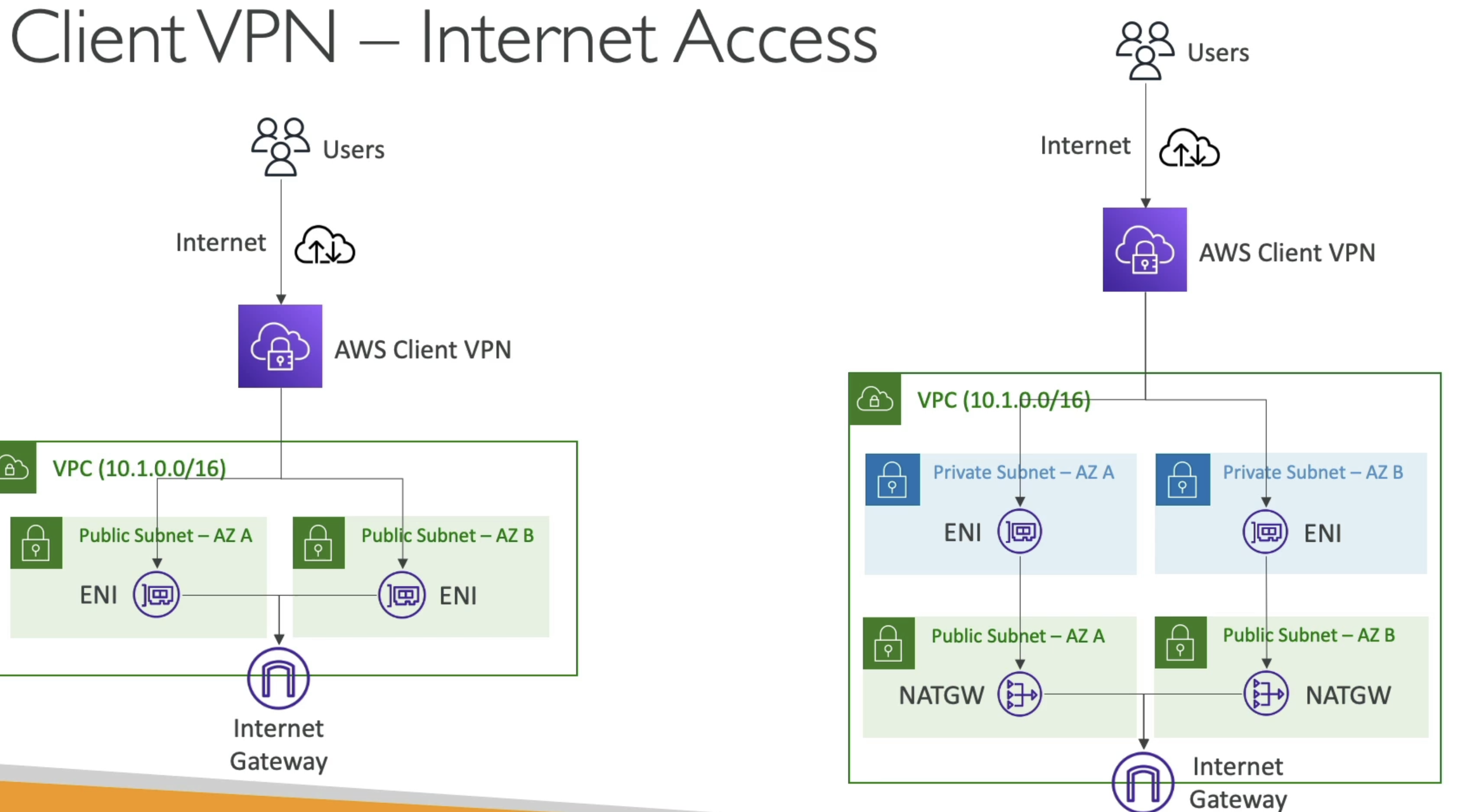
-
What if you had a Transit GW?
- Thena ll of this is possible, and you can setup
- Central hub TGW with ENI
- ENI in private subnets somewhere
- Connect AWS Client VPN to ENI
- Reach any VPC from ENI + TGW
- Thena ll of this is possible, and you can setup
AWS Direct Connect
- Provides a dedicated private connection from remote network (typically company data center) to VPC
- This is different than a VPN which goes over public internet
- Direct Connect is a physical connection from corporate data center to AWS data center
- More reliable, consistent network experience, lower latency, higher bandwidth than VPN
- Can be used with Site to Site VPN for encryption
- Can be used with TGW to connect multiple VPC's in multiple regions to corporate data center
- Completely bypasses ISP
- Provisioning Direct Connect:
- Choose AWS Direct Connect location
- Create a Direct Connect request
- This will end up going to a local provider like Equinix, Megaport, etc
- Once accepted, set up physical connection to AWS Direct Connect router utilizing configuration files provided by AWS
- Set up cross connect between customer router and AWS Direct Connect router
- Create a Virtual Interface (VIF)
- You need to fully reconfigure local network hardware to route traffic to AWS Direct Connect router
- This typically involves BGP routing
- Virtual Interfaces (VIF):
- Public VIF allows us to connect to public AWS endpoints (S3, EC2 services, anything AWS)
- Private VIF conncets to resources in private VPC (EC2, ALB, S3, etc)
- VPC Interface Endpoint can be access through private VIF
- Transit VIF connect to resources in a VPC using a TGW
- Setup as AWS Direct Connect locations with customer cage + AWS Direct connect cage
- Virtual GW on AWS conncets to AWS DC Cage and through to customer router or firewall on corporate data center
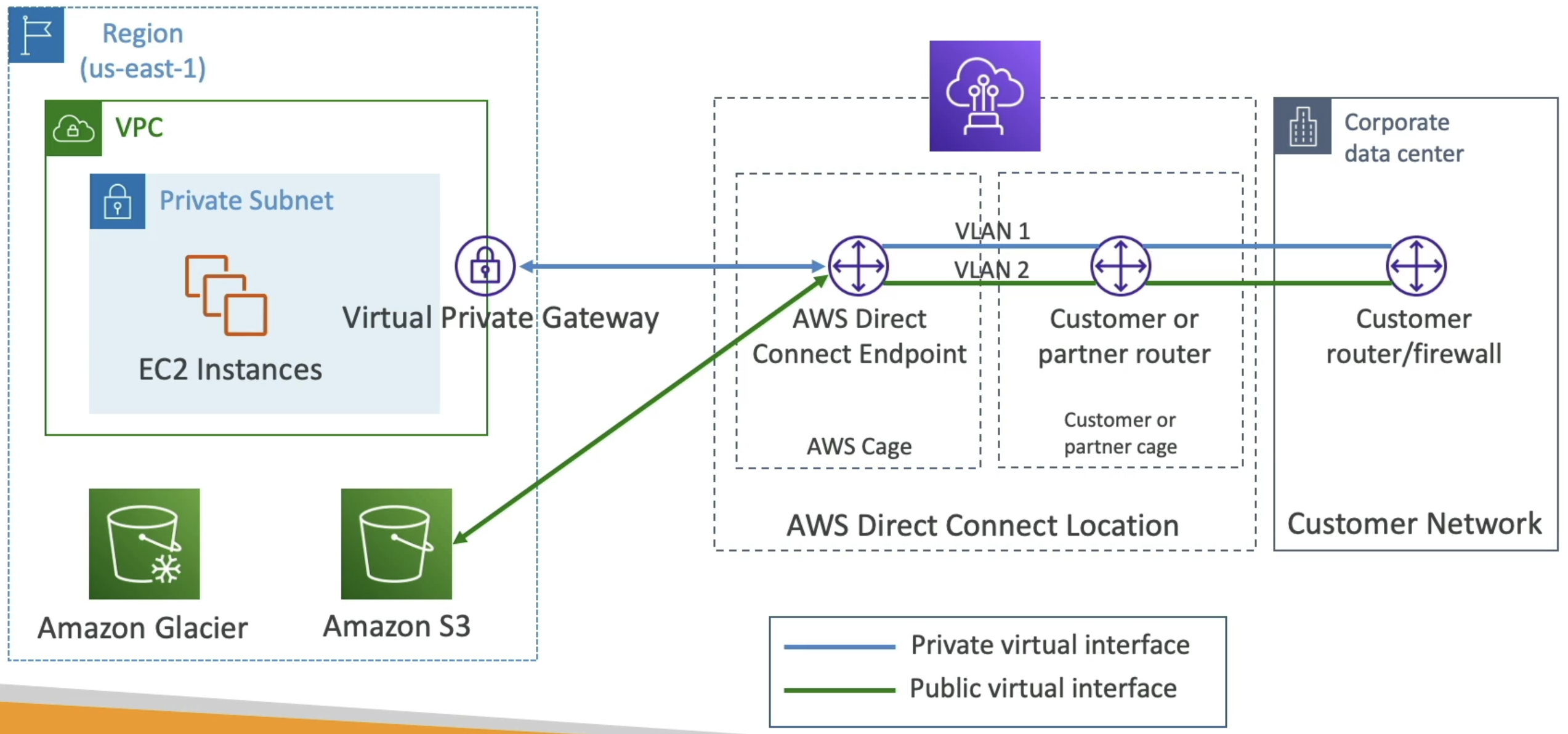
- Connection Types:
- Dedicated connections
- 1 GB/s, 10 GB/s, 100 GB / s capactity with physical ethernet port dedicated to customer
- Takes ~ a month to setup between client and AWS
- Hosted connections
- Capacity added or removed on demand
- 1, 2, 5, 10 GB/s avaialble
- Mostly 50 MB/s, 500 MB / s, up to 10 GB / s
- Dedicated connections
- Encryption
- Data in transit is not encrypted, but it's private
- Direct connect + VPN provides IP Sec encrypted private connection
- VPN over direct connect uses public VIF
- Link Aggregation Groups (LAG)
- Get increassed speed and failover by summing up existing DX connections into a logical one
- Aggregate up to 4 cnxns in active-active mode
Direct Connect Gateway
- If you want to setup a Direct Connect to one or more VPC in many different regions
- Can use a Direct Connect Gateway to remove redundant connections and centralize hub-and-spoke
- you can also connect Direct Connect gateway as another spoke on TGW
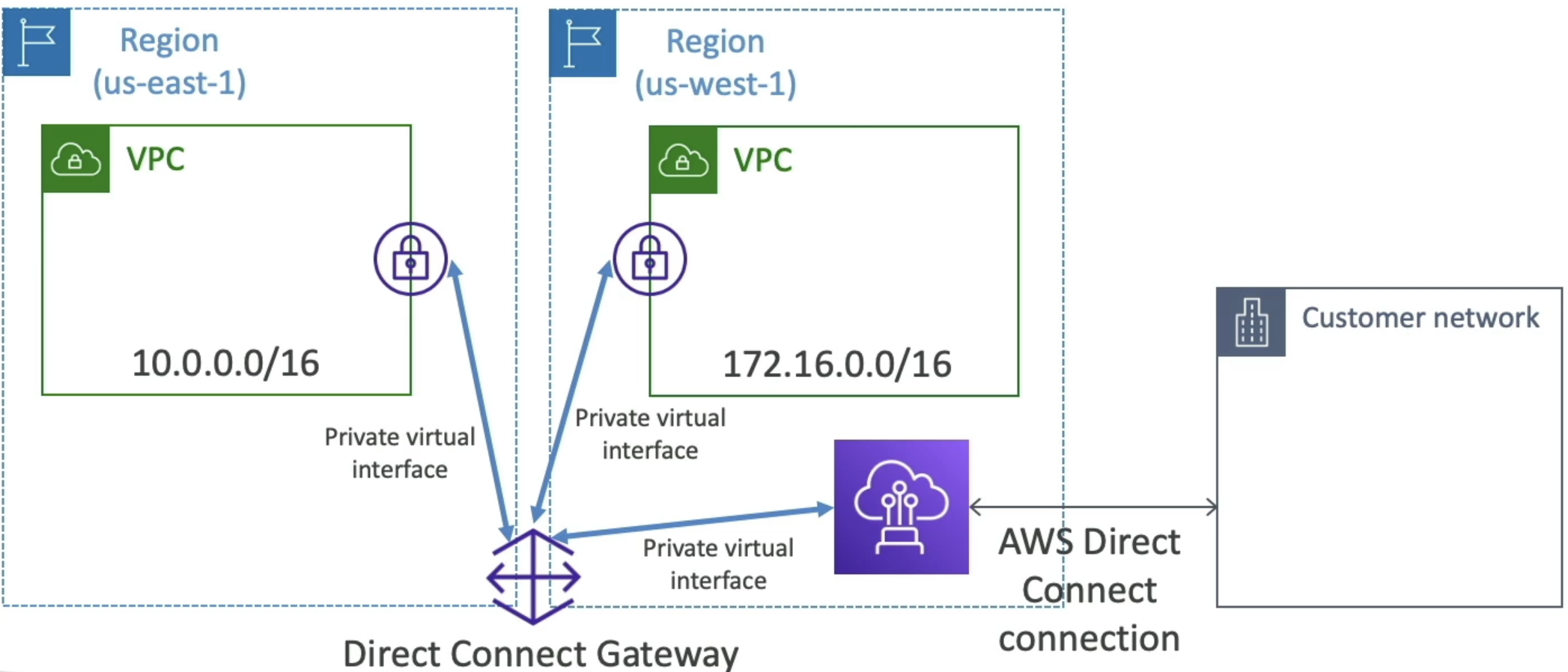
VPC Flow Logs
- VPC level, subnet level, or ENI level flow logs
- Help for troubleshooting
- S3, CW Logs, Kinesis Data Firehose
- Specific format of source, dest, bytes, etc...
- Query using Athena on S3 or CW Logs Insights
AWS Network Firewall
- Protecting networks
- Network Access Control Lists
- Security Groups
- WAF (malicious requests)
- AWS Shield
- AWS Firewall Manager (mgmt across accounts)
- How can you protect VPC in a sophisticated way?
- AWS Network Firewall
- Protect enitire VPC from OSI Layer 3 - 7
- Can inspect from any direction:
- VPC to VPC
- Outbound to internet
- Inbound from internet
- To / From Direct Connect and S2S VPN
- Internally the AWS Network Firewall uses AWS Gateway Load Balancer
- Can be managed across accounts
- Supports 1,000's ofrules
- IP & Port
- Protocol
- Regex pattern matching
- etc
- Common architectures
- Inspection VPC + Egress VPC
- Allows for us to track all requests, give internet access, and allow for on-prem and VPC
- TGW sitting in center
- Everything goes to Inspection VPC via TGW, and back to TGW, and then any internet traffic routed to Egress VPC
- Routing is done entirely in TGW, and ensures all traffic sink into Inspect VPC and then back out to TGW
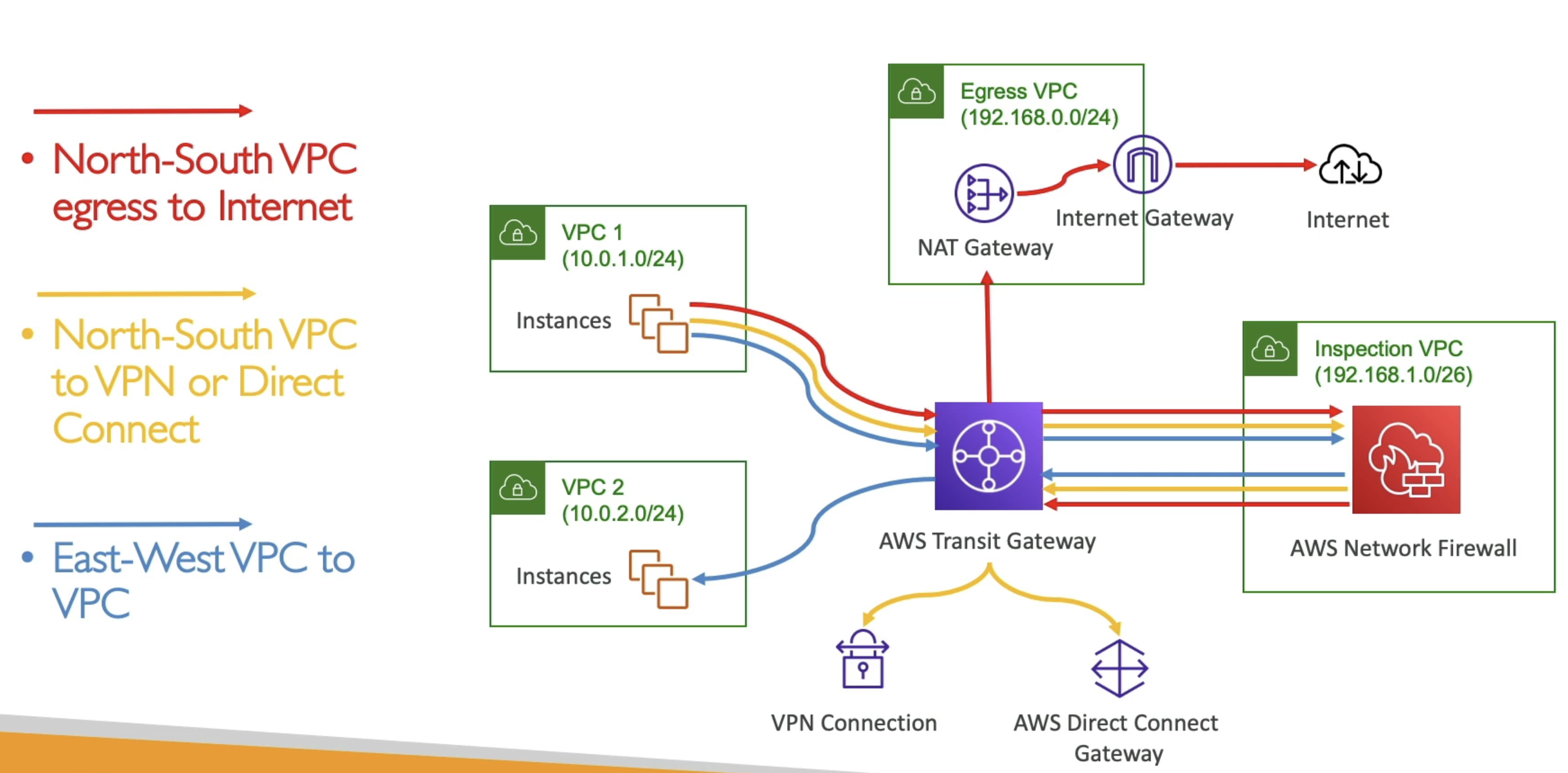
- Inspection VPC + Egress VPC
Costs
Figuring out where you pay for network ingress and egress is typically done for each AWS product, across AZ's, and across regions
- VPC Peering
- Intra-region: $0.01 per GB data transfer out from one VPC to another
- Inter-region: Varies by region, typically 0.09 per GB data transfer out
- Transit Gateway
- $0.05 per GB data processed
- $0.02 per hour per attachment
- VPN
- Site to Site VPN: $0.05 per hour per VPN connection + data transfer
- Client VPN: 0.05 per GB data transfer
- Direct Connect
- Dedicated Connection: 2.25 per hour depending on port speed
- Hosted Connection: 3.00 per hour depending on port speed
- Data transfer rates vary by region and connection type
- VPC Endpoints
- Gateway Endpoints: No additional cost
- Interface Endpoints: 0.01 per GB data processed
- AWS Network Firewall
- 0.065 per GB data processed
For each core AWS service like S3, EC2, RDS, etc, there are specific data transfer costs for ingress and egress that can be found on the respective pricing pages, but the TLDR is that you pay for egress across regions, and sometimes across AZ's, but typically not within the same AZ or region