Concurrency
Concurrency, parallelism, etc are ways to run certain code either in parallel or seemingly parallel (concurrent)
Parallelism executes multiple tasks at the same time Concurrency manages multiple tasks at the same time
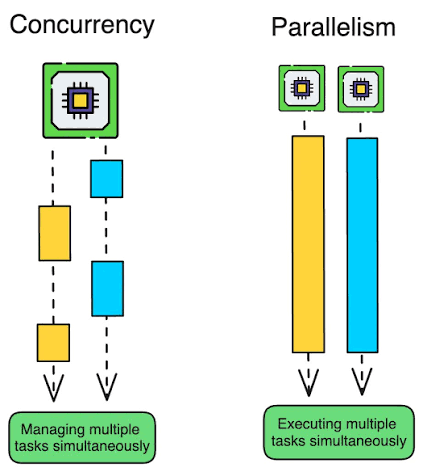
Programs are written to control many sub-processes than can run in parallel, and a process is a way to manage multiple threads / concurrent controls. We can have parallel processes handling things concurrently, but we can't have concurrent processes running in parallel
- Single threaded program running one task is not current not parallel
- Single core CPU running multiple threads is concurrent but not parallel (one core)
- Multi core CPU running multiple processes (parallel), where each process spawns multiple threads (concurrent) is both concurrent and parallel
Process vs Thread
At this point it's too self explanatory for me to write more
Process vs Thread Memory
Each thread is spawned from a process, and so processes are surely heavier than threads in terms of memory footprint
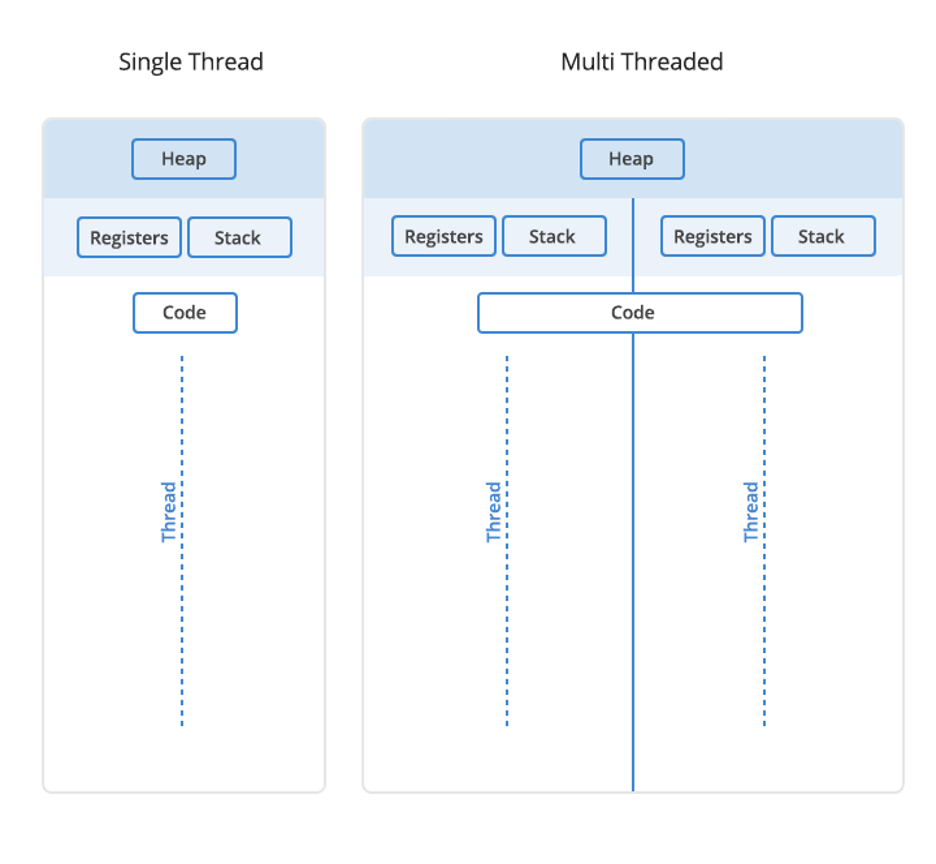
Each process has it's own heap space, which is the dynamic portion of memory that must be manually worked with or garbage collected. Each thread, even if it's the singular thread of a process, will have it's own stack and register space, which is the LIFO type of memory used to track code execution via scoped functions; Stack space is freed when the function ends automatically. New objects are stored in the heap space, and pointers / references to those objects are stored in stack space relative to each function call. In C++, the heap space is explicitly managed by the developer via new and delete keywords, whereas in Java, and other garbage collected languages, the background garbage collection task will sweep the heap and remove any memory no longer apart of the stack
Threads in the same process can access the main processes heap space, but cannot explicitly access each others stack space. Threads share the same overall stack space, but their individual slices of the stack space are different, so they're logically isolated. Furthermore, the heap, open files, sockets, and code of a process are all shared by the underlying threads
Inter Process Communication (IPC)
Since distinct processes have different heap spaces, they can't directly access underlying data of each other. To ensure different processes can transfer data, the actual underlying OS needs to facilitate data movement across the boundary, which means process communication needs to invoke the kernel. The mechanisms to do this are what support inter process communication:
- Pipes and FIFOs: A one-way byte stream where one process writes and another reads (this is what the shell sets up for
ls | grep foo)- A FIFO is a named pipe that lives on the filesystem, so unrelated processes can open it. The data is unstructured, so both sides must agree on where one message ends
- Message queues: The kernel delivers discrete messages instead of a raw byte stream, so you don't have to frame the data yourself. Messages can carry a priority, which fits request-response and event delivery
- Shared memory: Both processes map the same physical memory region and then read and write it directly, with no kernel call per access
- It is the fastest mechanism, but it provides no coordination, so you still need a semaphore to avoid reading half-written data
- Sockets: A bidirectional channel that works the same whether the processes sit on one machine or across a network
- On a single host, a Unix domain socket skips the network stack and stays fast, which makes sockets the default for client-server designs
- Files: One process writes, another reads. It is the slowest option and has no built-in notification, but the data is durable and outlives both processes, which suits logs and checkpoints.
Inter Thread Communication (ITC)
Inter thread communication is similar in thought to IPC except you can store the actual underlying message queue, pipe, or data structure in the heap space of the process so that you don't have to invoke the OS kernel to transfer data
One thread can write to a shared variable, and another thread can read that shared variable, without any coping or OS shenanigans
That's why there are message queue's that are inter-thread which sit in the heap space and require concurrency primitives to manage access - if multiple threads go trying to update the same object in heap space, a race condition can occur
Furthermore, if one process fails, other's don't automatically fail. However if one thread fails, the parent process can be taken down (in certain situations)
Process vs Thread Context Switching
When a CPU wants to pick up another thing to run, be it a process or a thread, it generally needs to save the state of the current one and load the new one. Above it was pointed out that processes are heavier than threads, which means context switching for processes is much heavier than threads
The act of an OS stopping one task and running another is a context switch:
- Save current tasks state (register, stack pointer, counters)
- Load next tasks state
- Switch memory mappings (for processes only, threads share this)
- Invalidate some caches
Processes have to switch entire memory mappings and virtual memory, whereas threads just need to swap some registers and stack pointers. Furthermore, most cache data and "heavy" memory is shared between threads, so it's much cheaper to context switch between threads
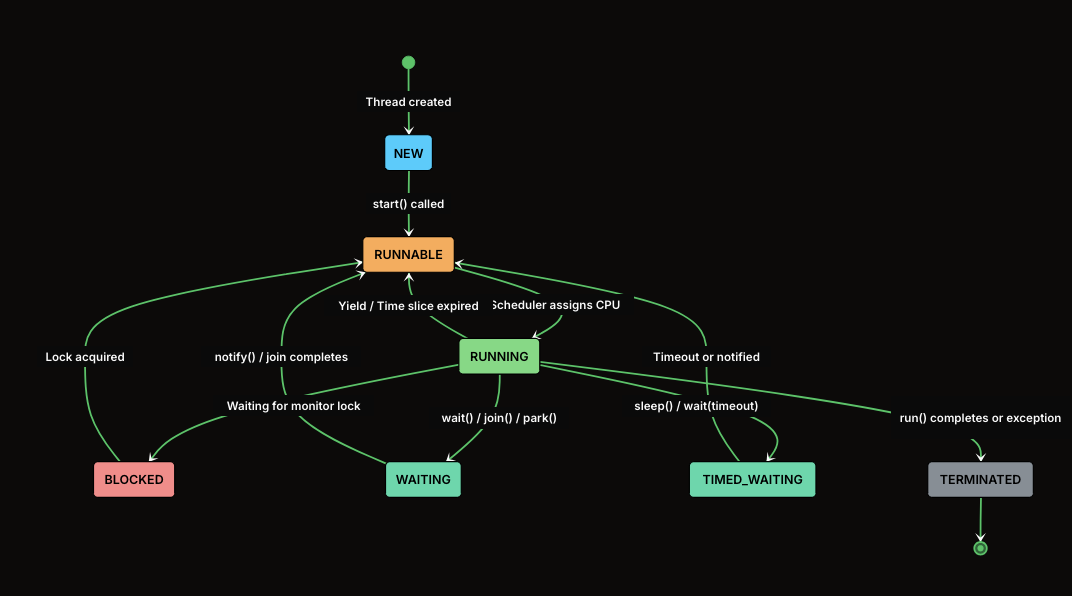
Threads have multiple states:
- Ready when everything has been created in memory, but hasn't started executing
- Running when the CPU has picked it up and it's running, and
- It will continue in this state until it's time slice has expired and it's preempted
- A thread can also voluntarily leave this state during I/O or an async call
- Blocked when it tries to acquire a lock and it can't
- Terminated when it's done
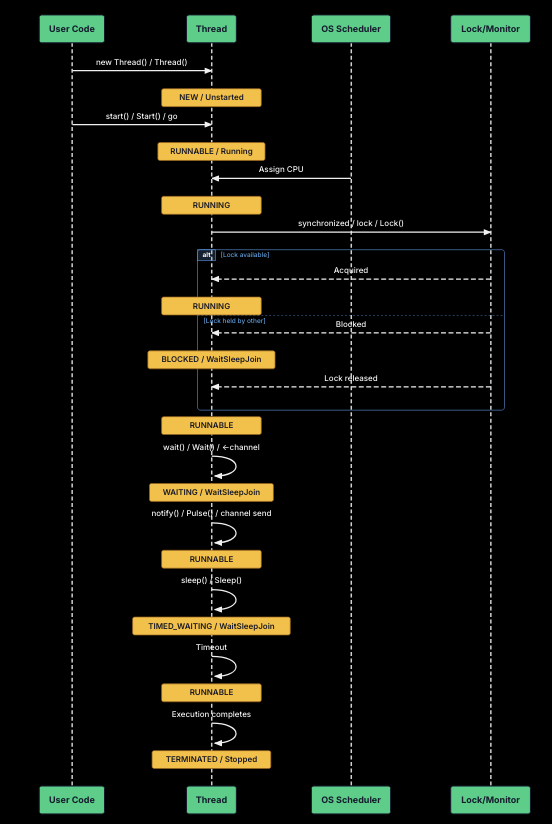
Some languages allow you to work with thread states in an imperative fashion, others like Go, force you into a declarative route and they handle concurrency for you. Both options are valid, you just have to work in the language correctly as it was designed to be used
Hybrid Approach To Use Both
Most real world systems utilize both threads and processes, because there are pros and cons to using both. Might as well use up as many pros as possible since they can be used at the same time
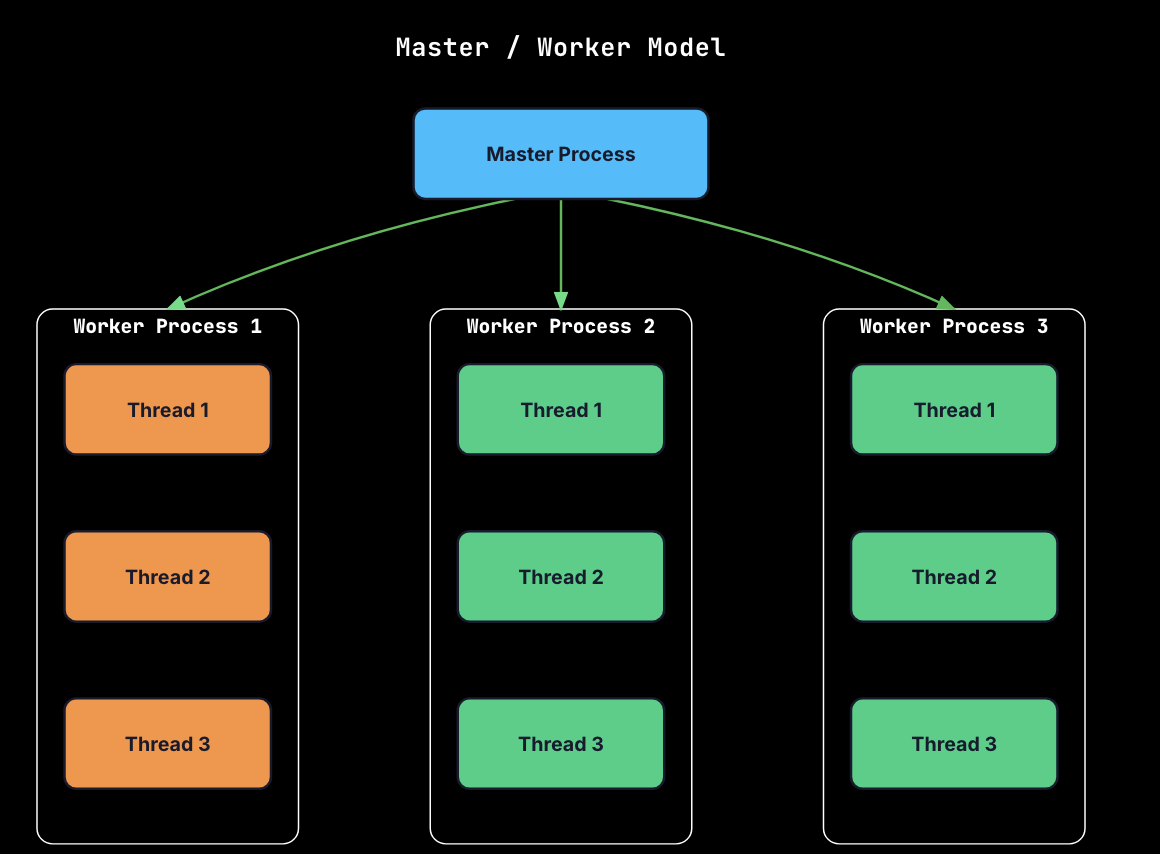
Web servers like NGINX are an easy example where the main control process manages multiple worker processes, each of these worker processes handles many async connections and so they run concurrent threads via an event loop
Process and Thread Pools
Pools are just ways to create a number of processes / threads before they're explicitly needed (usually based on number of CPU cores allocated to a applicatio), and then use them throughout an application lifecycle. Processes are pre-forked to create a fixed pool, and each process is re-used many times just so the expensive process creation part is done only once
Shared State Programming
To ensure we don't hit race conditions, there's multiple patterns that can be used to avoid shared state access
Application Declared Primitives
Mutex
Mutex (Mutual Exclusions) are a way to acquire a singular lock over a resource or piece of memory, and then ensure that only one thread can access a critical section at any given time. This critical section may encompass many variables, objects, or portions of application logic
Show Scripts
#include <mutex>

// UNSAFE: Race condition
class UnsafeCounter {
    int count = 0;
public:
    void increment() { count++; }  // Not atomic!
    int getCount() { return count; }
};

class SafeCounter {
    int count = 0;
    std::mutex mtx;
public:
    void increment() {
        std::lock_guard<std::mutex> lock(mtx);
        count++;
    }

    int getCount() {
        std::lock_guard<std::mutex> lock(mtx);
        return count;
    }
};
# UNSAFE: Race condition
class UnsafeCounter:
    def __init__(self):
        self.count = 0

    def increment(self):
        self.count += 1  # Not atomic!

    def get_count(self):
        return self.count

# SAFE: Using Lock
class SafeCounter:
    def __init__(self):
        self.count = 0
        self.lock = threading.Lock()

    def increment(self):
        with self.lock:
            self.count += 1

    def get_count(self):
        with self.lock:
            return self.count
Mutexes are synchronization primitives that provide mutual exclusion! When a thread acquires (locks) a mutex any other thread that tries to acquire the same mutex will move into blocked state, and can't continue until the initial thread releases unlocks it and it locks the mutex itself
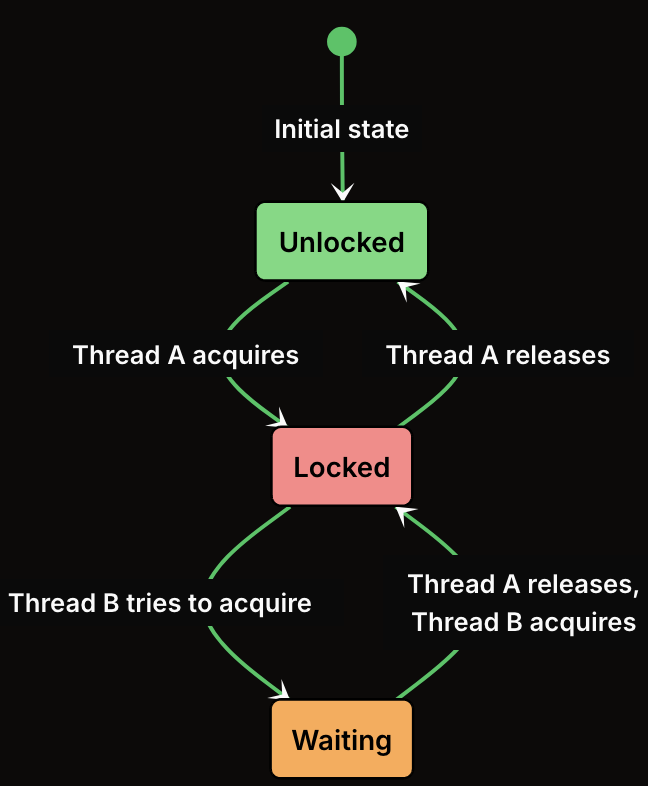
Mutexes solve critical sections which are defined as pieces of code that read or write to shared state that multiple threads can access. If more than one thread at any time executes these sections at the same time we can end up with race conditions
Semaphore
Show Scripts
#include <mutex>

// UNSAFE: Race condition
class UnsafeCounter {
    int count = 0;
public:
    void increment() { count++; }  // Not atomic!
    int getCount() { return count; }
};

class SafeCounter {
    int count = 0;
    std::mutex mtx;
public:
    void increment() {
        std::lock_guard<std::mutex> lock(mtx);
        count++;
    }

    int getCount() {
        std::lock_guard<std::mutex> lock(mtx);
        return count;
    }
};
# UNSAFE: Race condition
class UnsafeCounter:
    def __init__(self):
        self.count = 0

    def increment(self):
        self.count += 1  # Not atomic!

    def get_count(self):
        return self.count

# SAFE: Using Lock
class SafeCounter:
    def __init__(self):
        self.count = 0
        self.lock = threading.Lock()

    def increment(self):
        with self.lock:
            self.count += 1

    def get_count(self):
        with self.lock:
            return self.count
Object Level Primitives
Object level shared state means the object of themselves provide the ability to write shared state programs over them without the need of explicit locks or application level patterns
Atomic Operations
Atomic operations provide lock free thread safety out of the box, but each language provides different operations and primitives that are atomic
Show Scripts
#include <atomic>

class AtomicCounter {
    std::atomic<int> count{0};
public:
    void increment() {
        count.fetch_add(1, std::memory_order_relaxed);
    }

    int getCount() {
        return count.load(std::memory_order_relaxed);
    }
};
from multiprocessing import Value
import ctypes

class AtomicCounter:
    def __init__(self):
        self.count = Value(ctypes.c_int, 0)

    def increment(self):
        with self.count.get_lock():
            self.count.value += 1

    def get_count(self):
        return self.count.value
Immutability
Immutability is a trait of an object itself where it cannot be altered without creating a new version of it. Meaning thing = object(), thing = object.change() would produce a brand new thing in memory, not update the object in it's actual memory
Show Scripts
// Immutable class - no synchronization needed
class ImmutablePoint {
    const int x_;
    const int y_;

public:
    ImmutablePoint(int x, int y) : x_(x), y_(y) {}

    int getX() const { return x_; }
    int getY() const { return y_; }

    // Returns a new object instead of modifying
    ImmutablePoint move(int dx, int dy) const {
        return ImmutablePoint(x_ + dx, y_ + dy);
    }
};

// Usage - safe to share across threads without locks
void example() {
    const ImmutablePoint point(10, 20);
    ImmutablePoint newPoint = point.move(5, 5);  // Creates new object

    // Can safely pass to multiple threads - no mutation possible
    std::thread t1([&point]() {
        int x = point.getX();  // Safe read
    });

    std::thread t2([&point]() {
        int y = point.getY();  // Safe read
    });

    t1.join();
    t2.join();
}
from dataclasses import dataclass

# Immutable class using frozen dataclass - no synchronization needed
@dataclass(frozen=True)
class ImmutablePoint:
    x: int
    y: int

    # Returns a new object instead of modifying
    def move(self, dx: int, dy: int) -> 'ImmutablePoint':
        return ImmutablePoint(self.x + dx, self.y + dy)

# Alternative: Using named tuples (inherently immutable)
from typing import NamedTuple

class Point(NamedTuple):
    x: int
    y: int

    def move(self, dx: int, dy: int) -> 'Point':
        return Point(self.x + dx, self.y + dy)

# Usage - safe to share across threads
point = ImmutablePoint(10, 20)
new_point = point.move(5, 5)  # Creates new object, original unchanged
# point.x = 100  # This would raise FrozenInstanceError