DNS
DNS
DNS Servers just allow you to query a server to find the IP address for a given website
Since computers can't actually talk between google.com and facebook.com, they need to be resolved to IP addresses for usage later on
Most of the time different cloud providers like AWS will provide solutions like Route53 that take care of the actual updating the list of IP(s) for a website
This is how you can have google.com resolve to 162.0.8.10 and then 162.0.8.11, and it still is the same website (google would have multiple servers for serving content)

Things get weird in the future with sessions, sticky sessions, caching, cookies, and regional / location differences, but that's all covered in other docs like Route53 above
Some DNS Vocab
- Name Servers: Respond to users queries with IP addresses
- They cache content, are distributed, and are basically big K-V stores
- Alias: An alternative name for a domain or hostname
- It will point to another (canonical) hostname
- i.e. alternate name
- Authoritative DNS: A DNS server that holds the definitive up-to-date records for a domain
- This is what will answer queries about domains it's responsible for
- i.e. server with official records
- Canonical Hostname: The true of primary name of a host
- CNAME
- i.e. the real, official name of the host
- Resource Records:
- Store domain name to IP address mappings in the form of Resource Records (RR)
- RR's are smallest unit of information that can be requested from name servers
- Different type of RR's:
- Type A: Provides hostname to IP address
- Type NS: Provide the hostname that is the authoritative DNS for a domain name
- i.e provides the Name Server (NS)
- Type CNAME: Provides the mapping from alias to canonical hostname
- Type MX: Provides the mapping of mail server from alias to canonical hostname
- Store domain name to IP address mappings in the form of Resource Records (RR)
| Type | Description | Name | Value | Example |
|---|---|---|---|---|
| A | Provides the hostname to IP address mapping | Hostname | IP address | (A, relay1.main.educative.io, 104.18.2.119) |
| NS | Provides the hostname that is the authoritative DNS for a domain name | Domain name | Hostname | (NS, educative.io, dns.educative.io) |
| CNAME | Provides the mapping from alias to canonical hostname | Hostname | Canonical name | (CNAME, educative.io, server1.primary.educative.io) |
| MX | Provides the mapping of mail server from alias to canonical hostname | Hostname | Canonical name | (MX, mail.educative.io, mailserver1.backup.educative.io) |
How Does DNS Work
Ideally you can answer:
- How does it actually get me an IP address
- How are they updated for companies
- How does it scale
- How is it robust
DNS Hierarchy
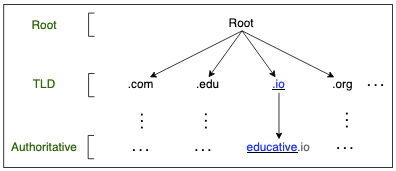
It is not a single server, it's a completely distributed infrastructure with name servers and servers of name servers, which all sit at different hierarchies
There are mainly 4 server types:
- DNS Resolver
- Resolvers initiate the querying sequence, and they forward requests to other DNS name servers
- DNS resolvers typically lie within the premise of the users network
- AKA local or default servers
- As they sit on computers, local network, or close to ISP
- Root-Level Name Server
- These receive requests from local servers (DNS Resolvers)
- These will maintain name servers based on top-level domain names
.com,.org,.eduetc are all top-level domain names- Searching for
educative.io, the request starts at the root-level domain name server that holds all IP addresses for.iodomains
- Top-Level Domain (TLD) Servers
- These hold all IP addresses of authoritative name serverrs
- Essentially these are a step below root level, and will go from
.ioeducative.io - The querying party gets a list of IP addresses that belong to the authoritative servers of the org
- Authoritative Name Servers
- These are the orgs DNS name servers that provide the IP addresses of the web or app servers
- These would hypothetically be served by Educative, and once reached they will dish out the actual
144.10.8.0IP address
DNS Query Process
When you type in educative.io in your browser, the following happens:
- The browser checks its cache for the IP address of
educative.io- If found, it uses that IP address to connect to the server
- If not found, it proceeds to the next step
- The browser sends a DNS query to the local DNS resolver (usually provided by your ISP)
- The local DNS resolver checks its cache for the IP address of
educative.io- If found, it returns that IP address to the browser
- If not found, it proceeds to the next step
- The local DNS resolver sends a query to a root-level DNS server
- The root-level DNS server responds with the IP address of a TLD server for the
.iodomain - The local DNS resolver sends a query to the TLD server for
educative.io - The TLD server responds with the IP address of the authoritative DNS server for
educative.io - The local DNS resolver sends a query to the authoritative DNS server for
educative.io - The authoritative DNS server responds with the IP address of the web server for
educative.io - The local DNS resolver caches the IP address for future queries and returns it to the browser
- The browser uses the IP address to connect to the web server and load the website
Highly Available Services on DNS
DNS, for most reasons any developer cares about, needs to help with high availability and service discovery - in Kubernetes and other orchestration platforms this is done via service registries and internal DNS servers that can resolve services to IP addresses
TODO: Add more on actually writing app and infra code that uses DNS for service discovery and high availability
TLDR; The AWS DNS Page goes into more detail about how AWS Route53 and ELB's work together to provide high availability via DNS, and is probably enough - can probably delete this page