Cloudflare Load Balancer Docs
Cloudflare Load Balancers
This is stated in main references page, but a majority of this is from Cloudflare Developer Docs on Load Balancing, and I'm just re-purposing it for my own notes.
Cloudflare is essentially one of the largest network / network solutions providers in the world - some crazy statistics like "Cloudflare operates within ~50 ms of ~95% of the world’s Internet-connected population" and "It is one of the largest global networks, with data centers spanning over 330 cities and interconnection with over 13,000 network peers."
Cloudflare LB's can handle:
- Load balancing
- Proxying
- DDoS protection
- Some DNS capabilities
- CDN / Caching
- Bot management
- WAF
- Health monitoring / pinging (TCP, UDP, ICMP, SMTP, HTTP(S), LDAP)
- etc..
Vocabulary
- Endpoint: A service or piece of hardware that intercepts and processes incoming public or private traffic
- Load balancing can be used for more than just web servers, and it can come in many forms specifically multiple software, and even hardware, solutions
- Endpoint here even covers things like reverse proxies, jump boxes, and routers
- Steering: Steering is a load balancers main function, it's also known as routing in other areas, and it's the process of handling, sending, and forwarding requests based on a set of policies
- These policies take many factors into account, including Layer 4 vs 7 most of the time
- Layer 7 (AKA application layer) includes URL, HTTP headers, endpoint latency / saturation, responsiveness, capacity, etc
- HTTP(S) based services
- Helps to cover DDoS, bot protection, WAF, CDN's, and more
- Layer 4 (AKA transport layer) includes things like protocol, IP:Port mappings, and devices and is responsible for end-to-end communication between two devices
- Network devices on Layer 4 can support a much broader set of services and protocols compared to Layer 7
- Layer 7 (AKA application layer) includes URL, HTTP headers, endpoint latency / saturation, responsiveness, capacity, etc
- These policies take many factors into account, including Layer 4 vs 7 most of the time
- SSL/TLS Offboarding**: Secure Socket Layer (SSL) and Transport Layer Security (TLS) are cryptographic protocols used to secure connections over the internet
- SSL + TLS offloading is a technique in load balancers and web servers to handle the SSL / TLS encryption + decryption process without affecting an endpoints performance
- Ultimately helps to improve backend server performance, simplifies certificate management, and enhaces scalability by offloading (en/de)cryption to specific devices so that application endpoints don't have to worry about this
- Once a request is "in the backend" all of the communication can be HTTP based without worrying too much about encrypted communication (unless you're jumping across networks)
Problems Solved By Load Balancing
Lots of things are solved by Load Balancing, but the 3 main ones covered are:
- Performance: Ensuring the application responds to requests in a timely manner
- Availability: Maintaining uptime for app, so it can always respond
- Scalability: Growing, shringking, or relocating app resources based on user behavior and demand
Performance
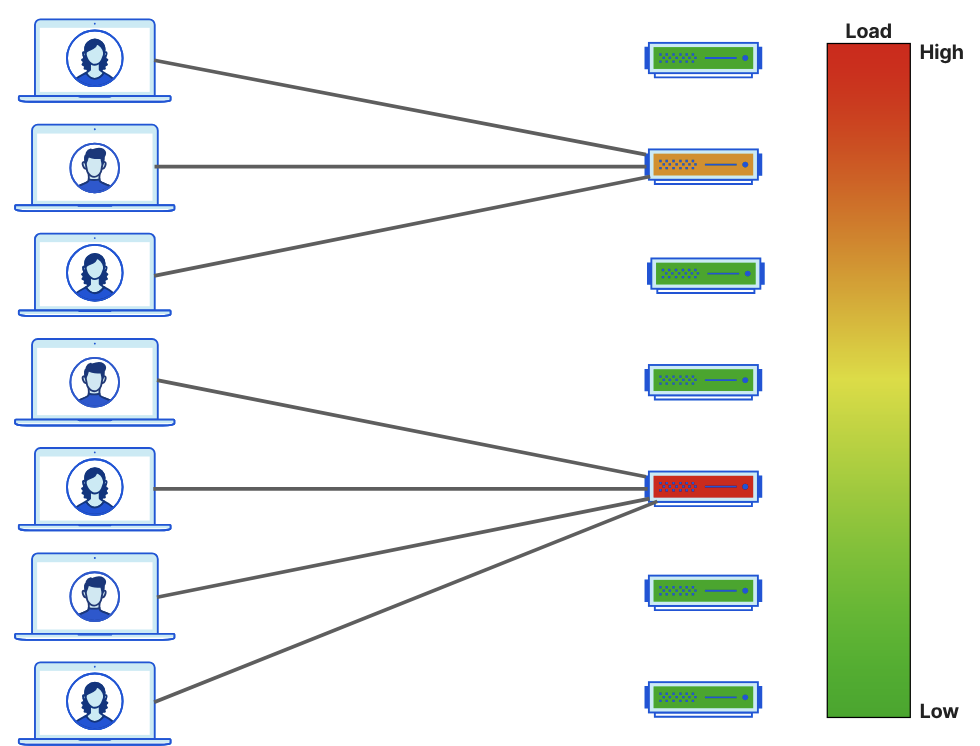
The most common scenario is when a backend server is "hot" and too much load is placed onto a specific endpoint
This may happen by chance, from bad steering / routing rules, from specific geo-location factors, a bad memory leak, or many other things, but ultimately when a backend server is overloaded you should do everything you can to route new requests to other servers!
Other solutions exist like scaling up the webserver (vertical scaling), but this leads to downtime (low availability), and the org ends up paying for these extra resources when they don't need them! Orgs can also deploy multiple endpoints, and this is where load balancing then comes in - how can you steer / route traffic to the correct location in these scenarios?
Below is the "bad"
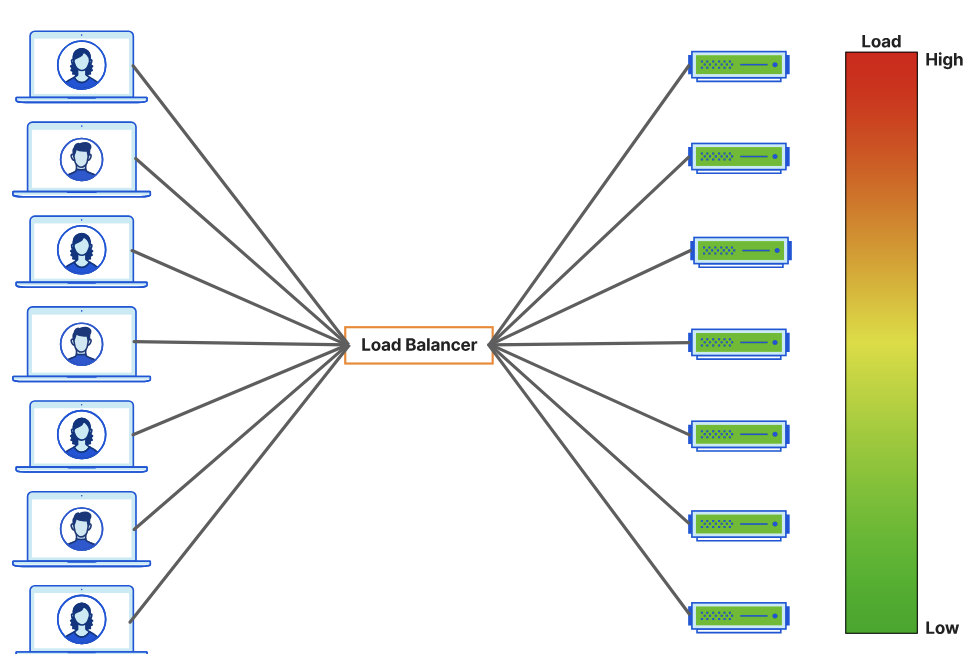
And then this is the "good"!
Geolocation is also a factor, as a client server that's US-2-US can expect a Round Trip Time (RTT) of ~20ms, but US-2-APAC could expect ~150ms - this is more than 7x as much! These small things affect user bounce rate, SLA's, overall availability, and other metrics that you must measure
As LB's can pass traffic to a less busy endpoint, they can also pass traffic to a geographically closer one too
Availability
Service availability encompasses both unintentional and intentional downtime of endpoints behind a load balancer. There are thousands of things that can contribute to these downtimes, and instead of solving for all of them you should instead design our system to assume they'll happen, and to handle them appropriately.
Load balancers help to solve this by always monitoring the health of our endpoints - they're the reason you have /ping or /heartbeat endpoints, so that something can poll our backend services to ensure they're still there! These can be ICMP (ping) tests, full on TCP connectivity checks, HTTP GETS, or a range of other things that you need to test (a server can respond to pings but fail TCP checks, however TCP checks are much more costly). If an endpoint fails this check, it's marked as degraded, and few or no more requests will go to it (based on configuration). At this point it's up to our application control plane to spin up more backend servers and register them with the load balancer.
Scalability
Traffic increases and decreases - some things go viral, some things are B2B and only used 9-5, and other things get randomly pressured by bots. During traffic increases orgs typically want more endpoints to handle requests, but they don't want to pay for these during low periods - that's where horizontal scaling comes in.
This again has factors of geo-location, where services may go up and down during business hours as the sun travels around the globe! you don't want APAC users having to use US endpoints, and unnecessarily spinning up more US endpoints because there's a perceived network lag simply because the request has to go around the globe.
Types of Traffic Management
There are two layers for load balancing for global apps
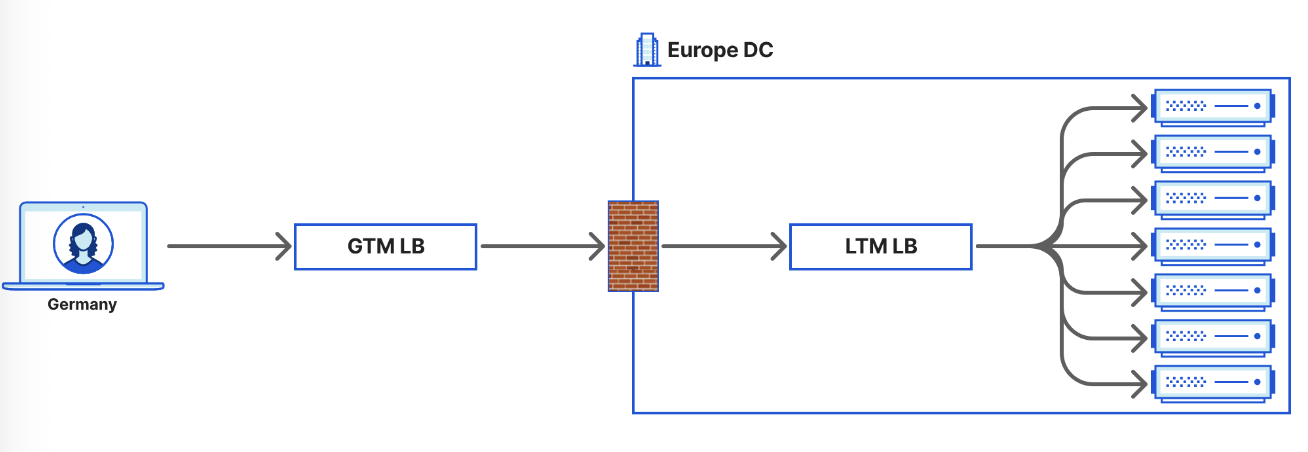
- Global Traffic Management (GTM) aka Global Server Load Balancing (GSLB) routes traffic from world to the correct region / data center
- Private Network Load Balancing* aka Server Load Balancing (SLB) routes traffic within a region / data center
Global Traffic Management
Typically responsible for routing requests, generally from the internet, to proper region or data center
Most of these load balancers operate at / alongside DNS layer which allows them to:
- Resolve a DNS request to an IP address based on geo / physical location
- i.e. to send requetss to the geographically closest web server to serve the request
- Provide the IP of the endpoint or service closest to the client, so it can connect
- Proxy traffic
- Perform HTTP inspections
- Alter HTTP / L7 parameters / headers inter-region
Altogether, these global load balancers are meant to route traffic to specific regions / data centers for further load balancing
Private Network Load Balancing
PNLB steers traffic within a data center or geographic location - these load balancers will route traffic efficiently to specific web app endpoints for processing
Can be responsible for:
- Load balancing
- SSL / TLS offloading
- Content switching
- Other app delivery functions
GTM load balancer sends traffic to Europe data center, and inside of there the LTM LB will route to actual servers for processing