Encryption
Cryptography Overview
- Symmetric keys have a single key which is used to encrypt and decrypt messages
- Asymmetric encryption utilizes 2 keys (public and private)
- Public key can be out in the open and used to encrypt messages
- Private key is kept secret and used to decrypt messages
- Asymmetric encryption is quite slow, so typically it's used to transmit the symmetric keys once, and the rest of the communication is secured via symmetric encryption
Hashing is a one way function that converts data into a fixed length string of characters - it doesn't involve keys
- Typically used for integrity and authentication
- Shows that data hasn't been altered, and that the data is from a trusted source
Data at rest means data stored on disk, while data in transit means data being transmitted over a network, and data encryption at rest means encrypting data stored on disk to protect it from unauthorized access, while data encryption in transit means encrypting data being transmitted over a network to protect it from interception and eavesdropping
Public Key Infrastructure
Hierarchy of digital security certificates and certificate authorities (CA's) that verify and authenticate the validity of each party involved in an electronic transaction
Certificates are issued by a certificate authority (CA) and contain:
- Public key
- Information about the entity the certificate is issued to
- Information about the CA that issued the certificate
- Expiration date
- Digital signature of the CA (hashes of the certificate data encrypted with CA's private key)
Private untrusted CA's can be created using AWS Certificate Manager Private CA (ACM PCA), and they typically are used by large companies for internal applications and services that require secure communication - however these certificates won't be trusted by public browsers and operating systems by default, so they are only suitable for internal use within an organization (when you try to pip install from a company computer and it fails b/c no one trusts your companies palo alto proxy certificate)
PKI's main components:
- Certificate Authority (CA): Issues and manages digital certificates
- Registration Authority (RA): Verifies the identity of entities requesting certificates
- Digital Certificates: Contain public key and identity information
- Certificate Revocation List (CRL): List of revoked certificates
- Each PKI can be hierarchical with a root CA at the top, intermediate CA's below it, and end-entity certificates at the bottom
- PKI's can be assigned to users, devices, applications, or services to allow for secure communication and authentication
- Certificate lifecycle:
- Requesting
- Issuance
- Usage
- Revocation
- Certificate revocation list (CRL)
- Online Certificate Status Protocol (OCSP)
- Renewal
- Types:
- Wildcard Certificates: Secure multiple subdomains with a single certificate (e.g.,
*.example.com)- This covers any domain like
app.example.com,mail.example.com, etc...
- This covers any domain like
- Wildcard Certificates: Secure multiple subdomains with a single certificate (e.g.,
SSL/TLS and MITM
When a user accesses a website, data is transferred between the client (browser process on laptop) and webserver - this data isn't safe in the world, because there are ways to read what's being sent to and from wifi routers in the world
If you want to send your credit card information over the internet in a public cafe, at some point you're transmitting wireless information. Any standard laptop can detect all active wifi network in range, and intercepting actual traffic can be done with laptops in monitoring mode using some specialized software. If this is encrypted, it's garbage, if it's not you can directly see all HTTP traffic being sent over the wifi signal. Most websites themselves enforce SSL / TLS so even if a network is unsecured, the traffic would be mostly random noise
SSL and TLS help to mitigate those risks by being the ways clients and servers encrypt traffic between themselves via SSL certificates - the certificate includes:
- Name of the entity to which the certificate was issued
- Public key required for encryption and digital signature verification
- Digital signature created with the private key of the certificate issuer
SSL is a protocol overall, and it is used to secure HTTP traffic (to become HTTPS). SSL is now deprecated in favor of TLS
- Secure Socket Layer (SSL) is used to encrypt connections
- Client to Server
- One or Two Way
- Transport Layer Security (TLS) is a newer version of SSL
- Basically all certs are TLS, but a lot of people refer to it as SSL
- Public SSL/TSL certs are provider by Certificate Authorities (CA)
- SSL certs have an expiration date (you set)
- Types:
- Asymmetric Encryption is expensive (lots of CPU time to compute it)
- Symmetric Encryption is cheaper, and only uses one key
- Symmetric encryption uses the same key to encrypt and decrypt
- So:
- Asymmetric handshake is used to exchange a per-client Symmetric random key, and then Client and Server use Symmetric key to talk in the future
- This means that the asymmetric handshake is used strictly to create a shared session key, which can be used as a symmetric key to encrypt and decrypt information from the client to the server and vice versa
- The master key (or session key) in the SSL/TLS flow is a symmetric encryption key that is shared between the client and the server after the handshake process. It is used to encrypt and decrypt all subsequent communication between the client and server during the session.
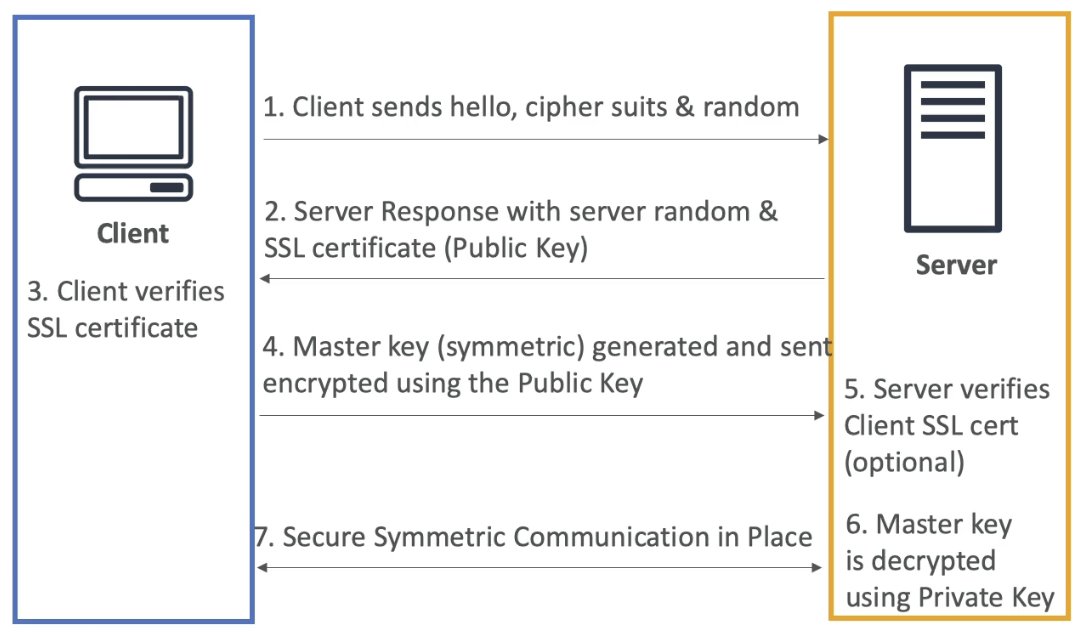
SSL/TLS Flow
Everything from 1-3 is public plaintext, and everything afterwards, from 4+, is encrypted
- Client Hello:
- The client sends a "hello" datagram message to the server, including:
- TLS version the client supports
- Supported cipher suites (encryption algorithms)
- A randomly generated value (client random)
- Server Hello:
- The server responds with:
- Its own randomly generated value server random
- Its SSL/TLS certificate, which contains the server's public key
- Certificate Verification:
- The client verifies the server's SSL/TLS certificate using a trusted Certificate Authority (CA) or other means
- If the certificate is valid, the handshake continues
- Client browser has a trust store where it stores certificates from popular Certificate Authorities, and that's how browsers know they're talking to the CA's themselves
- Master Key Generation:
- The client generates a random string of bytes called a pre-master secret (or directly a master key, depending on the protocol version)
- The pre-master key is encrypted using the server's public key (from the servers SSL certificate) it sent in 2.2
- Nothing else can decrypt this message outside of the private key which is stored (hopefully) only on the server
- The encrypted pre-master key is sent to the server
- No one snooping could decrypt what this pre-master key is at this point, only the server can
- Master Key Decryption:
- The server uses its private key to decrypt the pre-master key
- Both the client and server then derive the master key from the pre-master key, the client random, and the server random
master_key = g(pre_master, client_random, sever_random)- Server and Client Random could hypothetically be known by a MITM, but the pre-master key would be unreadable (as MITM can't decrypt the pre-master secret encrypted by the public key)
- Session Encryption:
- The master key is used to derive symmetric encryption keys for encrypting and decrypting all subsequent communication
- Both the client and server switch to symmetric encryption for the rest of the session
- Optional Client Authentication:
- If mutual authentication is required, the server may request the client's SSL/TLS certificate for verification
- Secure Communication:
- The client and server use the symmetric encryption keys (derived from the master key) to securely exchange data
Key Points About the Master Key
- The master key is never transmitted in plaintext
- It is derived from the pre-master key, client random, and server random
- It ensures that all communication after the handshake is encrypted and secure
So ultimately, by the use of public and private key encryption, TLS will utilize asymmetric encryption to derive master keys which are then used to securely create symmetric keys on both client and server for future communication
SSL on Load Balancers
- SSL Server Name Indication (SSL SNI) solves the problem of hosting multiple SSL Certificates for multiple websites on one computer
- One single VM can host websites 1-5, and each can have it's own SSL Certificate registered with the CA
- Without SNI, servers wouldn't know which certificate to present during SSL handshake
- Then, when a client goes to connect to one of the 5 websites, it can specify that hostname and the web server will use the corresponding SSL Certificate in the asymmetric handshake
- This is how both ALB, NLB, and Cloudfront are able to do SSL certification and offloading for multiple backend services
- SSL Offloading is the idea that ALB, NLB, or CloudFront can do SSL handshake, encryption, and decryption, and that logic can be removed from the application itself
- Each LB / Cloudfront will host a certificate for each of the backend services, and will use that for SSL verification and encryption / decryption
- The SSL Certificates are usually tied to target groups, where the target groups are related to hostname URL's
- This does not work for Classic Load Balancers, and for those we'd need to host a load balancer per domain, and have the singular SSL certificate on each load balancer
Preventing MITM Attacks
- Don't use HTTP, use HTTPS
- This will ensure traffic is encrypted, and any "server" you're talking to has been validated with a CA
- Since data is encrypted with HTTPS, attacker can't read or modify data
- Use a DNS with DNSSEC compliance
- Domain Name System Security Extensions (DNSSEC) adds more layers of security to DNS by ensuring the responses are authentic
- There's a second attack vector, even with HTTPS, where a DNS entry is forged / fake and you still use SSL to try to reach
goodwebsite.comand DNS ends up routing us to the incorrect bad one and it's still valid with the CA- This is known as DNS Spoofing
- Can bypass this by using a DNS Resolver thats DNSSEC compliant, and Amazon Route 53 is DNSSEC compliant, and even has KMS out of the box encryption for DNS queries
SSL on Load Balancer Architecture
- Using ALB:
- Setup ALB with SSL Cert(s) and for any incoming HTTPS request the ALB can do SSL handshake and then ALB sends HTTP data to auto-scaled target group of ECS tasks
- Maybe you want to use SSL directly onto an EC2 instance
- TCP to NLB, and route requests to EC2 instance level
- HTTPS from NLB to EC2
- Can setup user scripts on EC2 so that at boot time it retrieves SSL Certs from SSM Parameter Store, where Certs are protected by IAM permissions
- This is risky
- Storing certs on EC2's, those EC2s exposed to internet, IAM roels for getting plaintext SSL certs, etc...
- you can have the exact same architecture, except you replace SSM Parameter store with CloudHSM, and you use CloudHSM to do SSL offloading
- SSL PK never leavs HSM device
- CPU on EC2 doesn't get used to do decryption
- Must setup a Cryptographic User (CU) on the CloudHSM device
Alice Bob Example
Alice and Bob are commonly used expressions in networking that relate to 2 parties trying to efficiently, securely, and remotely communicate
- Alice's Request (local laptop) to Bob's Server (AWS VPC)
www.bob.com- Alice's Intent: Alice wants to access a webpage hosted on Bob's server
- Private IP + MAC Address: Alice's laptop has a private IP address (e.g. 192.168.1.2) in her Local Area Network (LAN) and a unique MAC address (e.g. 00:1A:2B:3C:4D:5E) tied to her network interface card (NIC)
- Essentially your laptop and TV and everything in your home has a private IP address that is only reachable within your home network (LAN)
- The MAC address is a hardware identifier that is unique to your device's network interface
- The router in Alice's home network has a public IP address (e.g. 203.0.113.1) that is used for communication outside the home network
- DNS Query: Alice's device checks it's DNS cache for Bob's Server's IP address, if it's not there a DNS query is sent to resolve Bob's domain name
www.bob.comto it's public IP address- The flow is discussed in DNS Page
- DNS Cache Update: Alice's device will update it's local cache of Bob's Server's IP address if it's found
- Networking Layers
- Application Layer (HTTP Request): Alice's browser creates an HTTP
GETrequest, focused on GETTING the.htmland other files from Bob's webserver - Transport Layer (TCP Segmentation): This request gets segemented by TCP
- The actual
GETrequest might be bytes total, and it would probably get padded to some total length like , and then chunked into divisible segments - Each of these segments is called a TCP Segment, and these are what get sent over the network individually with TCP specific segment sequence ID's
- This helps to ensure reliable delivery and proper sequencing of data (i.e. Bob's Server can check it's got all of the data, and can reorder segments if they arrive out of order)
- The actual
- Network Layer (IP Datagram): Each TCP segment is then encapsulated in an IP datagram, this datagram includes Alice's private IP as the source and Bob's public IP as the destination
- Data Link Laye (Ethernet Frame): The IP datagram is further encapsulated into an Ethernet frame, which'll include Alice's MAC address and her router's MAC address
- This gets turned into electrical signals or radio waves that travel over the physical medium (e.g., Ethernet cable, Wi-Fi)
- Application Layer (HTTP Request): Alice's browser creates an HTTP
- On the Road NAT + Routing
- NAT at Alice's Router: Alice's router uses Network Address Translation (NAT) to replace Alice's private IP with it's own public IP in the outgoing packets
- Routing over Internet: THese datagrams traverse the internet, hopping through routers using a variety of protocols (BGP, etc?) - in this process, routers use routing tables to determine the best path to the destination IP address. Payload is completely ignored, and routing is just done to figure out best path to source IP from destinations
- Entering Bob's Domain - VPC + Security
- Bob's VPC: Bob's server in Amazon VPC will sit in an isolated network within an AWS datacenter
- Security groups will manage what data can enter and leave Bob's server, and they are stateful meaning if Alice's traffic can enter they'll allow it to leave back to Alice's server
- Bob's SG will most likely allow ingress from all public IP's, or maybe just a select few that would include Alice's public IP (router)
- CGNAT in AWS: After reaching AWS, Alice's public IP based request is translated into an internal private IP using Carrier Grade NAT (CGNAT) which is then allowed to get into Bob's Server
- Bob's VPC: Bob's server in Amazon VPC will sit in an isolated network within an AWS datacenter
- Bob's Server
- Data Reception: Bob's server receives the request - tons of examples of
socketprogramming in various languages, or using a framework like FastAPI, Flask, or Express.js- These all handle the TCP/IP stack and provide abstractions for dealing with incoming network data
- The server's TCP stack reassembles the segments into the original HTTP request
- HTTP processing: HTTP request is then processes by the application layer on Bob's server, and then will most likely interact with a database, file storage, etc... (backend processing) and return a request of
.html,.js, and other content types - If HTTPS is involved, there's a number of security and TLS considerations that happen before any processing is done, and this can typically be offloaded to 3rd party services
- Data Reception: Bob's server receives the request - tons of examples of
- Response back to Alice
- Bob's server creates an HTTP response
- Everything gets reversed, and Bob's server takes that HTTP response and sends it back through the network layers, eventually reaching Alice's device
- The return route datagrams are handled by the same internet provider and returned back to Alice's router with the internet provider's public IP replaced by Alice's private IP via NAT
- Completing the cycle
- NAT at Alice's Router: Alice's router translates the public IP back to Alice's private IP and forwards the ethernet frame to Alice's device
- Response delivery: Alice's device receives the response and processes it, completing the communication cycle
Concepts
- Private and Public IP
- Private IP: Device's will have a private IP inside a LAN, which ultimately gets translated to a public IP for internet communication when going through a router or ENI
- Public IP: The IP address that is visible on the internet, assigned by the ISP or cloud provider, used for routing traffic to and from the device
- DNS Query and Cache
- DNS Query is how a domain name get's resolved into a public IP address that's findable over an internet provider
- DNS Cache is a temporary storage of DNS query results to speed up subsequent requests for the same domain
- TCP Segmentation and Reassembly
- Segmentation is breaking down a message into manageable segments, each with a sequence number for re-assembly
- Reassembly is the process of putting the segments back together in the correct order to reconstruct the original message
- IP datagram and routing
- IP Datagram: Each TCP segment is encapsulated in an IP datagram, which contains the source and destination IP addresses
- Routing: Routers direct the datagram through the network based on the destination IP address
- Multiprotocol Label Switching (MPLS) is an alternative method used in some specific networking strategies for more efficient routing
- There are tons of specific implementations of this as well, all are dependent on situation and environment
- Ethernet Frame and MAC Address
- Ethernet Frame: The data link layer encapsulates the IP datagram into an Ethernet frame, which includes source and destination MAC addresses
- MAC Address: A unique identifier assigned to network interfaces for communications on the physical network segment
- NAT (Network Address Translation)
- NAT is a method used by routers to translate private IP addresses to a public IP address and vice versa, enabling multiple devices on a local network to access the internet using a single public IP address
- From Reddit ELI5: " Every device on the internet has an IP address. This address must be unique, there can be no two devices with the same IP. The number of IP addresses is limited, and mostly used up. There is a group of addresses that have been reserved for use only in internal networks. This works because the devices sharing an address cannot see each other - they are on different networks with no route between them. Nat is implemented by a device (a computer, a router, or a firewall) that has two network connections, one to the internal network, one to the internet. When a device on the internal network wants to connect outside, it sends its messages (packets) to the NAT device. The NAT device strips the address of the original device and substitutes its own, then sends it out to the internet. When the reply comes back, the NAT device then strips its own address, substitutes the address of the original device, and sends it to the internal network."
- Handshakes
- Initiation: Alice's browser initiates a connection with Bob's server by sending a TCP segment with
SYNflag set - Acknowledgement: Bob's erver ack's this request by sending back a TCP
SYN-ACKflags set - Final agreement: Alice's device responds with an
ACKflag, completing the handshake - Purpose: Ensures both parties are ready for communicating
- This handshake is extended by TLS in the future, including ways to authenticate that Bob is Bob and Alice is Alice
- Initiation: Alice's browser initiates a connection with Bob's server by sending a TCP segment with
- Firewalls and protocols
- Firewalls: Software or Hardware based systems to enforce security rules
- Protocols: PPP (Point-To-Point Protocol) is an alternative for direct connection between 2 nodes
- Stateful vs Stateless
- Stateful: These remember the state of previous packets / handshakes, and ultimately allows new packets based on established connections
- Stateless: Makes decisions based purely on current packet without memory of past interactions
- Headers
- Metadata and Headers are used to provide information about the data being transmitted, such as source, destination, protocol, and other control information
- Used in both TCP and IP fragments, and essentially are
k:vpairs with information about the packet
- Fragments and Bytes
- Fragments are large IP datagrams that can be broken into smaller fragments that fit the MTU (Maximum Transmission Unit) of the network
- Bytes: Each fragment and packet consists of bytes which are the base unit of digital data transmission
- Sequence Numbers
- These are used in TCP to order segments and ensure data is reassembled correctly
Some other concepts listed, but mostly are just repeat of above
TCP vs UDP
TCP (Transmission Control Protocol) is a connection-oriented protocol that ensures reliable data transfer through error checking and acknowledgment mechanisms. UDP (User Datagram Protocol) is a connectionless protocol that allows for faster, but less reliable, data transmission without guaranteed delivery. Each has their specific use cases, and typically are the building blocks for higher level protocols like video streaming (DASH, HLS), gaming, VoIP, etc...
TCP:
- Connection-oriented: Establishes a connection before data transfer
- Reliable: Ensures data is delivered accurately and in order
- Error checking: Uses checksums and acknowledgments to verify data integrity
- Flow control: Manages data flow to prevent congestion
- Use cases: Web browsing (HTTP/HTTPS), email (SMTP), file transfers (FTP
UDP:
- Connectionless: No connection establishment before data transfer
- Unreliable: No guarantee of data delivery or order
- Minimal error checking: Basic checksums for data integrity
- No flow control: Sends data without managing congestion
- Use cases: Video streaming, online gaming, VoIP
Alice and Bob With UDP
Using UDP, Alice sends a video stream to Bob without establishing a connection. Each video packet is sent independently, and Bob may receive packets out of order or miss some entirely. This is acceptable for real-time applications like video streaming, where speed is prioritized over perfect accuracy
- Alice Request:
- Streaming Intent: Alice wants to watch a live video stream hosted on Bob's server
- Private IP + MAC Address: Same as TCP example
- Setup:
- No DNS cache or query needed if Alice already has Bob's public IP for streaming
- Datagram creation happens directly without handshakes, where Alice's device sends a UDP datagram to request the stream
- There is no segmentation or sequence numbers, each packet is independent
- No handshakes are performed, as UDP is connectionless
- UDP
- Application Layer (Video Stream): Alice's video player sends video data packets using UDP protocol
- Transport Layer (UDP Datagram): Each video packet is encapsulated in a UDP datagram with source and destination ports
- Network Layer (IP Datagram): The UDP datagram is encapsulated in an IP datagram with Alice's private IP and Bob's public IP
- Data Link Layer (Ethernet Frame): The IP datagram is encapsulated in an Ethernet frame with Alice's MAC address and her router's MAC address
- On the Road NAT + Routing
- NAT at Alice's Router: Same as TCP example
- Routing over Internet: Same as TCP example
- Entering Bob's Domain - VPC + Security
- Same as TCP example
- Handling Datagram: Bob's server receives the UDP datagrams directly without reassembly, as each packet is independent
- Stream Delivery Back to Alice
- Continuous Stream: Bob's server continuously sends UDP datagrams containing video data back to Alice's device
- It has no care if Alice receives every packet, or if they are in order - it just flings the packets over as fast as possible
- No Acknowledgments: Alice's device does not send acknowledgments for received packets, allowing for faster delivery
- NAT at Alice's Router: The datagrams are translated back to Alice's private IP and forwarded to her device (same as TCP example)
- Continuous Stream: Bob's server continuously sends UDP datagrams containing video data back to Alice's device
- Alice's Experience
- Video Playback: Alice's video player receives the UDP datagrams and plays the video stream, potentially with some packet loss or out-of-order packets, which may result in minor glitches or quality degradation
HTTPS
HTTPS (Hypertext Transfer Protocol Secure) is an extension of HTTP that uses encryption to secure data transmitted between a client and server. It employs Transport Layer Security (TLS) to encrypt the communication, ensuring confidentiality, integrity, and authenticity of the data exchanged. HTTPS is widely used for secure web browsing, online transactions, and sensitive data exchange
- Encryption: HTTPS uses TLS to encrypt data, preventing eavesdropping and tampering
- Encrypts the data being sent so that if anyone intercepts it, they can't read it
- Authentication: TLS provides server authentication, ensuring the client is communicating with the intended server
- Proves that Bob is Bob, and that he setup the server Alice is requesting data from
- Mitigates Man-in-the-Middle (MITM) attacks where someone "pretends" to be Bob
- Data Integrity: TLS ensures that data is not altered during transmission
Authentication Flow
- Your browser requests the site's SSL certificate containing it's public key and identity
- The TLS handshake happens where the website sends it's signed SSL certificate to your browser
- Browser must verify it matches the domain you're trying to reach
- Your browser verifies the certificate against trusted Certificate Authorities (CAs)
- If valid, it proceeds; if not, it warns you about potential security risks
- Your browser uses the public key to encrypt a symmetric session key, which is sent back to the server
- This encrypted exchange of symettric keys uses TLS to enable secure transmission of data going forward
Essentially HTTPS builds on top of HTTP by adding a layer of security through encryption and authentication, making it suitable for sensitive communications over the internet. TLS enables authenticated and encrypted connections, ensuring data integrity and confidentiality between clients and servers, and SSL certificates provide the authentication mechanism to verify server identities