Iceberg
Apache Iceberg is a generally more friendly and open source alternative to Delta that can be used by different data engine systems
The Apache Iceberg Spec goes through all of the bits and pieces that make Iceberg, and it's a fair amount of rules and specs that all come together to create the robust system and file format - it reads similar to RAFT and other distributed data systems, and each part is an important part of the puzzle
Delta tables are "tightly" integrated to Spark, and eventually Databricks by way of Spark, and offers ACID transactions via Spark with higher write throughput abilities
It's called Iceberg because it's supposed to work for large scale (iceberg), slow moving (iceberg), analytical datasets! The actual online spec mentions "This is a specification for the Iceberg table format that is designed to manage a large, slow-changing collection of files in a distributed file system or key-value store as a table."
Architecture
Iceberg completes it's goals using certain architecture layers and components that have evolved over different versions - these are all described below
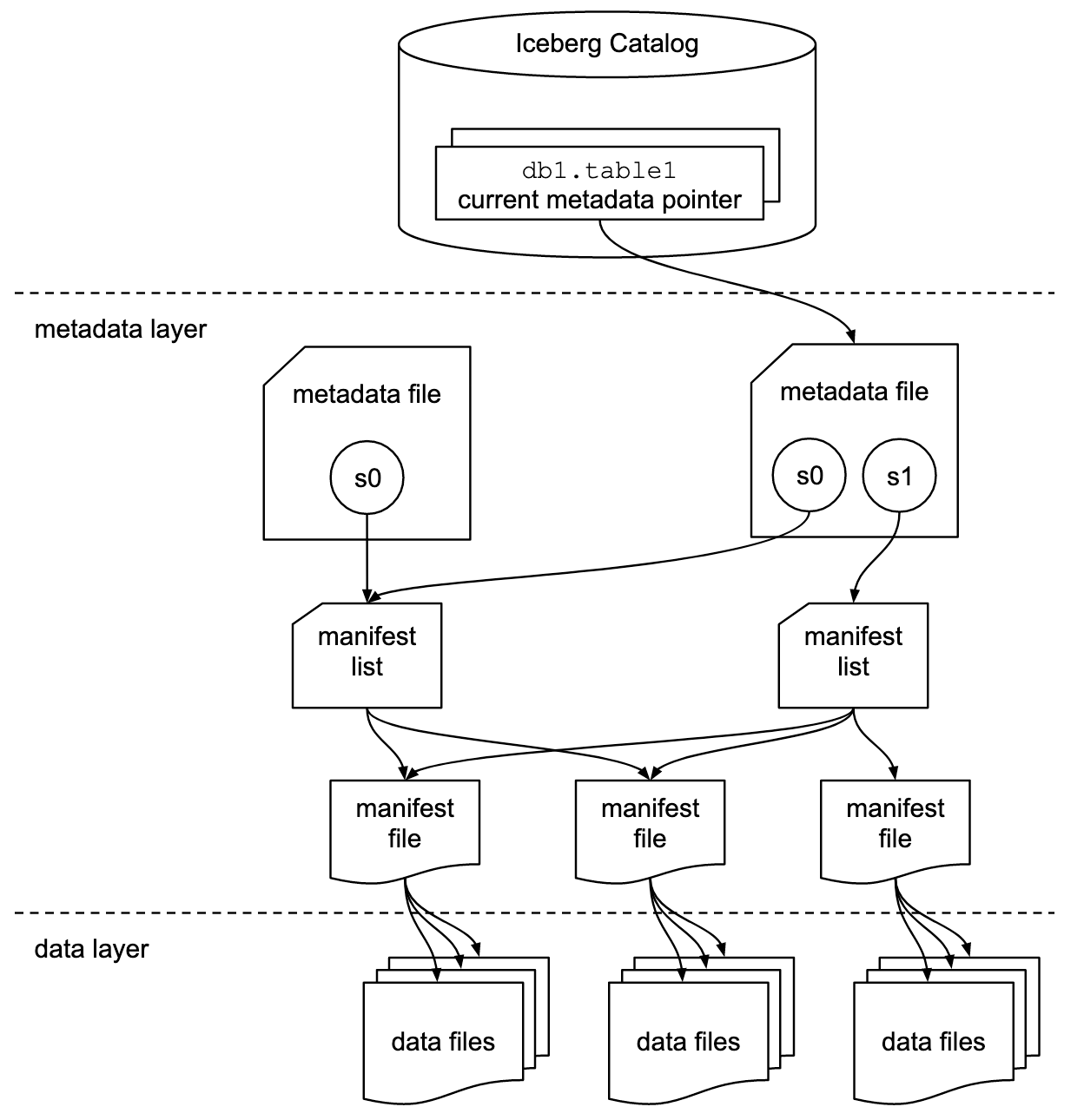
From a high level, the below shows how the different layers in the overall architecture are used to achieve speed and scale goals
Goals
The ultimate goals of Iceberg are to provide some level of isolation, write abilities, speed, scale, and evolving abilities for large scale analytical data systems
In the OLAP community there are always certain requirements for "Big Data" and having scale with distributed compute and storage, and then over time requirements have grown into some sort of ACID compliant structures for consistency
- Serializable Isolation
- Reads are isolated from concurrent writes, and always use a consistent snapshot of data
- Writes will support removing and adding files in a single operation
- Readers never have to acquire locks
- Isolation Level are annoying, but altogether serializable isolation means the transactions appear to have a sequential order
- The only "gotcha" is that transactions are not guaranteed to be executed in the order they were started or committed
- Speed:
- Operations will use remote calls to plan files for scanning
- Mentions explicitly it won't use where grows with the size of the table
- I believe this will be done by using metadata files so that the underlying dataset can grow almost infinitely, but metadata stays in one singular place
- Manifest files, and manifest lists, describe the data files and their locations
- The manifest files are compact and organized so that planning a scan only requires using information in the metadata files instead of going through each file
- Manifest lists point to a set of manifest files
- Each manifest file contains metadata about a subset of data files
- To plan a read / scan Iceberg needs to read list, then read corresponding files, without going through all
- Essentially, it will use some sort of metadata about min, max, first, last, and ordering of different columns to skip and plan file reads
- i.e. it'll use header information, and this header information is updated in metadata files during writes
- Scale:
- No centralized bottleneck
- Job planning handled by clients and not a central metadata store / handler
- Metadata includes info needed for optimizations and planning
- No centralized bottleneck
- Evolution:
- Tables support full schema and partition evolution
- Schema evolution allows column add, drop, reorder, and rename
- Storage Separation:
- Paritioning will be a table configuration
- Ensures tables with different requirements can be handled appropriately
- Reads are planned using predciates on data values and not partition values
- Idk what this means
- Paritioning will be a table configuration
Versions
- Version 1:
- Solely used to manage large scale distributed analytical tables, and specifically focuses on using immutable files stored on disk
- Version 2:
- Adds row level updates and deletes to immutable files
- Does this by including deletion data files that specify what rows are deleted in existing immutable files
- Version 3:
- Adds in new data types, and support for some dynamic structures
- Version 4:
- Not included in current spec
Layers
- Catalog
- A Catalog has many tables
- Individual data files make up a table
-
- Data files are created + updated with explicit transactions
- You add data files to a table with explicit commits
-
- Table state maintained with metadata files
- Metadata
- Data
File Types
Most of the files below end up being used for the Speed goal, and having an plan while also enabling snapshot and point-in-time querying
Manifest lists store which manifest files are apart of a table at any point in time, a table is a union of it's manifest files at the time, and the manifest files track which data files are apart of a table
That's why in the architecture diagram above, you see manifest lists pointing to multiple manifest files as they describe which data files make up a table
- Manifest File
- Track data files inside of a table
- Contain a row for each data file in a table, the files partition data, and metrics / headers about the underlying data
- Manifest List
- Stores information about manifest files
- Helps to do historic / snapshot queries, and stores which manifest files were apart of a table at a specific time
- Each manifest list stores metadata about manifest files!
- Partition stats, data file counts, and ultimately any information to help avoid reading manifests that aren't required for an operation
- Stores information about manifest files
- Metadata File
- Table state is maintained within a metadata file
- Any changes to a table creates a new metadata file, and replaces old one with an atomic swap
- Table metadata file tracks:
- Table schema
- Partitioning configurations
- Custom properties
- Snapshots of the table itself
- Snapshot represents the state of a table at some point in time, and it's used to access the complete set of data files in the table at that point in time
- Data files in snapshots are tracked by manifest files
- Manifest files contain a row for each data file in the table
- Data in a snapshot is the union of all files in it's manifests
- Manifests that make up a snapshot are stored in a manifest list file
- Data File
- Data files store the actual underlying data
- They will use parquet, ORC, avro and other disk based file structures
- Most of these data files are columnar based, and therefore allow operations over columns in a much more efficient format versus rows
- In columnar structures the values in a column are placed next to each other instead of values in a row
Components
These components describe specific patterns / components that help ensure the goals above
Optimistic Concurrency
Atomic swaps of metadata files for tables is how serializable isolation is achieved
Basically, when a reader looks for data is uses a snapshot that was current when it loads the table, and so as a write updates the tables metadata files it will atomically swap these files in and out - this ensures readers aren't affected by changes until it refreshes new metadata
Writers create table metadata files optimistically, which means they assume the current version won't be changed before they write their commits. Once a writer has created an unpage, it commits it's known write by swapping tables metadata file pointer from the base to the new version
So if the base snapshot / pointer is no longer current (another write has updated things in meantime), the writer must retry the update using the new current version - this is what you mean by serializable, sequential updates, but they may not be in the exact order each one was executed / committed. There are some well-defined conditions where you can change some metadata and retry, but ultimately you must retry the entire commit from new base pointer.
Can alter the isolation level by altering the writer's write requirements - serializable isolation isn't strictly enforced. This showcases how a writers requirements, which isn't bottlenecked in by central metadata handler, can determine isolation level of the entire system
Sequence Numbers
Every successful commit receives a sequence number, and each commit creates a new snapshot. Each new snapshot has:
- A
sequence-number - A
summaryincluding operation types likeappend, replace, overwrite, delete - A pointer to a manifest list
Therefore, we're able to tell the relative age of data and delete files. As a snapshot is created for a commit, it's optimistically assigned the next sequence number and is written to the snapshot's metadata. Basically, you can follow the sequence (serialized) chain of events that optimistically commit via their sequence numbers.
If a commit fails and has to be retried the sequence number is reassigned and written to a new snapshot metadata
Every single file, manifests, data, and deletion, for a singular snapshot will inherit the snapshot's sequence number. The manifest file metadata in manifest list will also include it's sequence number which helps in historic querying of versions / snapshots - you include manifests in the union via sequence numbers.
New data and metadata file entries are written with null in place of sequence number, and it's replaced with manifests sequence number at read time
When new data is written to a new manifest the inherited sequence number is written to ensure it doesn't change after it's inherited. This inheritance allows writing a new manifest once and reusing it in commit retries, and then changing a number for a retry means only a manifest list must be re-written. All of this inheritance is to ensure there aren't multiple write fanouts that aren't necessary, and only tweaking metadata and sequence numbers would be needed for retries.
Row Level Deletes
These are stored in delete files, which are also immutable files
- Position Deletes will mark a row deleted by data file path and row position
- i.e. filepath
/path/to/dat1.datwith location256 - Position deletes are encoded in position delete file in V2, or deletion vectors in v3
- i.e. filepath
- Equality Deletes mark a row deleted by one or more columns (some sort of identifier)
id = 5means and row with that ID is deleted in subsequent reads
- Deletion Vectors are optimized compressed bitmaps that help to efficiently identify which rows are deleted, but they're an entirely separate data structure that covers a compresesd version of the above 2 ideas
Deletion files are also tracked by partitions as well, and a deletion file must be applied to older data files within the same partition and this is determined and planned in Scan Planning
File System Operations
Iceberg only requires file systems to support:
- In-Place Writes: Files aren't moved or altered once they're written
- Seekable Reads: Data file formats require seek support
- Deletes: Tables delete files that are no longer used
And these are compatible with most BLOB storage systems like S3 and GCS
Tables don't require random write access, once a table is written, all of it's files are immutable until deleted - therefore there's no need for any sort of random write over the files!
Scan Planning
Scan planning is apart of query planning where Iceberg tries to decide which files need to be read for a query. If Iceberg were to simply read from every snapshot until if finds the right data, or read through a number of transaction logs until it has latest state, it would be horribly inefficient. Icerberg revolves around not having to read all rows of data to return up-to-date information including updates and deletes
Snapshots point to a single manifest list, and that manifest list points to a set of manifest files that describe the data and delete files apart of that snapshot
catalog pointer current metadata.json chosen snapshot manifest list manifests data/delete files
We essentially need to find a version, find all of the manifest files (via manifest lists) apart of that snapshot, and find any deletes / updates corresponding to any rows or ID's apart of that current snapshot. Finally a snapshot is the table state at any point in time, and the data apart of the snapshot is the union of all these manifest and delete files!
At a high level, scan planning looks like this:
- Resolve the table snapshot to read
- For a normal read, this is the current snapshot
- For time travel, this is the snapshot associated with
AS OF TIMESTAMP,VERSION AS OF, a tag, or an explicit snapshot ID
- Read the snapshot's manifest list
- The manifest list stores metadata about the manifests in that snapshot, including partition value ranges and file counts
- Iceberg uses this metadata to avoid opening manifests that cannot possibly match the query predicate
- Read only the relevant manifest files
- Each manifest contains a subset of the table's data files or delete files
- For each file entry, Iceberg stores partition values and column-level statistics such as null counts, lower bounds, and upper bounds
- Those stats are used to prune files that cannot match the filter
- Apply delete files when needed
- In V2+, Iceberg can track row-level changes using immutable delete files
- Scan planning determines which delete files apply to which data files before the final scan is executed
- Produce the final scan tasks
- The engine now has the exact set of data files, and any applicable delete files, that must be read for this query
The key idea is that Iceberg plans from metadata rooted at a snapshot, not from the full history of the table and not from raw directory listing. That is why old snapshots can still be queried efficiently: each snapshot already describes the table state at that point in time. Furthermore, for each snapshot we don't store full copies of data, we simply store which underlying data files are apart of it, and those data files can be reused by other snapshots
Hidden partitioning and query predicates
A subtle but important point in Iceberg is that reads are planned using predicates on data values, not directly on partition paths or partition columns. In practice, the query is written against the actual table columns, and Iceberg converts those predicates into partition predicates internally using the table's partition spec. This is one of the reasons Iceberg can support partition evolution without forcing users to think in terms of physical partition directories
For example, if a table is partitioned by day(event_ts), a query would still look like:
SELECT *
FROM events
WHERE event_ts >= TIMESTAMP '2026-04-20 00:00:00'
  AND event_ts <  TIMESTAMP '2026-04-21 00:00:00'
The engine can derive the relevant partition value (2026-04-20) from the predicate on event_ts, and use that to prune manifests and files during planning. The query is written against the logical column, while the partition transform remains a storage detail
Versioning, Partitioning, and Time Travel
At first glance, it's tough to figure out how partitions are stored efficiently so that we can utilize metadata inside of them for query planning, while also covering incremental updates, inserts, and deletes on that immutable data. If we have data from Jan 01 sitting in a deeply established partition and we update a row that was sent there on June 01, we'll have some _metadata/0001.json that stores that change, but then our query planning loses the ability to plan properly!
Somehow is still answers “give me the table as of version X” without drowning in metadata
Suppose we have an Iceberg table which has gone through 3 total commits
CREATE TABLE orders (
  order_id BIGINT,
  customer_id BIGINT,
  order_ts TIMESTAMP,
  region STRING,
  amount DECIMAL(10,2)
)
PARTITIONED BY (day(order_ts), region);
Commits:
- S1 is an initial load of data that creates 2 data files
data/us_2026-04-20_f1.parquet- The below is metadata about the data file itself
- Partition
day(order_ts)=2026-04-20, region='us' - Rows are OrderID's
1-1000 amounthasmin=15, max=900
data/eu_2026-04-20_f2.parquet- Partition
day(order_ts)=2026-04-20, region='eu' - Rows are OrderID's
1001 - 1800 amounthasmin=15, max=900
- Partition
- Snapshot S1 can point to manifest list
mlist_s1.avrowhich points to manifestsm1.avrowherem1.avrocontains entries for both data files - it essentially means "these 2 files are apart of S1", and this is exactly how Iceberg skips reading both data files, all rows, to plan reads (it still needs to full read them during query time)
- S2 is a new batch of data for the next day
data/us_2026-04-21_f3.parquetpartition: day(order_ts)=2026-04-21, region='us'
data/eu_2026-04-21_f4.parquetpartition: day(order_ts)=2026-04-21, region='eu'
- So Iceberg creates some new manifest files
mlist_s2.avroand one of more manifests that now describe the table for S2- What's important is that Iceberg does not mutate S1, or the underlying data /manifest files associated with S1, it creates an entirely new snapshot via updated manifest files only!
- Older snapshots remain available for time travel via
AS OF SNAPSHOT S1
- S3 is looking to delete a single row in
data/us_2026-04-20_f1.parquet(the first file ever written in S1). In Iceberg V2 this can be represented with a delete file rather than rewriting the original data file in place - it's a tombstone record!deletes/us_2026-04-20_d1.parquet- Applies to
data/us_2026-04-20_f1.parquet - Marks order 55 as deleted, either by position (index) or equality rule (ID=55) depending on delete type
- Applies to
- Snapshot S3 points to a new manifest list overall, and this manifest list includes the existing data files apart of the table (through S2) and the new delete file that must be applied during all subsequent reads
- The original data file is still immutable, but the actual change is represented by new metadata and a new delete file
So how does a read get planned out on this table?
SELECT *
FROM orders
WHERE order_ts >= TIMESTAMP '2026-04-20 00:00:00'
  AND order_ts <  TIMESTAMP '2026-04-21 00:00:00'
  AND region = 'us'
  AND amount > 300;
Since we didn't specify a snapshot, the current snapshot of this query is S3, and so Iceberg would plan out which data files to read based on mlist_s3.avro
- Load snapshot S3 (based on data files listed from manifest files in
mlist_s3.avromanifest list) - Use manifest list partition ranged to ignore manifests that don't contain
region=usorday(order_ts)outside of the specified range - Open only the matching manifest files that are still included
- Inside these manifests, inspect file level partition data and column statistics
data/us_2026-04-20_f1.parquetis a candidate because it is in the right partition and its amountmax=500data/eu_2026-04-20_f2.parquetis skipped becauseregion='eu'data/us_2026-04-21_f3.parquetis skipped because theday=2026-04-21
- At this point we have our data files that need to be included
- Also need to attach the applicable delete file
deletes/us_2026-04-20_d1.parquetapart of this snapshot - Finally read
data/us_2026-04-20_f1.parquetand apply the delete during execution
If we did
SELECT *
FROM orders /* AS OF SNAPSHOT S1, conceptually */
WHERE region = 'us';
We would just start the traversal from the S1 snapshot instead
The initial execution is done by the catalog pointing to metadata.json which points to any number of snapshots, and these snapshots are what include metadata of manifests for us to read only specific data files! In this way it can plan a query without reading all data rows!
Incremental Read Between Snapshots
So what if we wanted to read data that incrementally occurred between two snapshots? i.e. if data that was placed in S2 had a number of updates / inserts into it - does it actually update it's actual .parquet data file? No, and so where does that overall metadata sit? We know there are transaction logs for Apache Delta (Parquet) Files, but does Iceberg interact with them, especially during query planning and execution, or does it do something entirely different?
Iceberg doesn't use transaction logs from Apache Delta, so we can ignore that. All Parquet, ORC, etc files are immutable, and so they can't be modified in place. Iceberg handles direct updates to rows via creating new versions of files and storing new metadata:
- Copy-on-Write (COW): When a row is updated, iceberg identifies the data file containing that row, reads it, applies the change, and writes a completely new data file under a new snapshot (S4). This is a bit more write intensive, but ensures optimal read performance because no merging is required during read time, readers have direct access to the fully complete row if they read S4
- Merge-on-Read (MOR): Instead of rewriting the entire data file, Iceberg appends small delete files to mark existing rows as obsolete and writes new data files for the updated values
- Position deletes mark rows by their specific file path and row position
- Equality deletes mark rows based on specific column values, i.e.
ID=5 - Deletion vectors use highly compressed bitmaps to track deleted rows more efficiently than individual parquet delete files
- COW will re-write the entire data file in a new snapshot with the updates, MOR will essentially create deletes + new rows in a delete file, and so if there are 100 rows total in the original and 10 updates, COW has 100 rows and MOR has 10 tombstone deletes in one file, and 10 new rows in it's data file, but they need to be merged with S1 data file on read
Each commit creates a new snapshot, and each snapshot has a sequence number, a summary (append, delete, overwrite), and a pointer to a manifest list. That manifest list points to one or more manifest files, and this manifest list also stores summary metadata around the number of added / existing / deleted files, partition summaries, and manifest's sequence number. In total, there is no "data between S2 and S3" - S3 is an entirely new snapshot that will have COW or MOR based data / delete files associated to it, and those would be utilized via manifest metadata on data that may or may not have been involved in S2 and backwards
Each Iceberg snapshot defines a complete table state, and the metadata written for that snapshot records file-level changes - added, existing, and deleted data/delete files - relative to prior state. Simple incremental reads only support append snapshots; updates and deletes are represented through rewritten data files and/or delete files, not by mutating Parquet in place